Personal Project

Music Player — Web Development

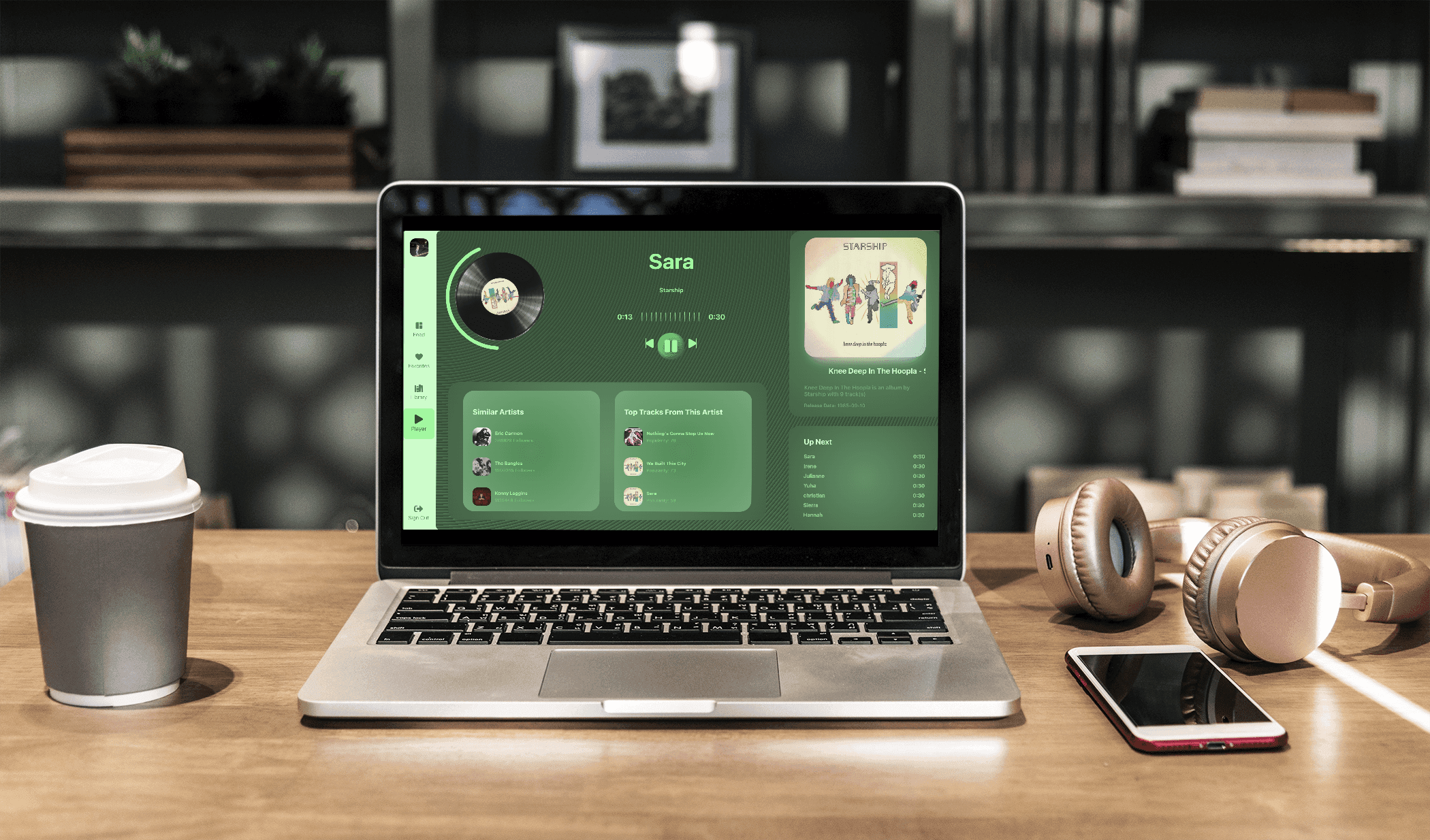
Using the Spotify API for Developers, the goal was to create a functional music player app, implementing quick API retrievals and up-to-date UI/UX design trends.

Industry

Media


Created

2024

Project Objective

Project Objective

To develop a dynamic and engaging music player web application that leverages the Spotify API, allowing users to seamlessly play their favorite tracks and discover new music tailored to their tastes. This project aims to combine music streaming with modern UI/UX trends, creating an intuitive, visually appealing interface that enhances user interaction and promotes effortless music exploration. By integrating trending design elements, the application offers an immersive experience that aligns with current aesthetics while maximizing functionality and ease of use.

Results

Results

I successfully created a user-friendly platform where users can easily access and explore a wide variety of music using the Spotify API. The app’s responsive design and integration of trending UI/UX elements is visually appealing layout, intuitive navigation, and interactive features.

React

JavaScript library for creating interactive user interfaces efficiently

Tools Used

Javascript, HTML, CSS

Coding Languages Used

Problem Statement

Problem Statement

With vast music options available, users often struggle to find an intuitive, visually engaging platform that simplifies music playback and discovery. This project aims to address that gap by developing a streamlined, modern music player app that utilizes the Spotify API to offer a seamless, personalized, and aesthetic music experience.
Process

Process

01

Research

I began by analyzing the current web app's usage patterns and identifying pain points, gathering specific ideas for designs.

02

Define

We conducted user interviews, surveys, and analyzed in-app analytics to understand the pain points and user needs. We also studied competitor apps and industry trends to gather insights

03

Design

We conducted user interviews, surveys, and analyzed in-app analytics to understand the pain points and user needs. We also studied competitor apps and industry trends to gather insights

04

Visual Design System

We conducted user interviews, surveys, and analyzed in-app analytics to understand the pain points and user needs. We also studied competitor apps and industry trends to gather insights

05

Development

We conducted user interviews, surveys, and analyzed in-app analytics to understand the pain points and user needs. We also studied competitor apps and industry trends to gather insights

01

Research

I began by analyzing the current web app's usage patterns and identifying pain points, gathering specific ideas for designs.

02

Define

We conducted user interviews, surveys, and analyzed in-app analytics to understand the pain points and user needs. We also studied competitor apps and industry trends to gather insights

03

Design

We conducted user interviews, surveys, and analyzed in-app analytics to understand the pain points and user needs. We also studied competitor apps and industry trends to gather insights

04

Visual Design System

We conducted user interviews, surveys, and analyzed in-app analytics to understand the pain points and user needs. We also studied competitor apps and industry trends to gather insights

05

Development

We conducted user interviews, surveys, and analyzed in-app analytics to understand the pain points and user needs. We also studied competitor apps and industry trends to gather insights

01

Research

I began by analyzing the current web app's usage patterns and identifying pain points, gathering specific ideas for designs.

02

Define

We conducted user interviews, surveys, and analyzed in-app analytics to understand the pain points and user needs. We also studied competitor apps and industry trends to gather insights

03

Design

We conducted user interviews, surveys, and analyzed in-app analytics to understand the pain points and user needs. We also studied competitor apps and industry trends to gather insights

04

Visual Design System

We conducted user interviews, surveys, and analyzed in-app analytics to understand the pain points and user needs. We also studied competitor apps and industry trends to gather insights

05

Development

We conducted user interviews, surveys, and analyzed in-app analytics to understand the pain points and user needs. We also studied competitor apps and industry trends to gather insights

Research

Research

Quantitative Research

Quantitative Research

I first researched a bit more into Spotify's usage and statistics and compared the data to the design of the Spotify Web Player app itself.

I first researched a bit more into Spotify's usage and statistics and compared the data to the design of the Spotify Web Player app itself.

User Activity: Approximately 44% of Spotify's monthly active users engage with the platform daily, making it a consistent part of their routine. On average, users spend about 25 hours per month listening to music on Spotify​ (Tone Island)

Playlist Engagement: A significant portion of Spotify listening occurs through curated playlists. Roughly one-third of Spotify’s total listening time is dedicated to these playlists, showing their role in helping users discover new music (Kommandotech)

Device Distribution: Mobile devices account for around 52% of listening time, highlighting the platform's popularity among on-the-go users. Meanwhile, the web player and desktop apps make up the remaining share. (Kommandotech)

User Needs

User Needs

With a large portion of users listening on mobile devices, the application needs to be responsive to particularly mobile screens.

Since one-third of Spotify listening time is spent on curated playlists, users need efficient ways to discover new music tailored to their preferences.

The web player should offer a smooth, responsive, and visually engaging experience to the millions of users.

Define

Define

User Personas

User Personas

Based on the quantitative research that I conducted on the original app, I thought of 2 user personas that would demonstrate the potential uses and audience of the app.

Based on the quantitative research that I conducted on the original app, I thought of 2 user personas that would demonstrate the potential uses and audience of the app.

Elizabeth Smith

Age:

29

Occupation:

Data Analyst

Location:

Salt Lake City, Utah

Brief Story

Elizabeth is a data analyst for a company, and during her work hours, she often finds that listening to music while she works allows her to concentrate better on crunching numbers repetitively. She loves using web players for music, as she can easily switch between tabs without having to switch devices.

Goals

  • To continuously discover new artists, genres, and tracks that align with her tastes and mood.

  • Quickly access her favorite playlists, albums, and recently played tracks.

  • To have a soothing, visually cohesive color scheme that promotes a calm, focused atmosphere.

Needs

  • Needs an intuitive recommendation engine that suggests new music based on her listening patterns and preferences.

  • An easily accessible interface that allows quick navigation to her most listened-to tracks or playlists.

  • Emma requires intuitive music control buttons that allow for easy track skipping, pausing, or adjusting volume on any device.

Elizabeth Smith

Age:

29

Occupation:

Data Analyst

Location:

Salt Lake City, Utah

Brief Story

Elizabeth is a data analyst for a company, and during her work hours, she often finds that listening to music while she works allows her to concentrate better on crunching numbers repetitively. She loves using web players for music, as she can easily switch between tabs without having to switch devices.

Goals

  • To continuously discover new artists, genres, and tracks that align with her tastes and mood.

  • Quickly access her favorite playlists, albums, and recently played tracks.

  • To have a soothing, visually cohesive color scheme that promotes a calm, focused atmosphere.

Needs

  • Needs an intuitive recommendation engine that suggests new music based on her listening patterns and preferences.

  • An easily accessible interface that allows quick navigation to her most listened-to tracks or playlists.

  • Emma requires intuitive music control buttons that allow for easy track skipping, pausing, or adjusting volume on any device.

Age:

29

Occupation:

Data Analyst

Location:

Salt Lake City, Utah

Elizabeth Smith

Brief Story

Elizabeth is a data analyst for a company, and during her work hours, she often finds that listening to music while she works allows her to concentrate better on crunching numbers repetitively. She loves using web players for music, as she can easily switch between tabs without having to switch devices.

Goals

  • To continuously discover new artists, genres, and tracks that align with her tastes and mood.

  • Quickly access her favorite playlists, albums, and recently played tracks.

  • To have a soothing, visually cohesive color scheme that promotes a calm, focused atmosphere.

Needs

  • Needs an intuitive recommendation engine that suggests new music based on her listening patterns and preferences.

  • An easily accessible interface that allows quick navigation to her most listened-to tracks or playlists.

  • Emma requires intuitive music control buttons that allow for easy track skipping, pausing, or adjusting volume on any device.

Ryan Lee

Age:

22

Occupation:

Aspiring Medical Student / YouTuber

Location:

San Diego, CA.

Brief Story

Ryan, a 24-year-old medical student, spends long hours studying and preparing for exams. He uses music as a way to stay focused, de-stress, and maintain a routine. While studying, Ryan prefers to listen to instrumental tracks, classical music, or lo-fi beats to help him concentrate. He also likes to vlog his study sessions and so he likes to have aesthetics that match his vibe.

Goals

  • A distraction-free music experience that helps him concentrate for extended study periods.

  • He wants to easily access playlists that are specifically tailored for concentration, stress relief, and relaxation, which is key to his mental well-being during intense study periods.

  • Ryan aims to transition seamlessly between focus time and relaxation during study breaks, with music that aligns with both activities.

Needs

  • Needs a music player that provides easy access to playlists designed for study and relaxation, such as lo-fi, classical, or ambient playlists.

  • Needs a music player that looks clean and aesthetic so that he can include it within his videos.

  • Needs the music player to offer tailored recommendations that align with his study habits and the specific genres he listens to

Ryan Lee

Age:

22

Occupation:

Aspiring Medical Student / YouTuber

Location:

San Diego, CA

Brief Story

Ryan, a 24-year-old medical student, spends long hours studying and preparing for exams. He uses music as a way to stay focused, de-stress, and maintain a routine. While studying, Ryan prefers to listen to instrumental tracks, classical music, or lo-fi beats to help him concentrate. He also likes to vlog his study sessions and so he likes to have aesthetics that match his vibe.

Goals

  • Streamline service workflows by leveraging new technology and the necessary number of staff needed.

  • Manage client relationships, ensuring they are satisfied with the service provided.

  • Lead and train engineers to stay up-to-date with the latest tools and techniques.

  • Ensure optimal performance and minimal downtime of ASML equipment in the field.

Needs

  • Balancing time between urgent equipment repairs and preventative maintenance.

  • Coordinating with international colleagues across time zones for specialized support.

  • Optimal performance and minimal downtime of ASML equipment in the field.

  • Access to data from multiple sites internationally to compare and assess performance.

Age:

22

Occupation:

Aspiring Medical Student / YouTuber

Location:

San Diego, CA

Ryan Lee

Brief Story

Ryan, a 24-year-old medical student, spends long hours studying and preparing for exams. He uses music as a way to stay focused, de-stress, and maintain a routine. While studying, Ryan prefers to listen to instrumental tracks, classical music, or lo-fi beats to help him concentrate. He also likes to vlog his study sessions and so he likes to have aesthetics that match his vibe.

Goals

  • A distraction-free music experience that helps him concentrate for extended study periods.

  • He wants to easily access playlists that are specifically tailored for concentration, stress relief, and relaxation, which is key to his mental well-being during intense study periods.

  • Ryan aims to transition seamlessly between focus time and relaxation during study breaks, with music that aligns with both activities.

Needs

  • Needs a music player that provides easy access to playlists designed for study and relaxation, such as lo-fi, classical, or ambient playlists.

  • Needs a music player that looks clean and aesthetic so that he can include it within his videos.

  • Needs the music player to offer tailored recommendations that align with his study habits and the specific genres he listens to

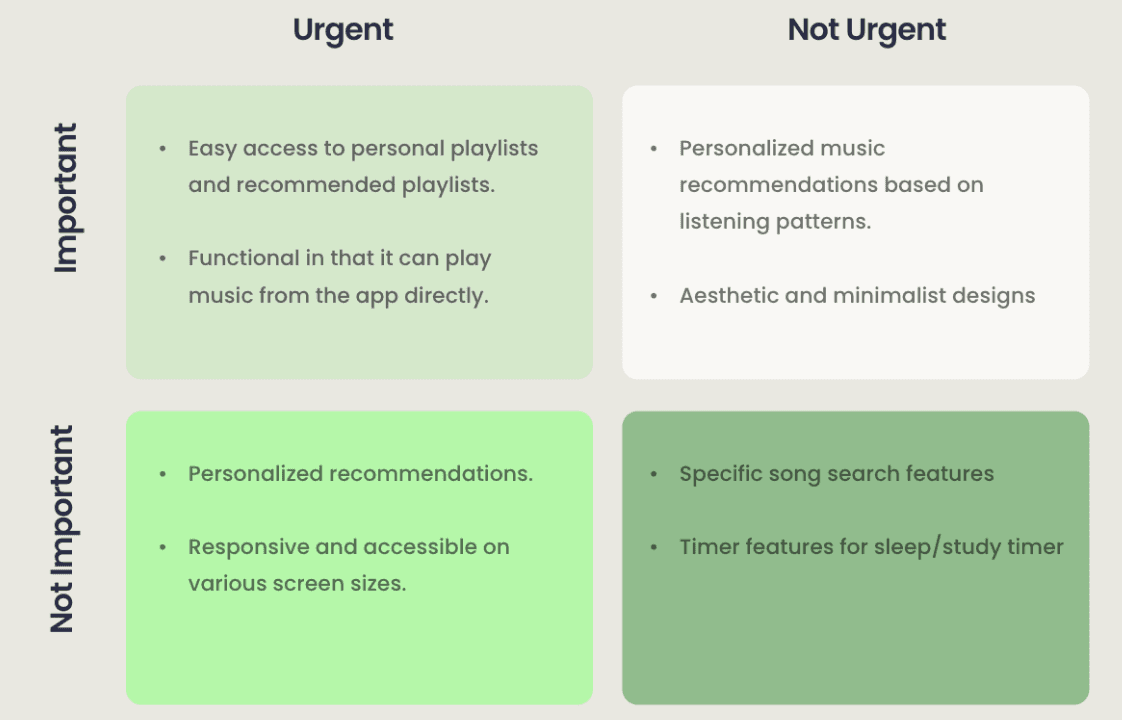
Eisen Hover Matrix

Urgent

Not Important

Not Urgent

Important

  • Easy access to personal playlists and recommended playlists.


  • Functional in that it can play music from the app directly.

  • Personalized recommendations.


  • Responsive and accessible on various screen sizes.

  • Personalized music recommendations based on listening patterns.


  • Aesthetic and minimalist designs

  • Specific song search features


  • Timer features for sleep/study timer

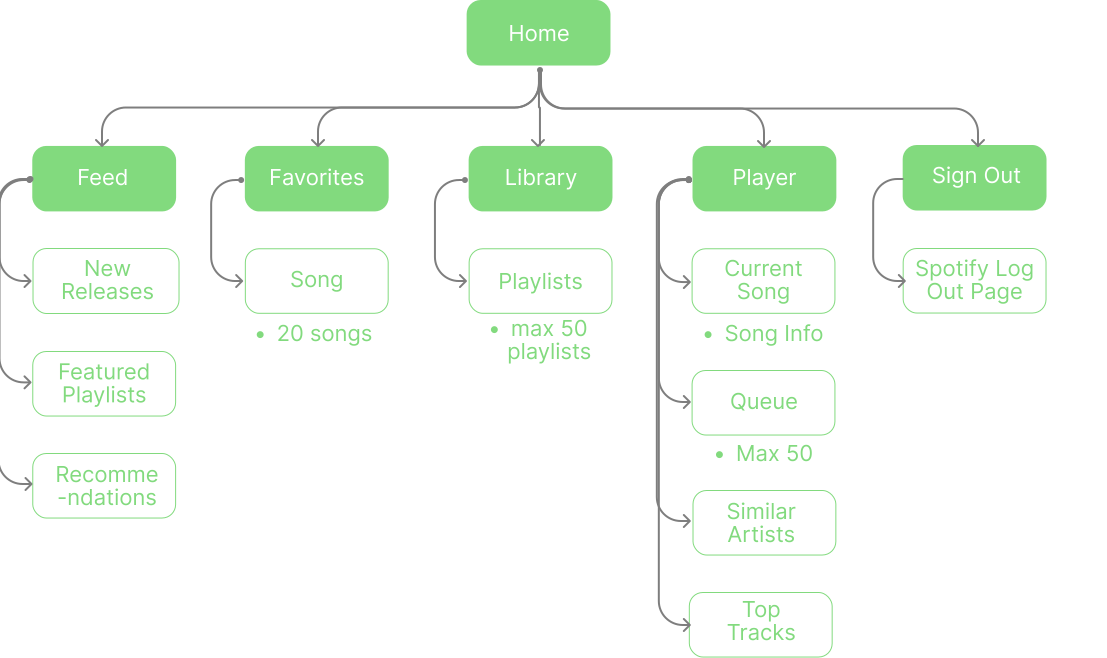
Site Map

Site Map

User Flow

User Flow

Scenario 1: Play Music from a Favorite Playlist

Scenario 1: Play Music from a Favorite Playlist

Open the website

Login

Start at Feed Page

Go to Library

Choose a playlist

Click on the Playlist

Listen to Song

Open the website

Login

Start at Feed Page

Go to Library

Choose a playlist

Click on the Playlist

Listen to Song

Scenario 2: View Your Personal Most Played Songs

Scenario 2: View Your Personal Most Played Songs

Open the website

Login

Start at Feed Page

Go to Favorites

View your top 20 songs

Open the website

Login

Start at Feed Page

Go to Favorites

View your top 20 songs

Design

Design

Ideation Sketches

Ideation Sketches

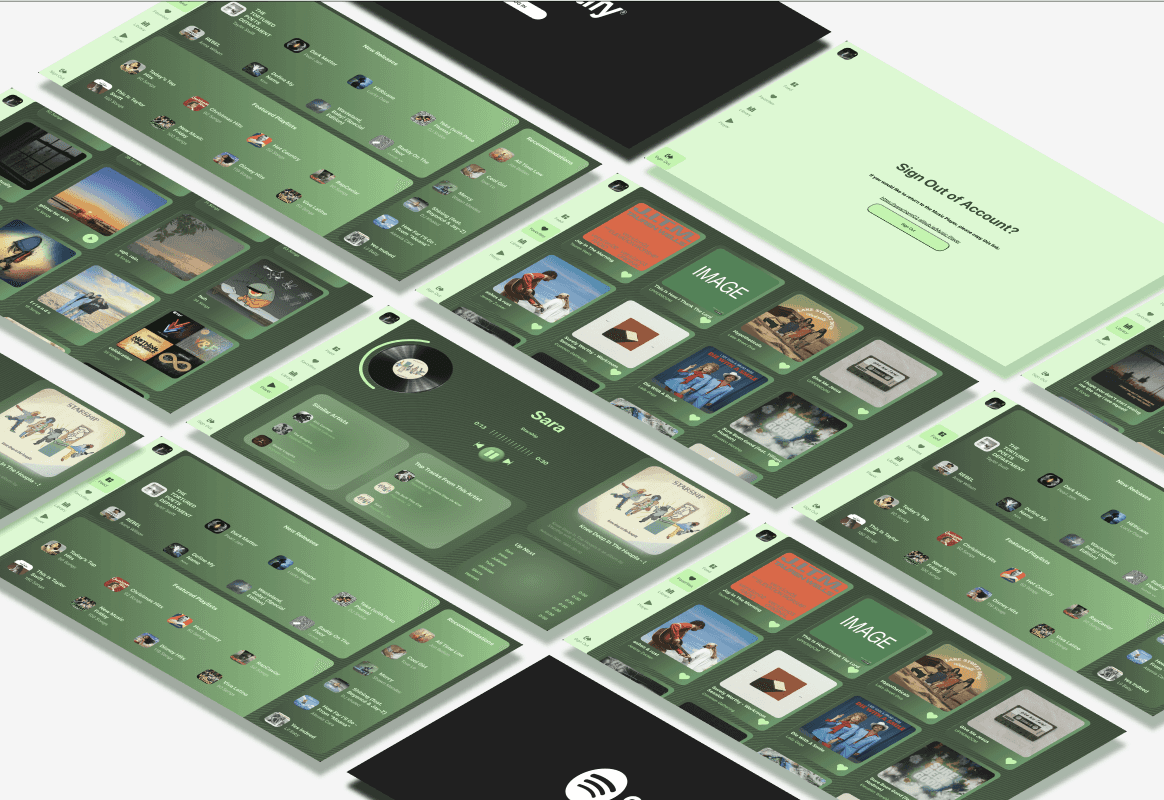
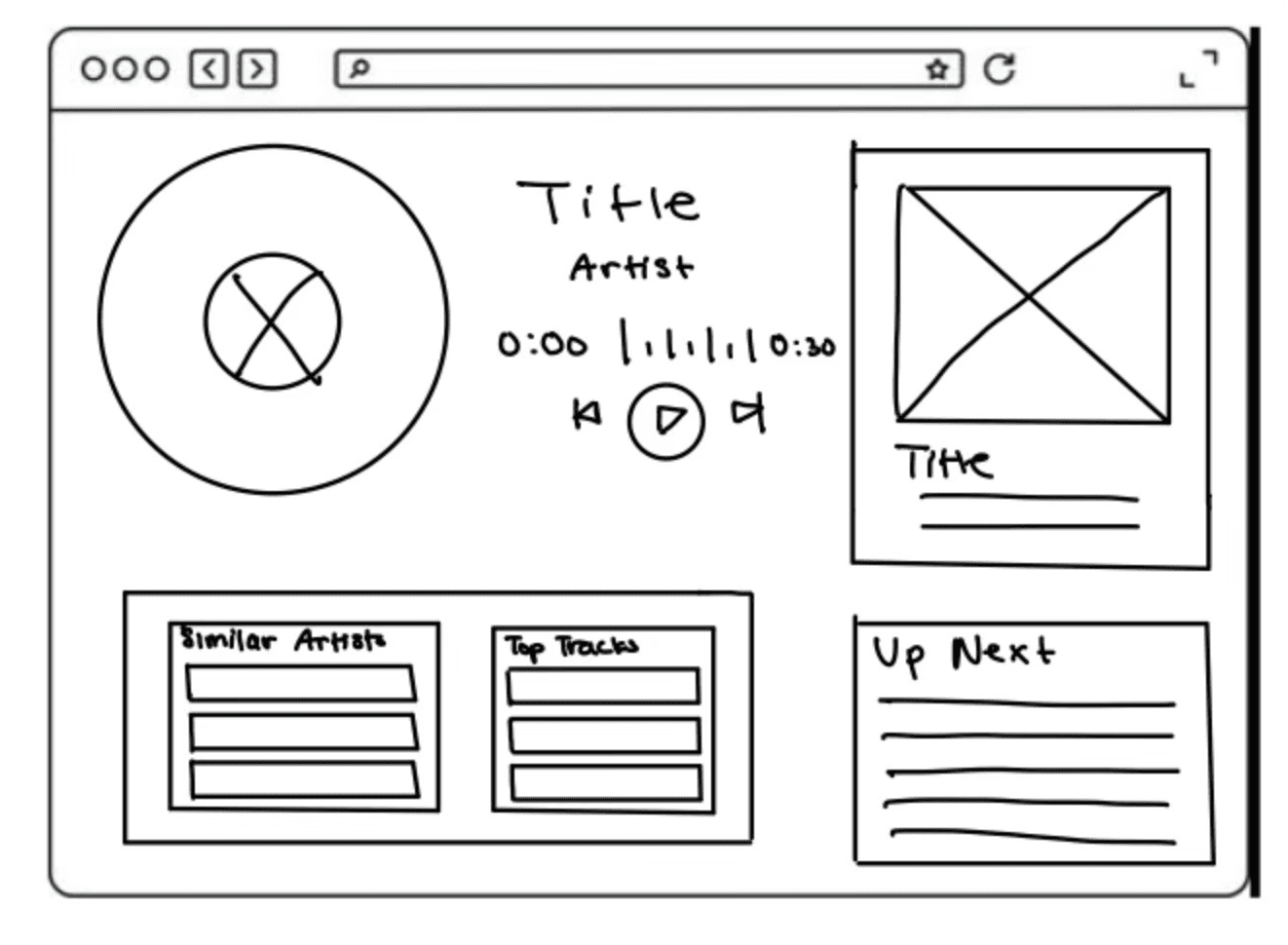
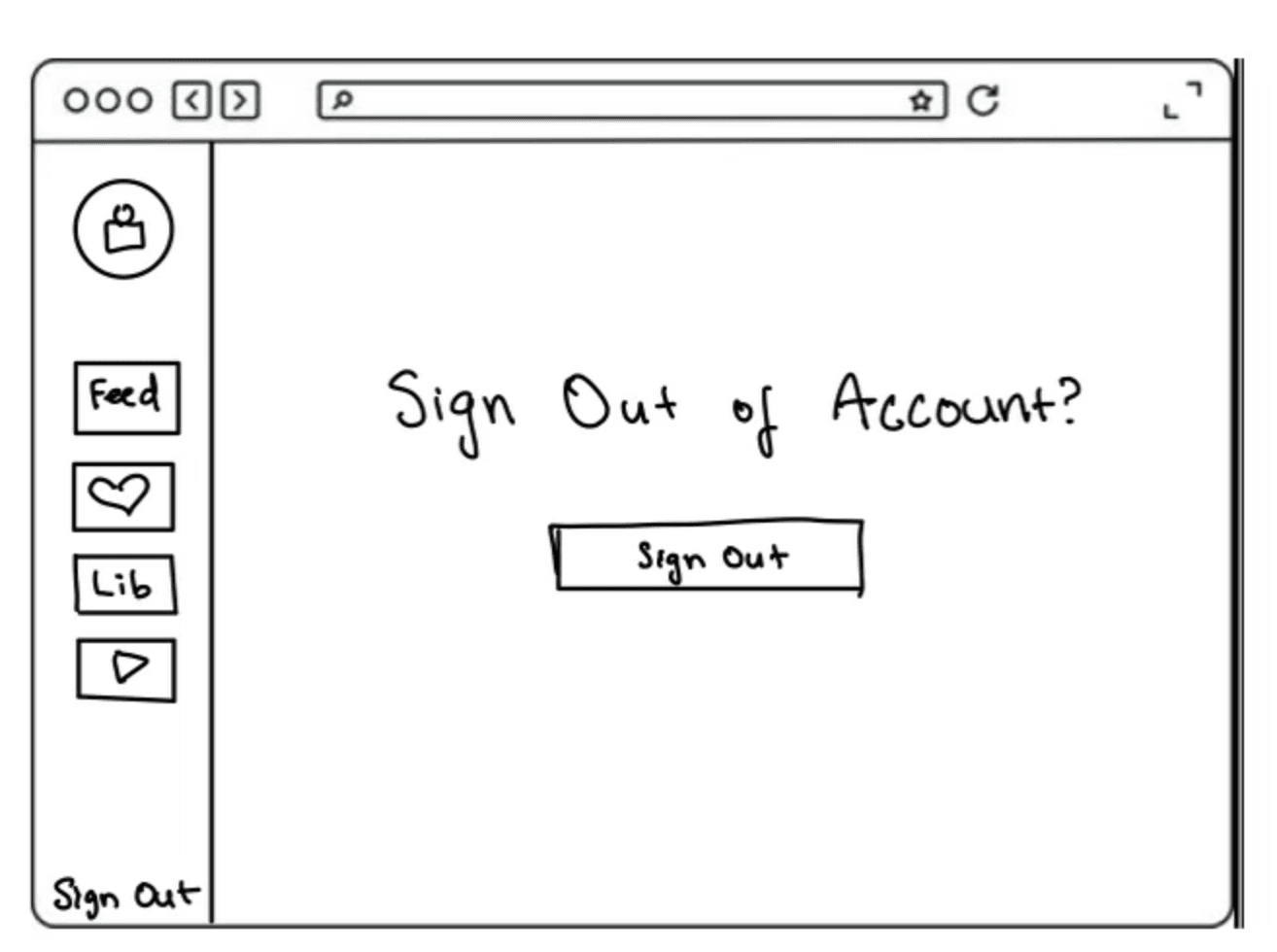
I sketched low fidelity wireframes in order to think of the layouts that would best display the information I wanted to convey to the user, as well as thinking of different important components I would need to add, such as the navigation bar, card components, and different animations I want to add.
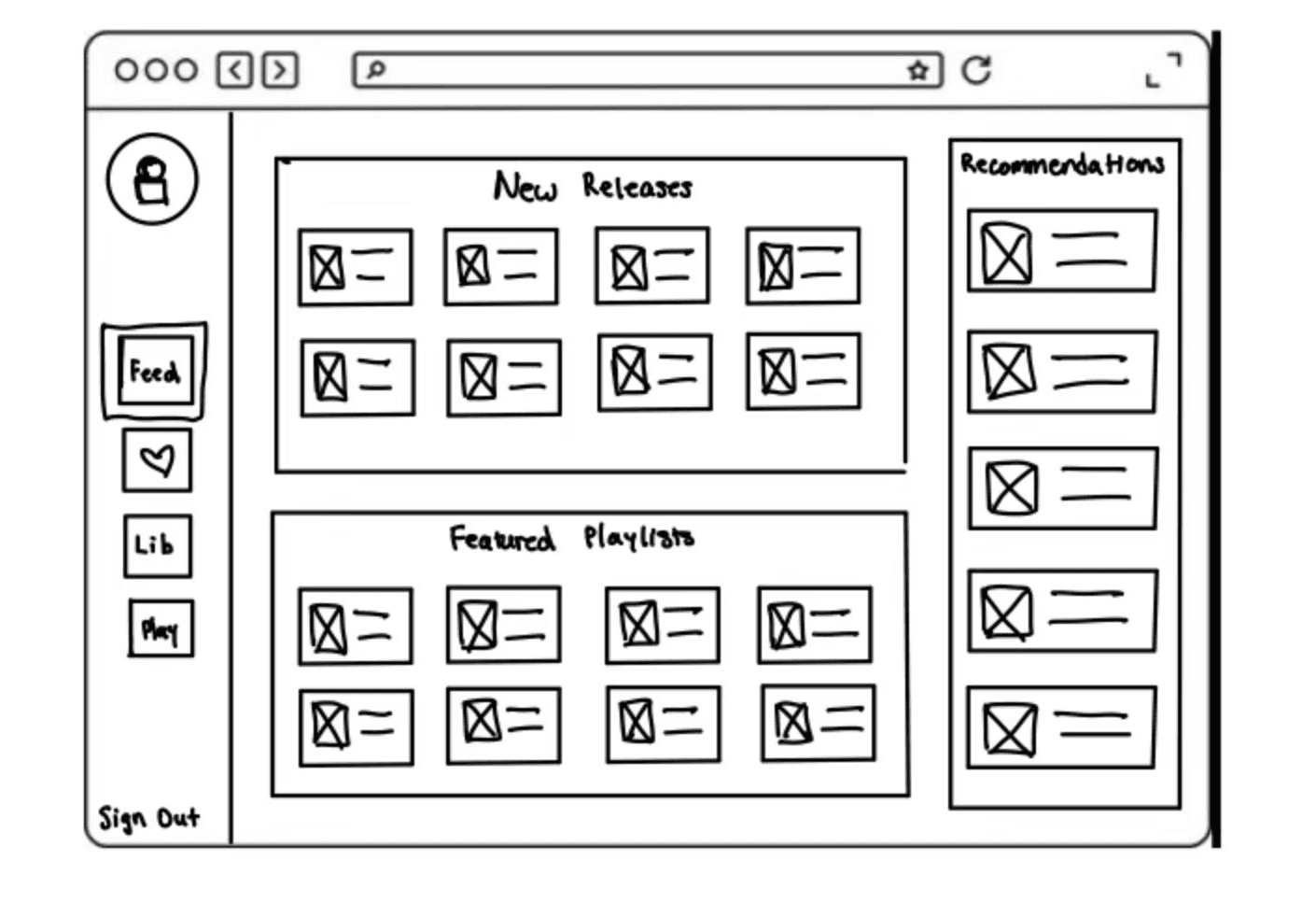
Feed / Home Page

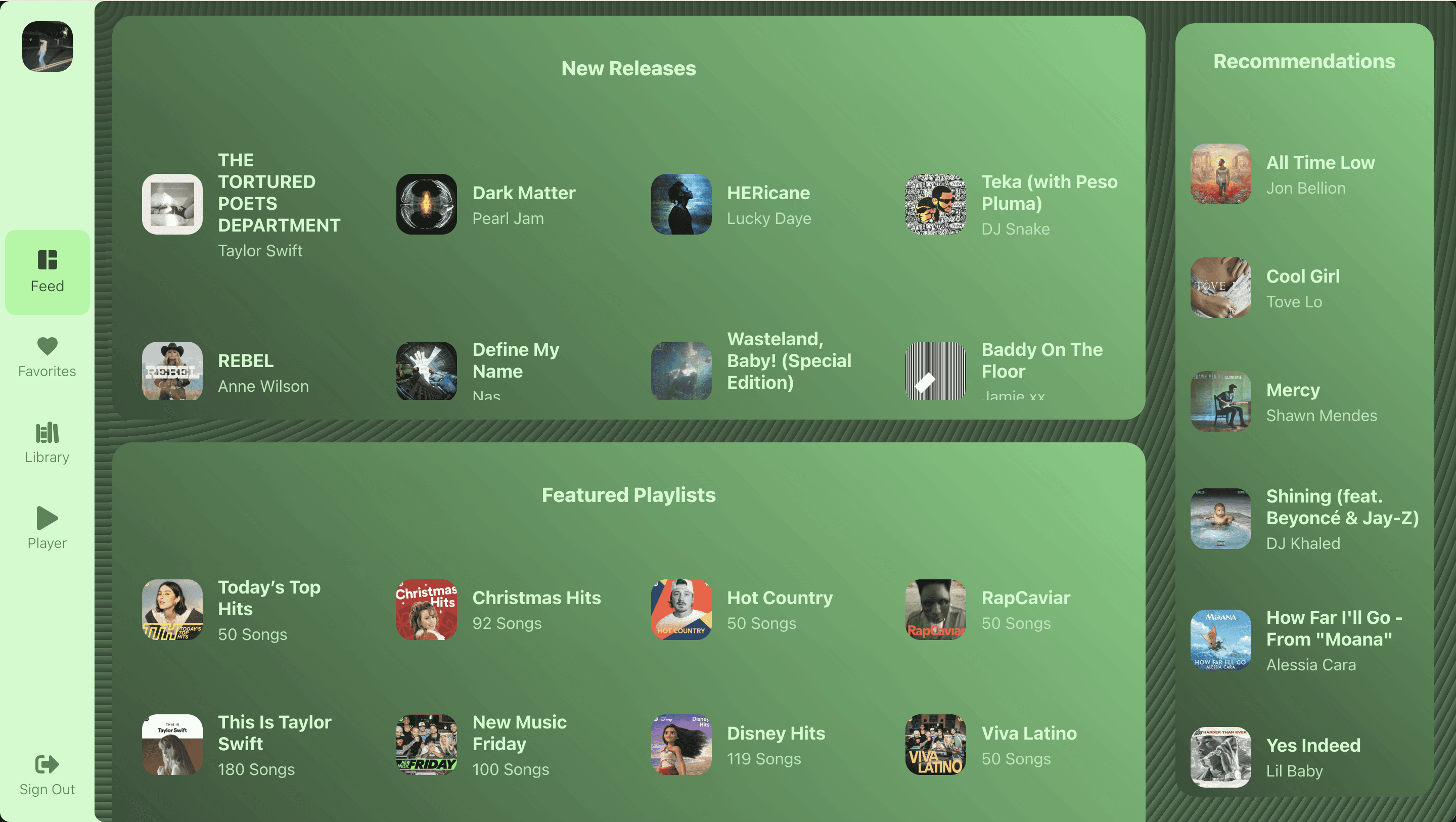
Separate the screen into 3 sections with a flex layout and organize the personal recommendations / suggestions.
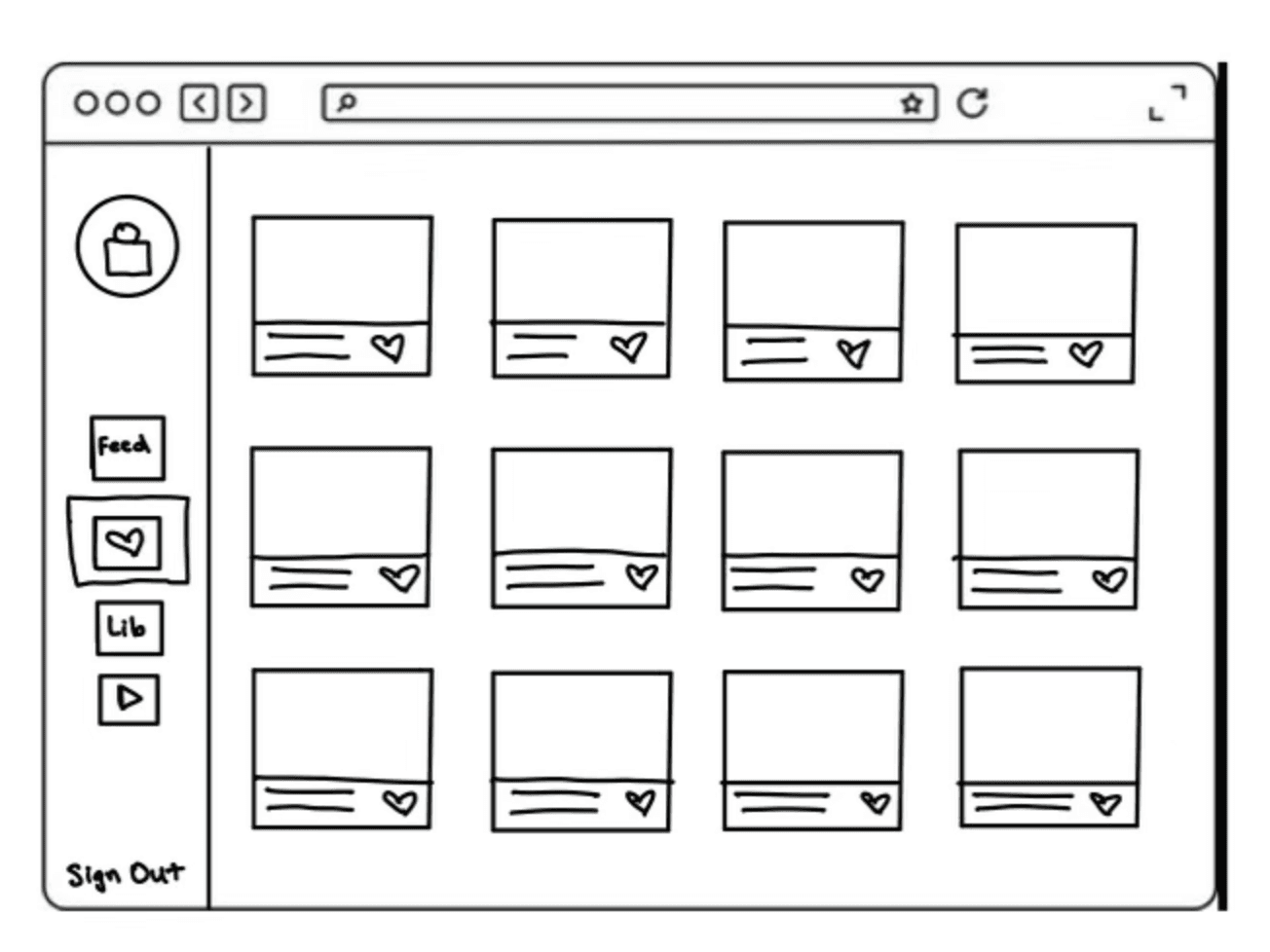
Favorites Page

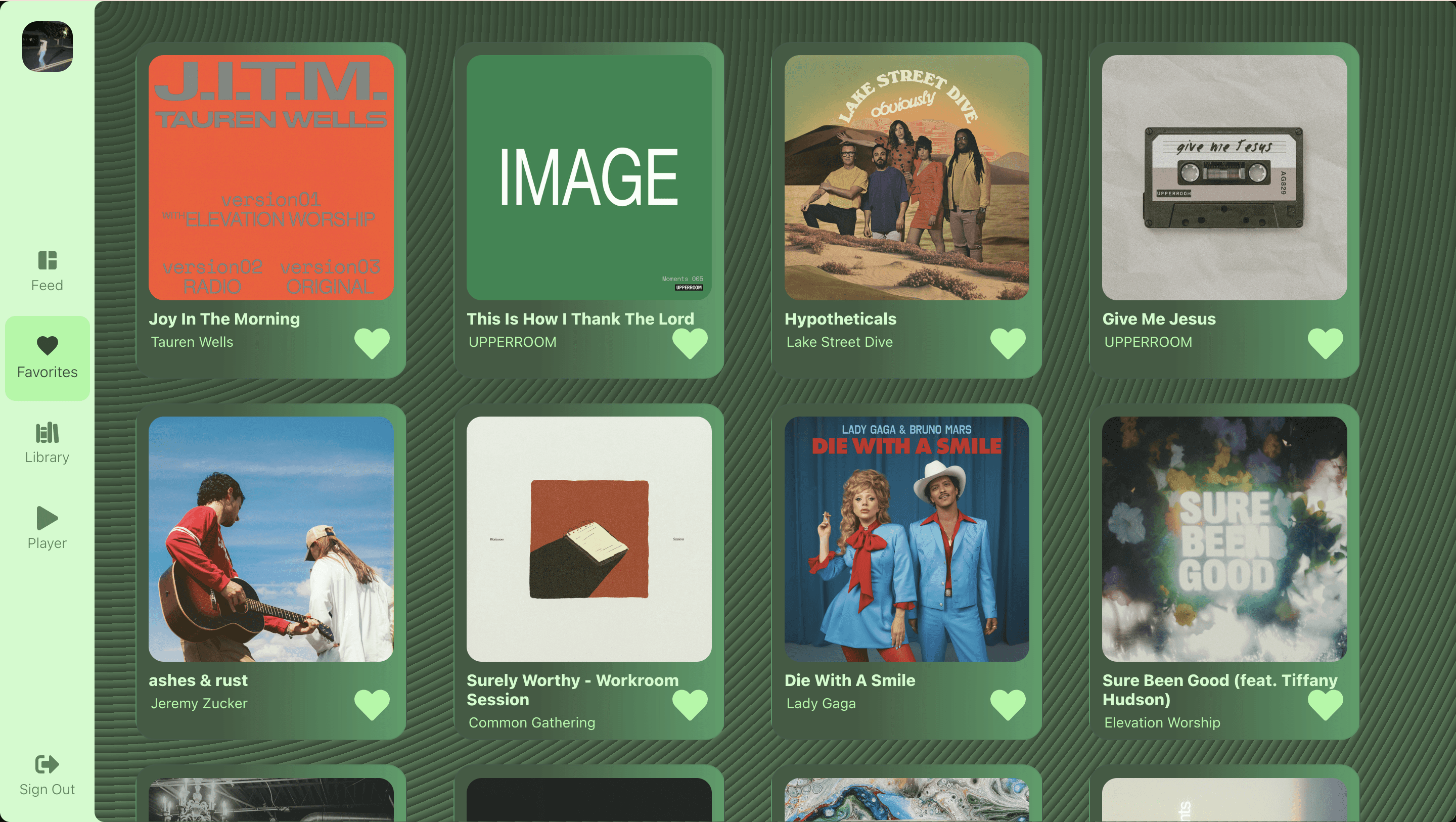
A card for each song that can display the info for each song that the user plays the most.
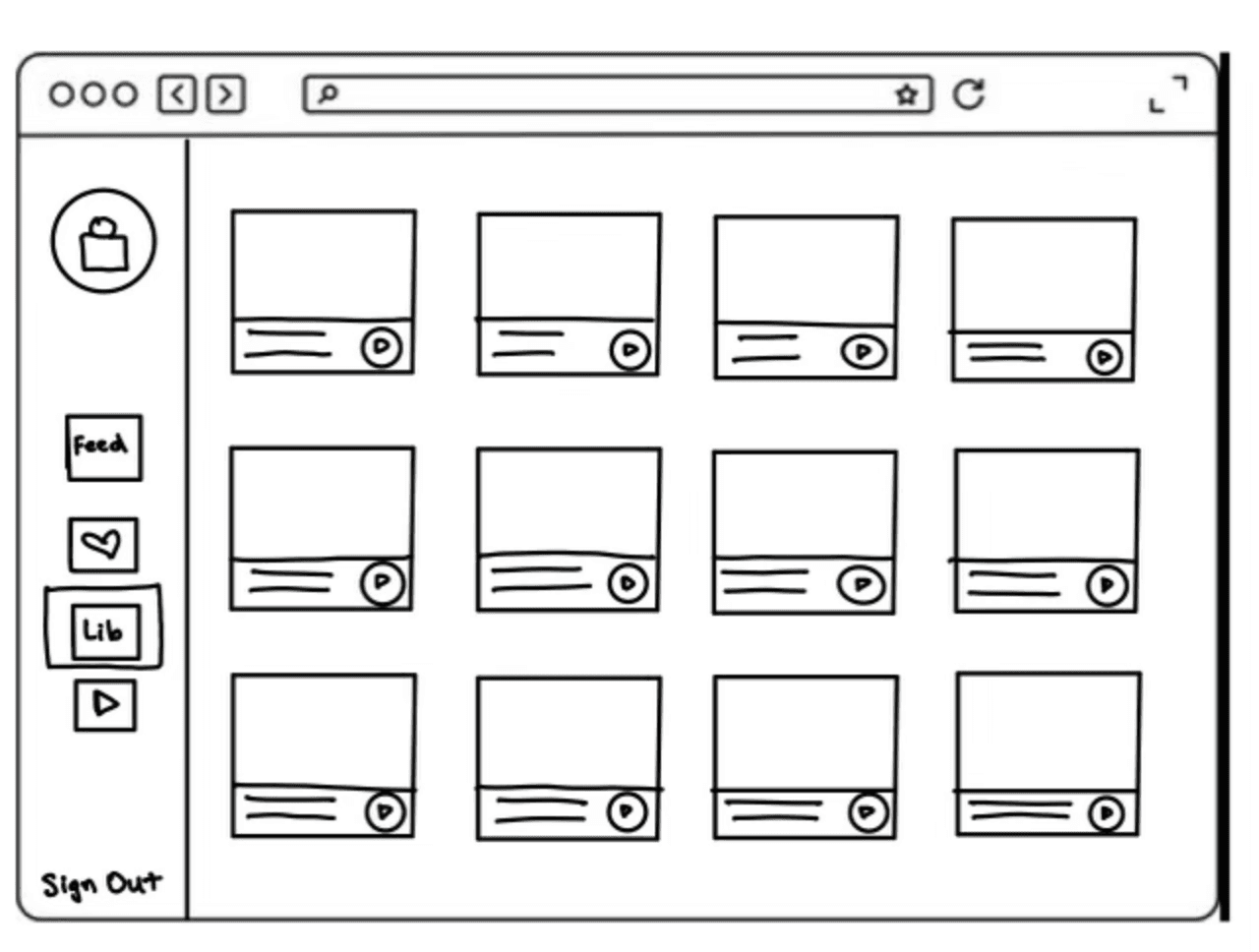
Library Page

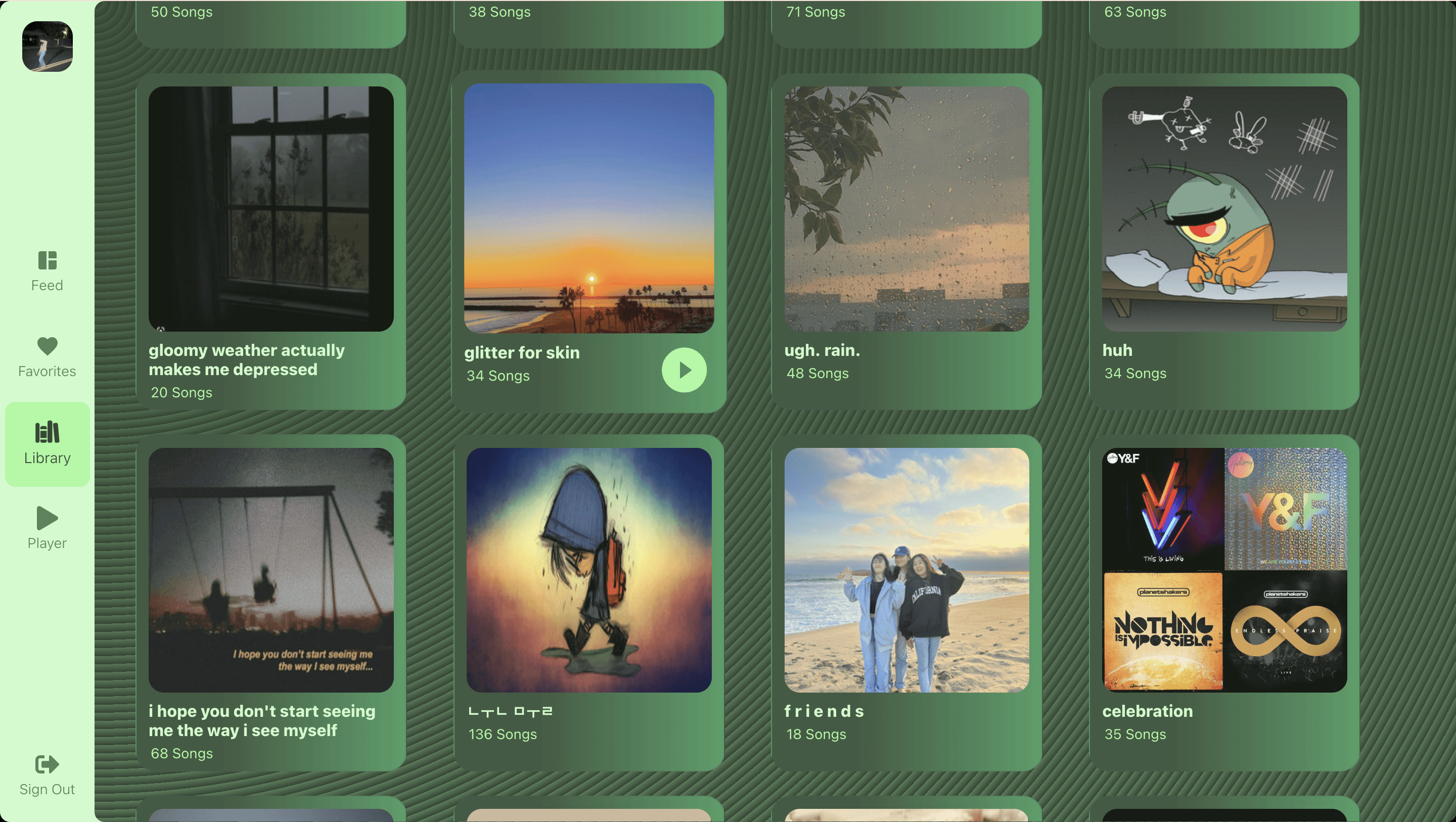
Similarly to the Favorites Page, using the playlist cover, create a card for each playlist that displays the number of songs.
Player Page

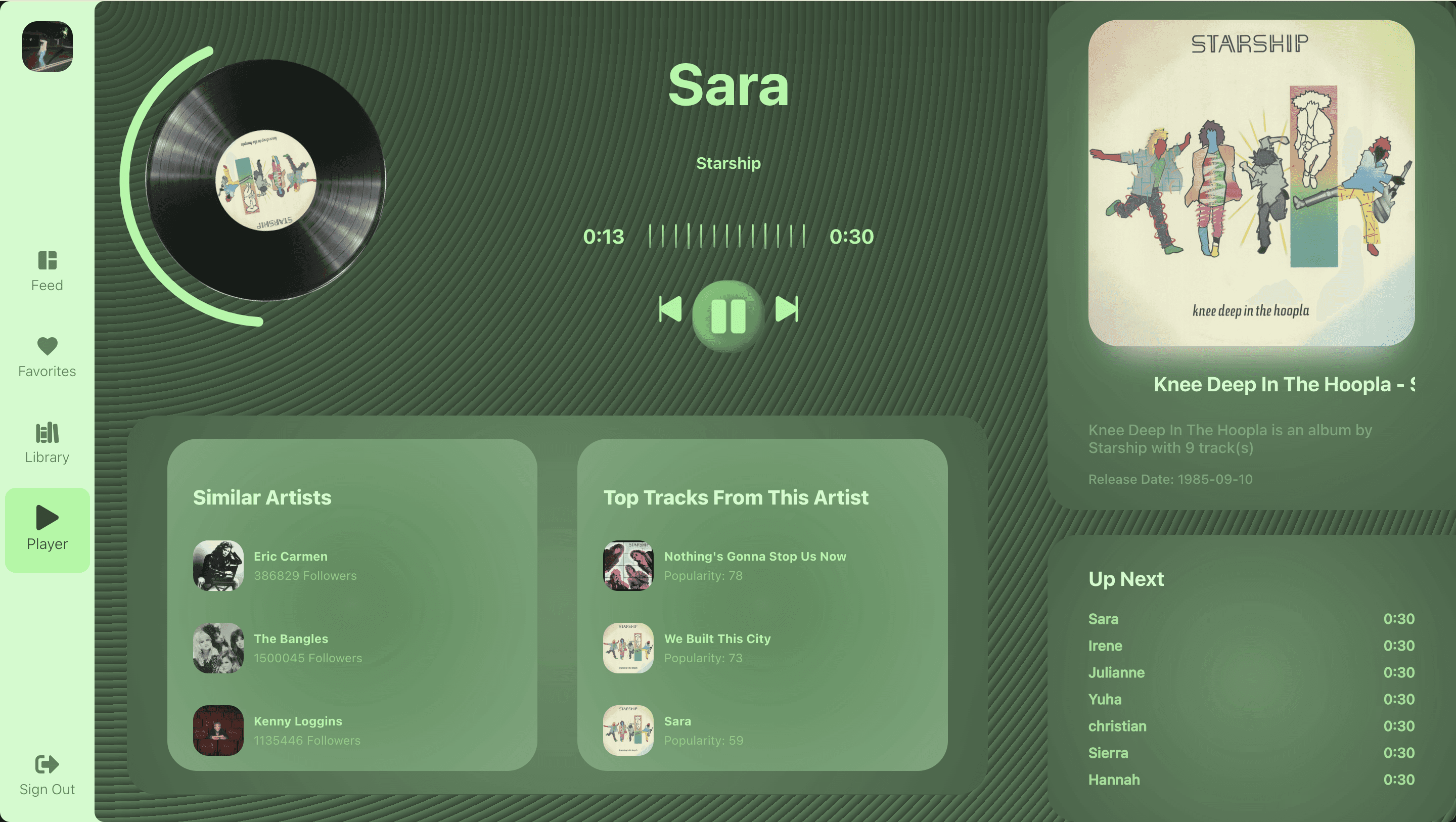
Display the information of the song that is playing and have a Queue as well as similar artists and other recommendations.
Sign Out Page

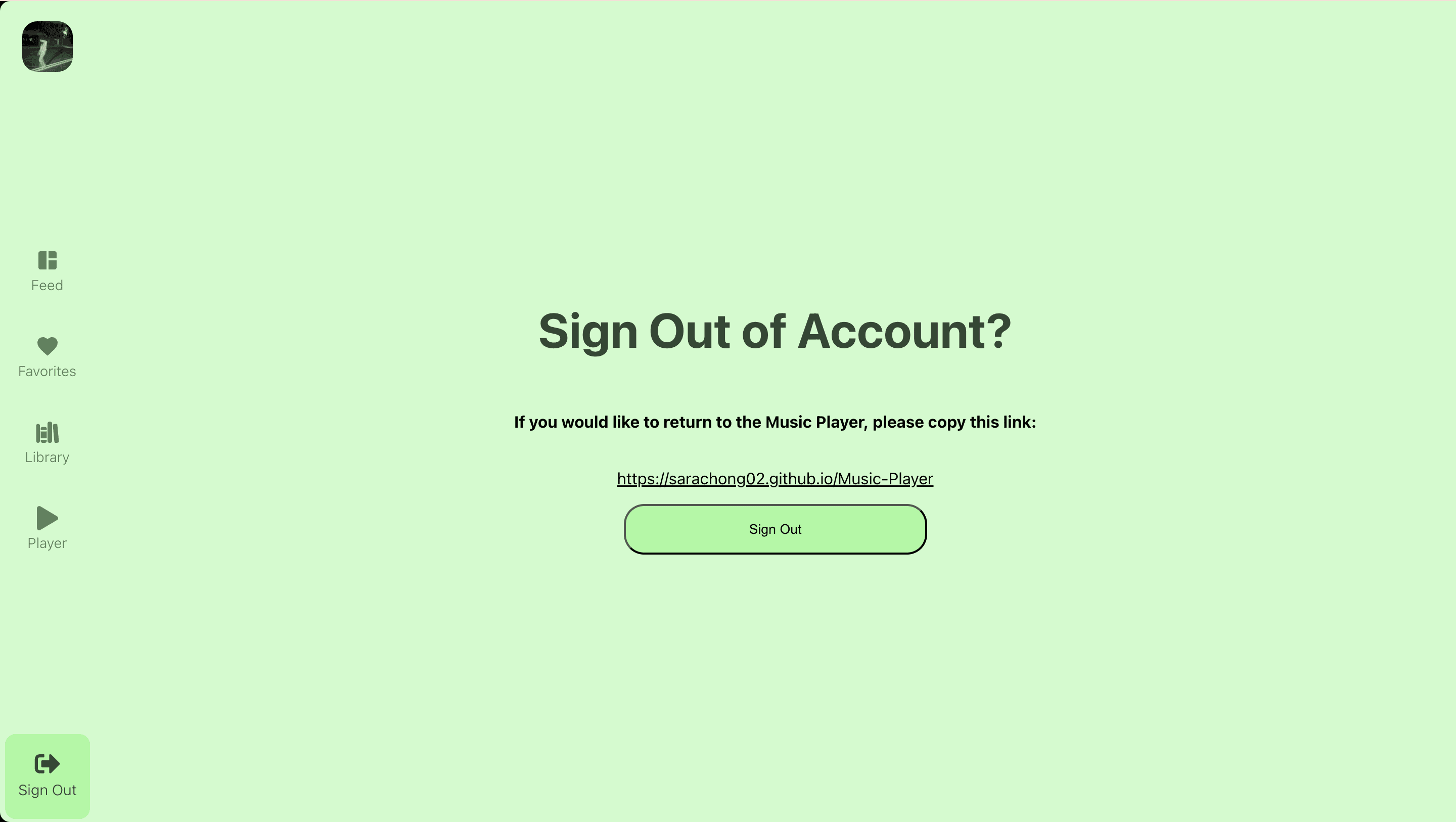
Create a Sign Out page with a quick button so that the user can access other accounts or log out with ease.
Implementing Design Trends

Implementing Design Trends

There are several UI/UX design techniques that are trending such as the Bento Box layout, glassmorphism, and microinteractions. To put these techniques into practice, and to accent the important parts of the design, I experimented with different techniques.

There are several UI/UX design techniques that are trending such as the Bento Box layout, glassmorphism, and microinteractions. To put these techniques into practice, and to accent the important parts of the design, I experimented with different techniques.

Glassmorphism

Glassmorphism

Design trend that uses semi-transparent, frosted-glass-like elements to create a sense of depth and layering in UI

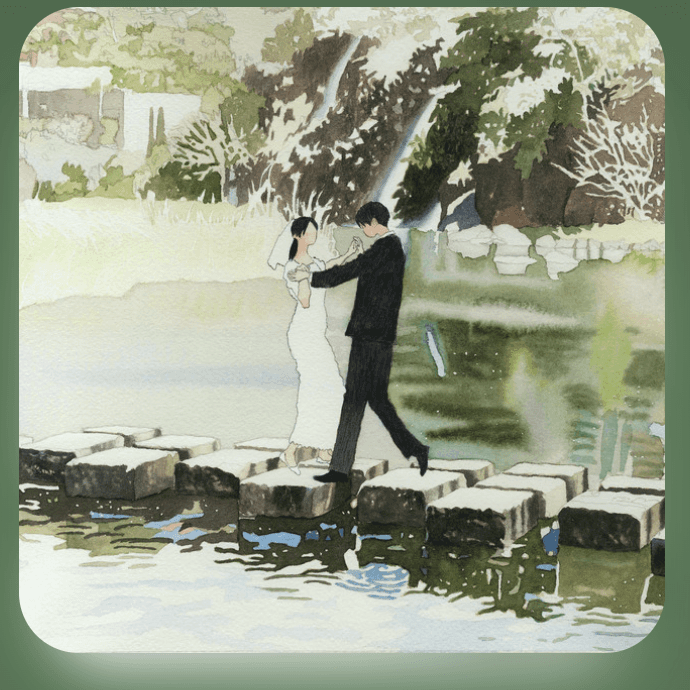
I decided to use glassmorphism on major images of the songs in order to emphasize the image itself in a subtle way that separates it from other parts

Microanimations

Microanimations

Small, animated interactions that provide feedback to users when they engage with elements

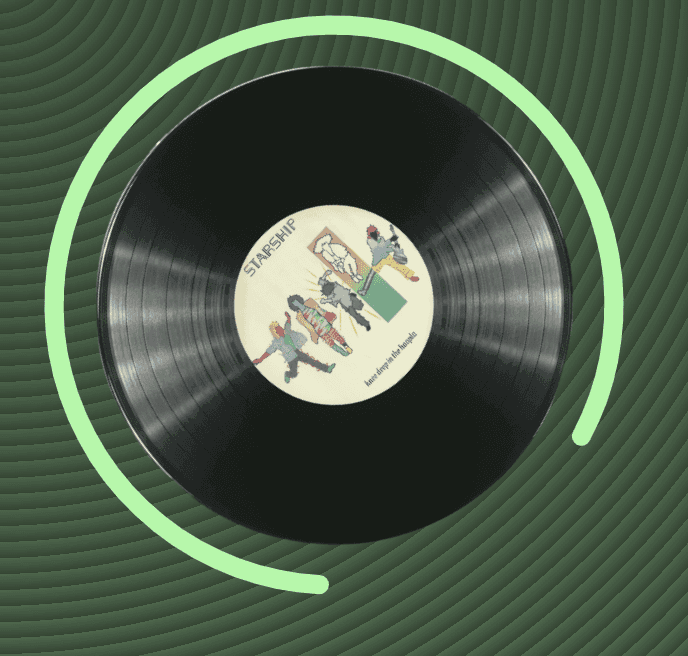
I decided to incorporate microanimations for parts of the screen that the user could interact with to make the experience more engaging and intuitive. I also added microanimations for the play button, skip buttons, and queued songs.
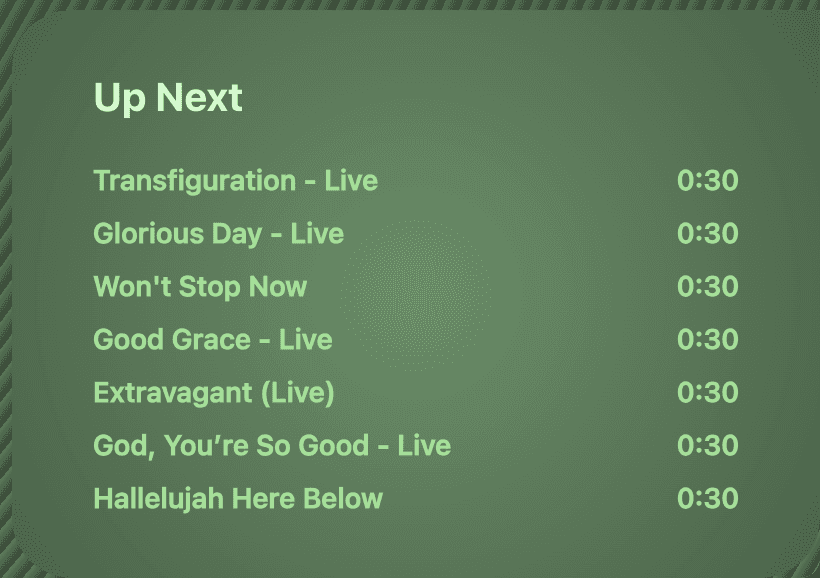
Neuromorphism

Neuromorphism

Design style that combines flat design with soft, 3D effects to create a tactile, “extruded” look.

I wanted to combine light and dark colors in a radial gradient to bring the shadows to the edges, and color the text to complement the shadow effects to make the text "pop out" within a flat surface.
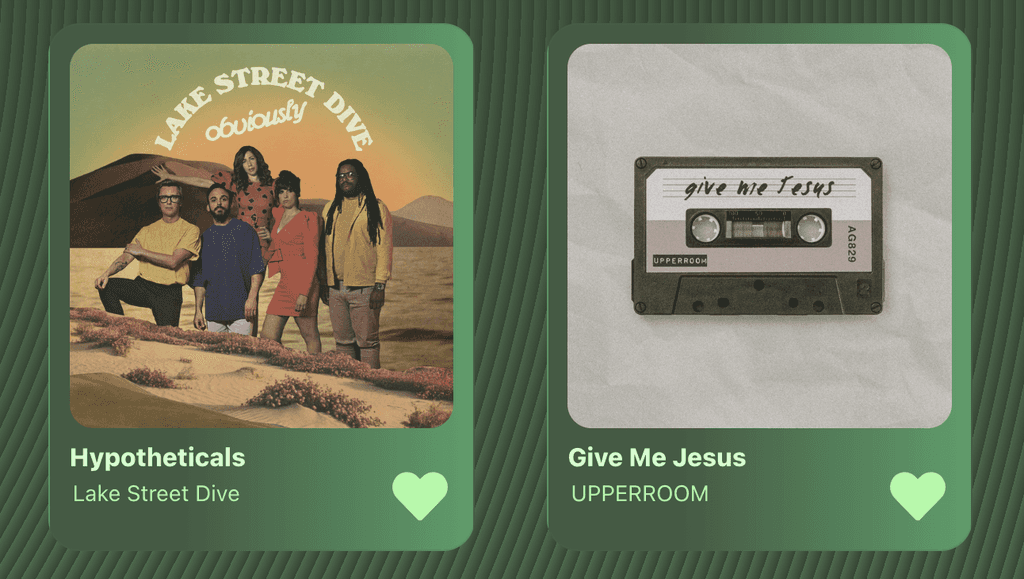
Textures

The visual or tactile quality of a surface that can be used to create a sense of feel and add depth to a design

I wanted to add a textured background for the screens in order to allow the important components pop out and create a 3D effect for all the components.

Textures

The visual or tactile quality of a surface that can be used to create a sense of feel and add depth to a design

I wanted to add a textured background for the screens in order to allow the important components pop out and create a 3D effect for all the components.

Visual Design System

Visual Design System

Color Challenge

Color Challenge

I wanted to challenge myself to use a monochromatic color scheme. Therefore, for the colors, I restricted myself to only make use of different shades and gradients of my personal favorite color — green.

I wanted to challenge myself to use a monochromatic color scheme. Therefore, for the colors, I restricted myself to only make use of different shades and gradients of my personal favorite color — green.

Note: there is a trending aesthetic called the ~girlie green~ aesthetic, which is where a person has all green items and decorates all their device wallpaper screens in a green theme, which was what I was aiming for in this color design.

Note: there is a trending aesthetic called the ~girlie green~ aesthetic, which is where a person has all green items and decorates all their device wallpaper screens in a green theme, which was what I was aiming for in this color design.

#213122

#314933

#496E4D

#568259

#6BCB77

#A0FA9E

#CCFCCB

#213122

#314933

#496E4D

#568259

#6BCB77

#A0FA9E

#CCFCCB

#213122

#314933

#496E4D

#568259

#6BCB77

#A0FA9E

#CCFCCB

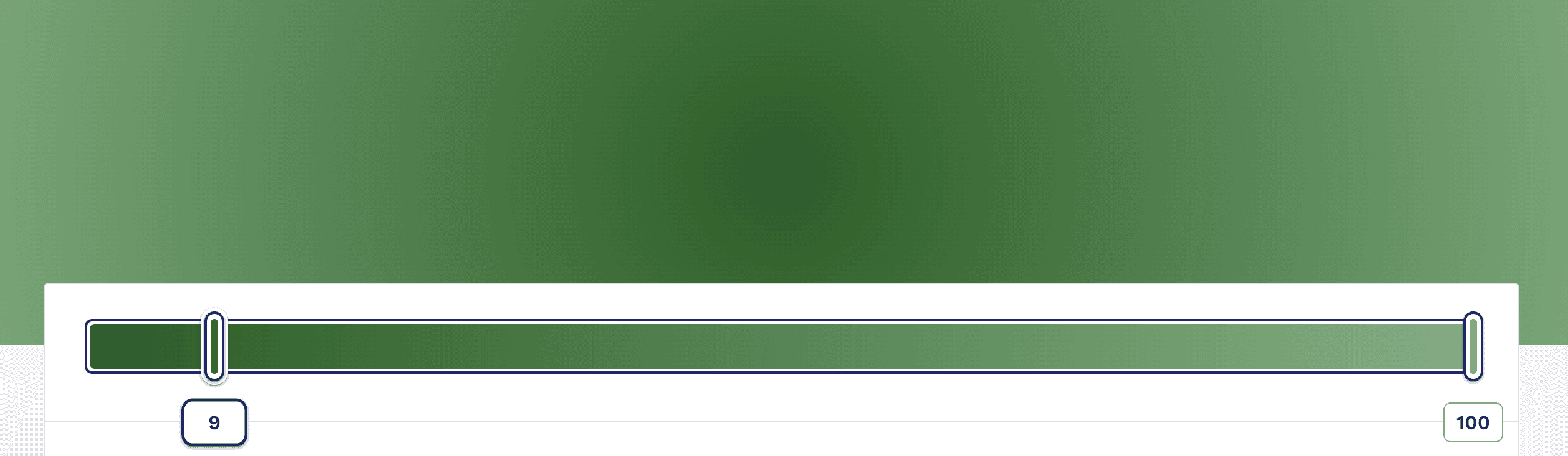
I used gradients in color to add to the textured, 3D effect for the components. For larger containers, I used a linear gradient, so as to create more of an organized structure for the many smaller components within, and I used a radial gradient for smaller components to create a neuromorphic effect.

I used gradients in color to add to the textured, 3D effect for the components. For larger containers, I used a linear gradient, so as to create more of an organized structure for the many smaller components within, and I used a radial gradient for smaller components to create a neuromorphic effect.

Development

Development

Connecting to the Spotify API

Connecting to the Spotify API

The most important part of the development was to connect my application to the Spotify API. The API allows developers to retrieve lots of data from Spotify's database and allows for direct connections to its streamline service.
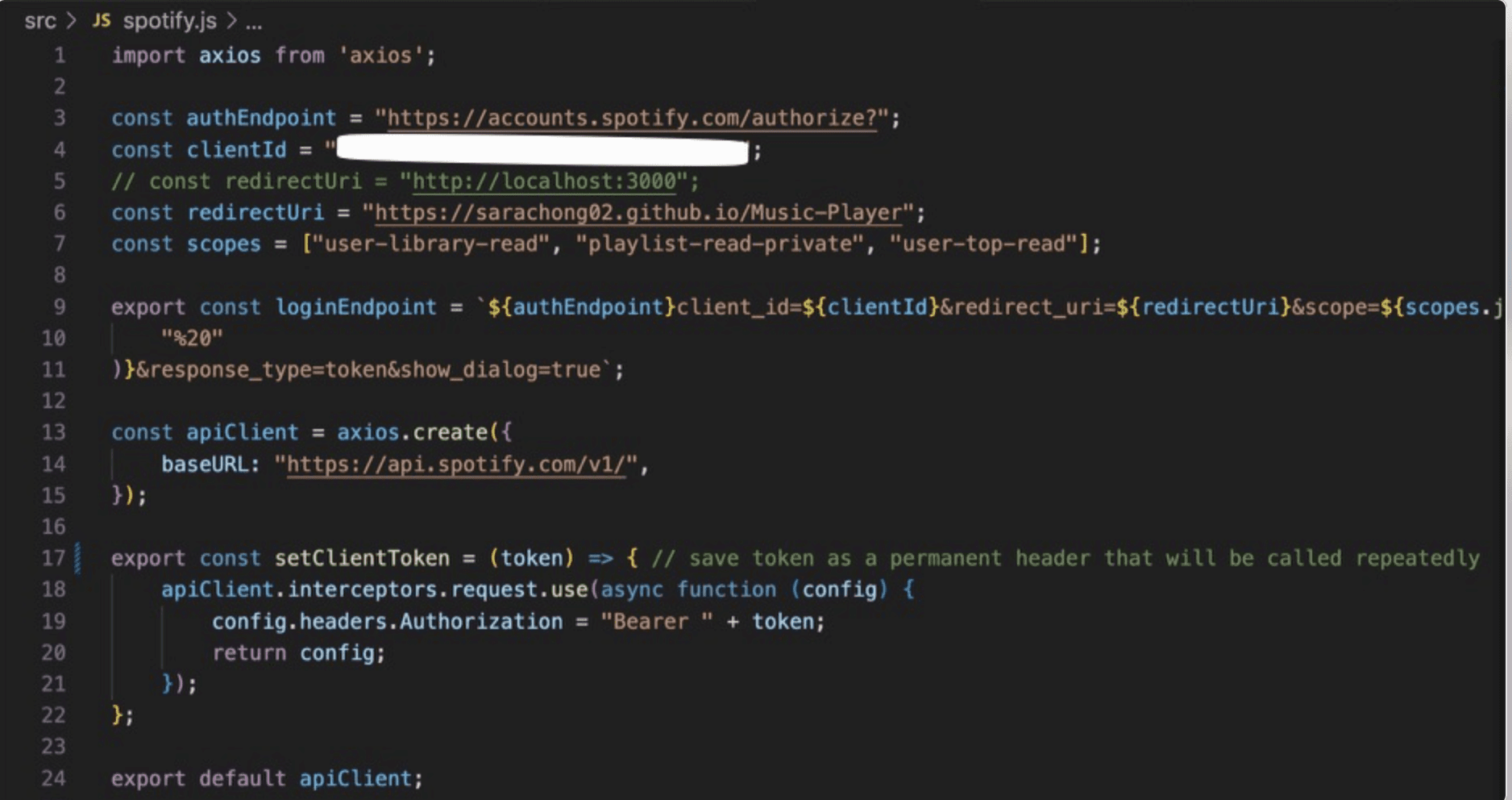
Backend Connection

In order to access the wonders of the Spotify API, I needed to first import Axios to handle HTTP requests. I then needed to establish the authorization endpoints and client information (clientId) in order to handle authentication that would be needed to retrieve personal preferences and recommendations from the user. Once authorized, the redirectUri allows the user to be redirected to the Music Player webpage. The 'apiClient' variable creates an Axios endpoint with a base url and sets it to the endpoint to the API. Lastly, the setClientToken function configures apiClient to automatically include the user’s token in every request header.
With a Hashrouter, I connected the Sidebar component and the five available routes that would lead to varying pages throughout the webpage. However, before being able to access any of the routes, I ensured that the clientToken was saved in a localStorage variable. If there was no specified token in the localStorage, when opened, the Route would be taken to the Login page; otherwise, the rest of the pages would be available to view.

With a Hashrouter, I connected the Sidebar component and the five available routes that would lead to varying pages throughout the webpage. However, before being able to access any of the routes, I ensured that the clientToken was saved in a localStorage variable. If there was no specified token in the localStorage, when opened, the Route would be taken to the Login page; otherwise, the rest of the pages would be available to view.

Pulling from the API

Pulling from the API

I had to retrieve a lot of different types of information from the API including — New Releases, Featured Playlists, Recommendations, User's Top Tracks, User's Playlists, Similar Artists, and Top Tracks from an Artist. Luckily the Spotify API made it very easy to pull the information from its database

I had to retrieve a lot of different types of information from the API including — New Releases, Featured Playlists, Recommendations, User's Top Tracks, User's Playlists, Similar Artists, and Top Tracks from an Artist. Luckily the Spotify API made it very easy to pull the information from its database

API Connection Pt. 1

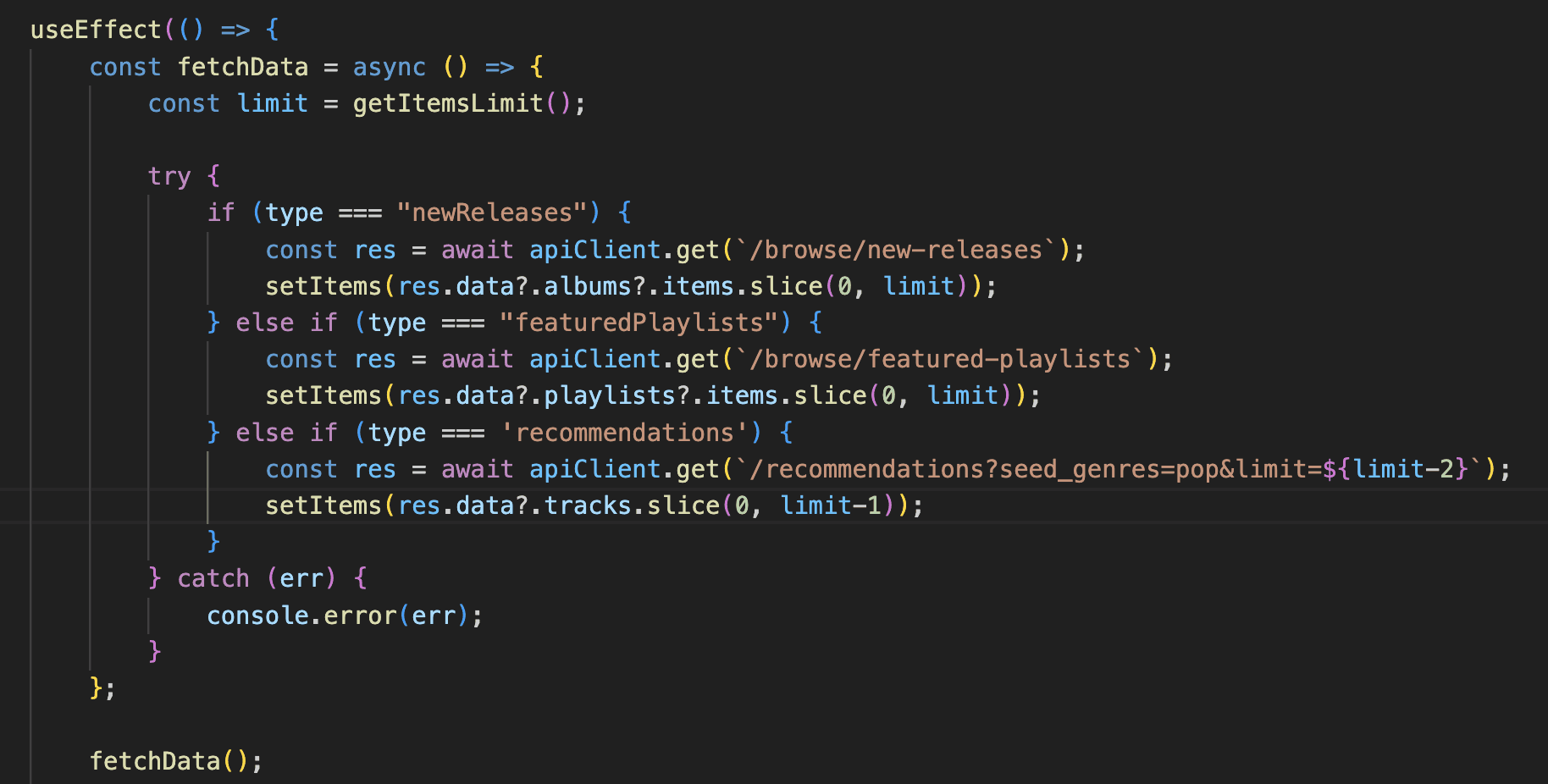
This code is from PlaylistContainer.js, which calls from the API and displays the items into a container and is later called in the Feed page. Specifically, this fetchData function in the useEffect hook uses a try-catch format to potentially catch any errors, and uses an if statement that checks the "type" to determine the which endpoint to use. Depending on the "type", the apiClient.get method fetches the specified endpoint, accesses a certain number of information from the endpoint, and lastly, sets the component's state with the fetched items using setItems(). To trigger the async function, I call fetchData() within the useEffect.
API Connection Pt. 2

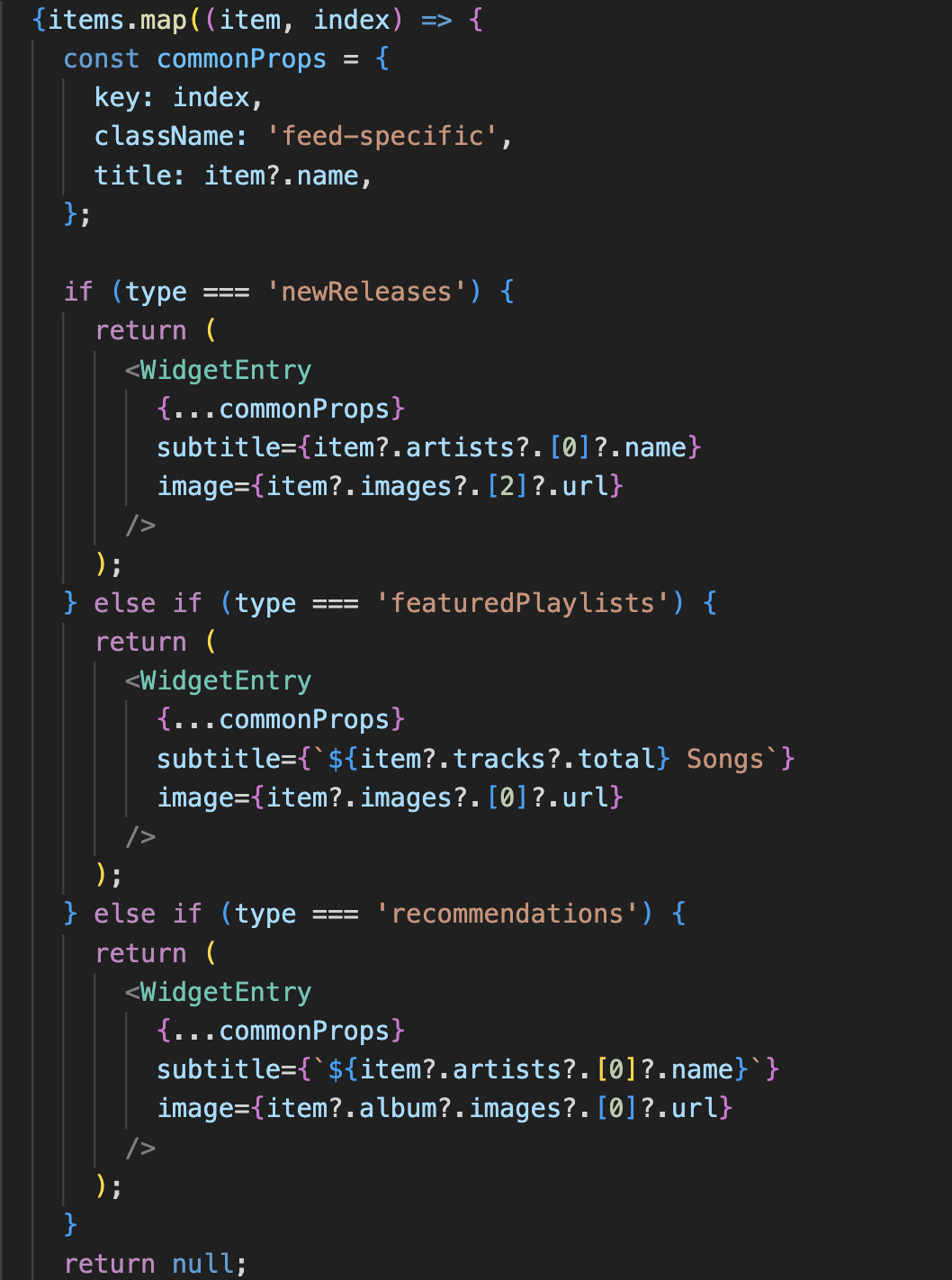
Within the number of items that is called in PlaylistContainer.js, I also need to call the information of each item. I do that (for the Feed Page) in FeedCard.js, which is similar in style to the other places I retrieve such information. Using the map() function, I iterate through each item and return a <WidgetEntry /> component depending on the item's type. The commonProps object holds the properties that are common to all the <WidgetEntry /> components to write cleaner code. Using the if statements, I check for the object's "type", and depending on that type, I either render the name or number of songs, as well as the image of the respective playlist or song. This style of code is similar for other pages such as the Favorites, Library, and Player pages.
Playing the Audio

Playing the Audio

Probably the most complicated part, there are a lot of controls and conditions that take part in playing the audio. these functions handle play/pause, track navigation, and progress tracking, forming the core of a music player app’s control logic.

Probably the most complicated part, there are a lot of controls and conditions that take part in playing the audio. these functions handle play/pause, track navigation, and progress tracking, forming the core of a music player app’s control logic.

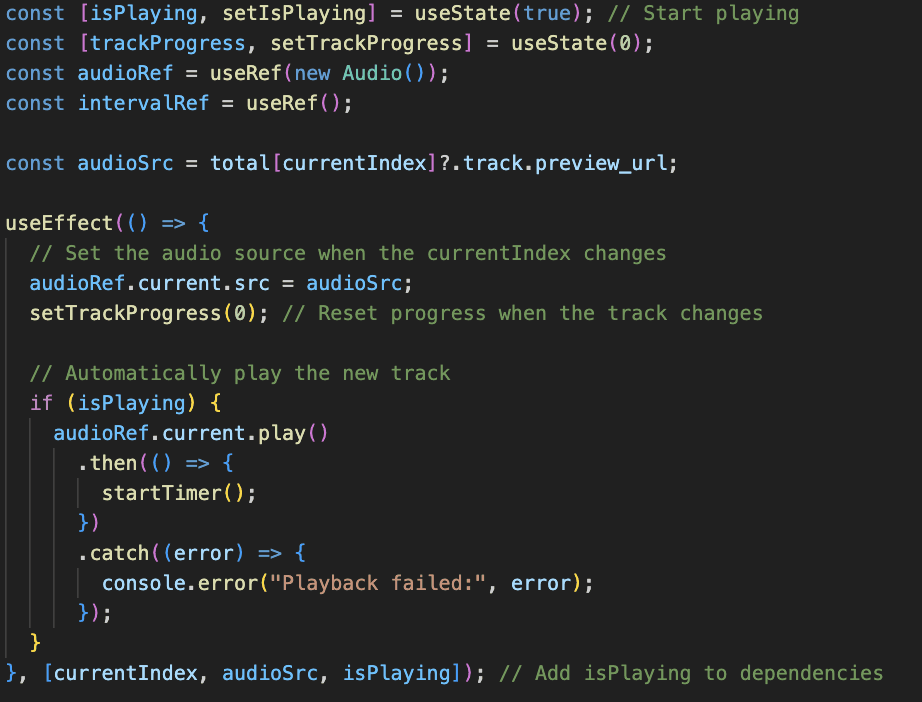
I have several state and reference declarations that determine whether the audio should be playing, current progress of the audio, a reference of the Audio object, and another for the timer. I then store the audio source after calling from the API, and then use a useEffect hook to set the audio source when the currentIndex changes using audioRef.current.src = audioSrc. If isPlaying is true, then I play the audioSrc (audioRef.current.play()) and start a timer. The dependency array ensures the useEffect hook runs whenever currentIndex, audioSrc, or isPlaying changes.

I have several state and reference declarations that determine whether the audio should be playing, current progress of the audio, a reference of the Audio object, and another for the timer. I then store the audio source after calling from the API, and then use a useEffect hook to set the audio source when the currentIndex changes using audioRef.current.src = audioSrc. If isPlaying is true, then I play the audioSrc (audioRef.current.play()) and start a timer. The dependency array ensures the useEffect hook runs whenever currentIndex, audioSrc, or isPlaying changes.

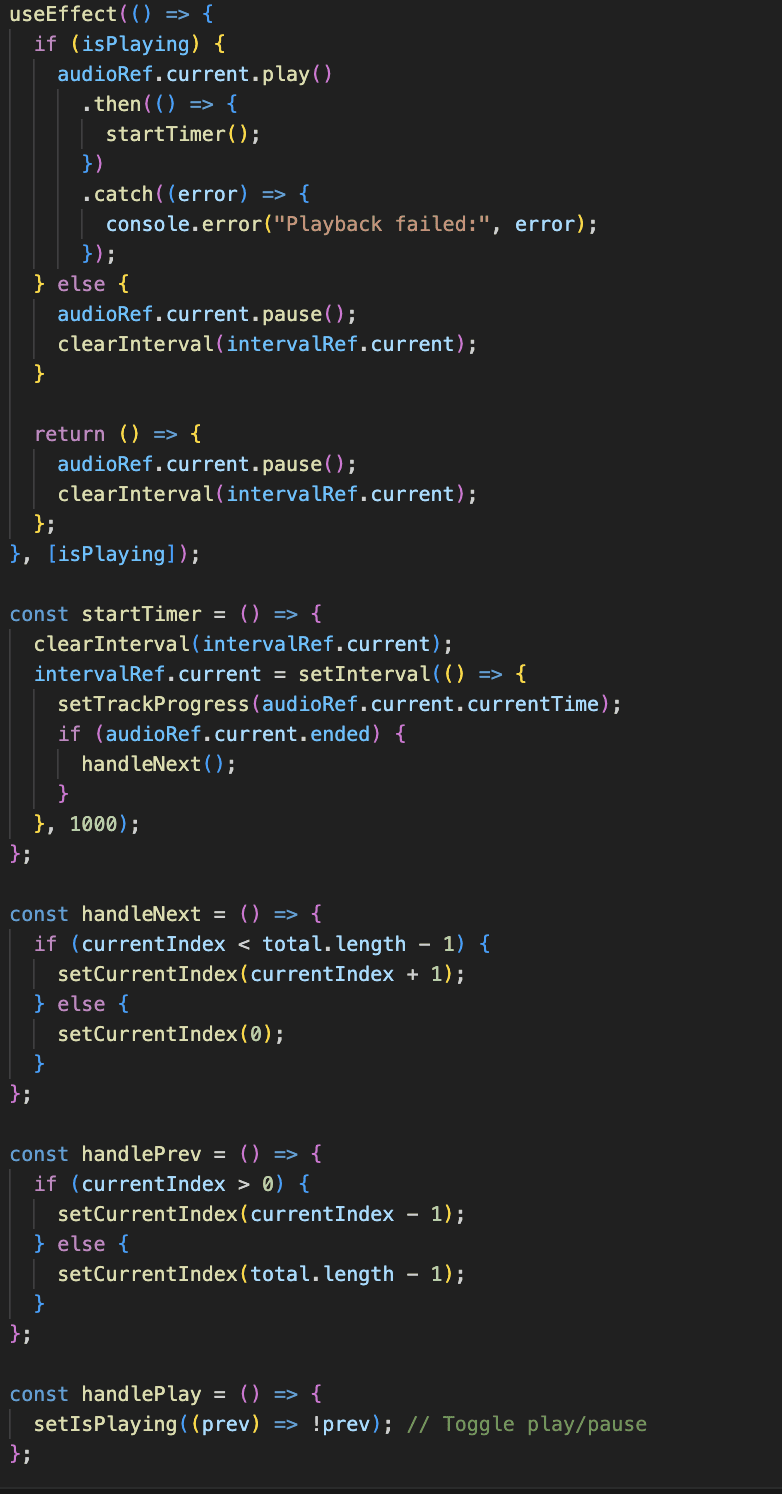
This useEffect hook runs when the isPlaying state changes, controlling whether the audio should play or pause. If isPlaying is true, it attempts to play the audio. On success, it starts the timer using startTimer() to track progress. If isPlaying is false, it pauses the audio and clears the timer (stopping progress tracking).

This useEffect hook runs when the isPlaying state changes, controlling whether the audio should play or pause. If isPlaying is true, it attempts to play the audio. On success, it starts the timer using startTimer() to track progress. If isPlaying is false, it pauses the audio and clears the timer (stopping progress tracking).

This useEffect hook runs when the isPlaying state changes, controlling whether the audio should play or pause. If isPlaying is true, it attempts to play the audio. On success, it starts the timer using startTimer() to track progress. If isPlaying is false, it pauses the audio and clears the timer (stopping progress tracking).

The startTimer() function manages tracking of the audio’s playback progress. It makes sure to clear any existing interval from the current timer. Then using the setInterval() function, updates trackProgress every second with the current playback time (audioRef.current.currentTime). If the audio has ended (audioRef.current.ended), handleNext() is called to go to the next track.

The startTimer() function manages tracking of the audio’s playback progress. It makes sure to clear any existing interval from the current timer. Then using the setInterval() function, updates trackProgress every second with the current playback time (audioRef.current.currentTime). If the audio has ended (audioRef.current.ended), handleNext() is called to go to the next track.

The startTimer() function manages tracking of the audio’s playback progress. It makes sure to clear any existing interval from the current timer. Then using the setInterval() function, updates trackProgress every second with the current playback time (audioRef.current.currentTime). If the audio has ended (audioRef.current.ended), handleNext() is called to go to the next track.

The handleNext(), handlePrev() and handlePlay() functions use a similar format. handleNext() uses the logic that If currentIndex is not the last item, currentIndex will be incremented by 1. If at the last track, loop back by setting currentIndex to 0. handlePrev() uses the logic that If currentIndex is greater than 0, it decreases currentIndex by 1. If currentIndex is 0, it loops back to the last track. Lastly for handlePlay(), It sets isPlaying to the opposite of its current state, pausing or playing the audio as needed.

The handleNext(), handlePrev() and handlePlay() functions use a similar format. handleNext() uses the logic that If currentIndex is not the last item, currentIndex will be incremented by 1. If at the last track, loop back by setting currentIndex to 0. handlePrev() uses the logic that If currentIndex is greater than 0, it decreases currentIndex by 1. If currentIndex is 0, it loops back to the last track. Lastly for handlePlay(), It sets isPlaying to the opposite of its current state, pausing or playing the audio as needed.

The handleNext(), handlePrev() and handlePlay() functions use a similar format. handleNext() uses the logic that If currentIndex is not the last item, currentIndex will be incremented by 1. If at the last track, loop back by setting currentIndex to 0. handlePrev() uses the logic that If currentIndex is greater than 0, it decreases currentIndex by 1. If currentIndex is 0, it loops back to the last track. Lastly for handlePlay(), It sets isPlaying to the opposite of its current state, pausing or playing the audio as needed.

Coding Animations

Coding Animations

There were two major animations that I focused on to practice manipulating with CSS.

There were two major animations that I focused on to practice manipulating with CSS.

Rotation Animation

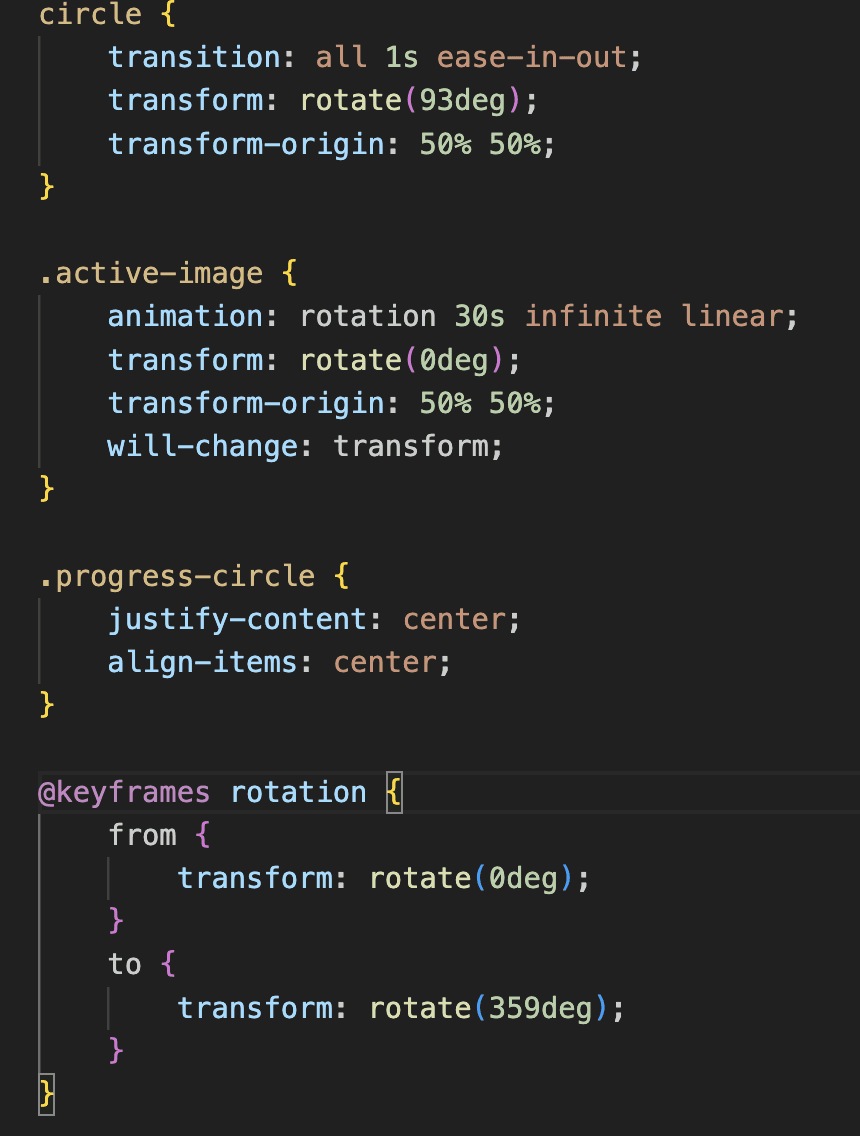
When the webpage is on the Player page, an image of a record player with the image of the album cover in the center, rotates with a timed progress circle as the song is playing. Using CSS, I first designed the main circle class to rotate by 93 degrees (transform: rotate(93deg);) and sets the origin of this rotation to the center (50% of the width and height) (transform-origin: 50% 50%;). If the track is playing, I have the .active-image CSS property that applies the rotation keyframe animation to the .active-image class. The rotation completes in 30 seconds and loops infinitely with a steady (linear) speed (animation: rotation 30s infinite linear;). The @keyframes rotation sets up a smooth continuous rotation from the start to near-completion of a circle (from { transform: rotate(0deg); } and to { transform: rotate(359deg); }).
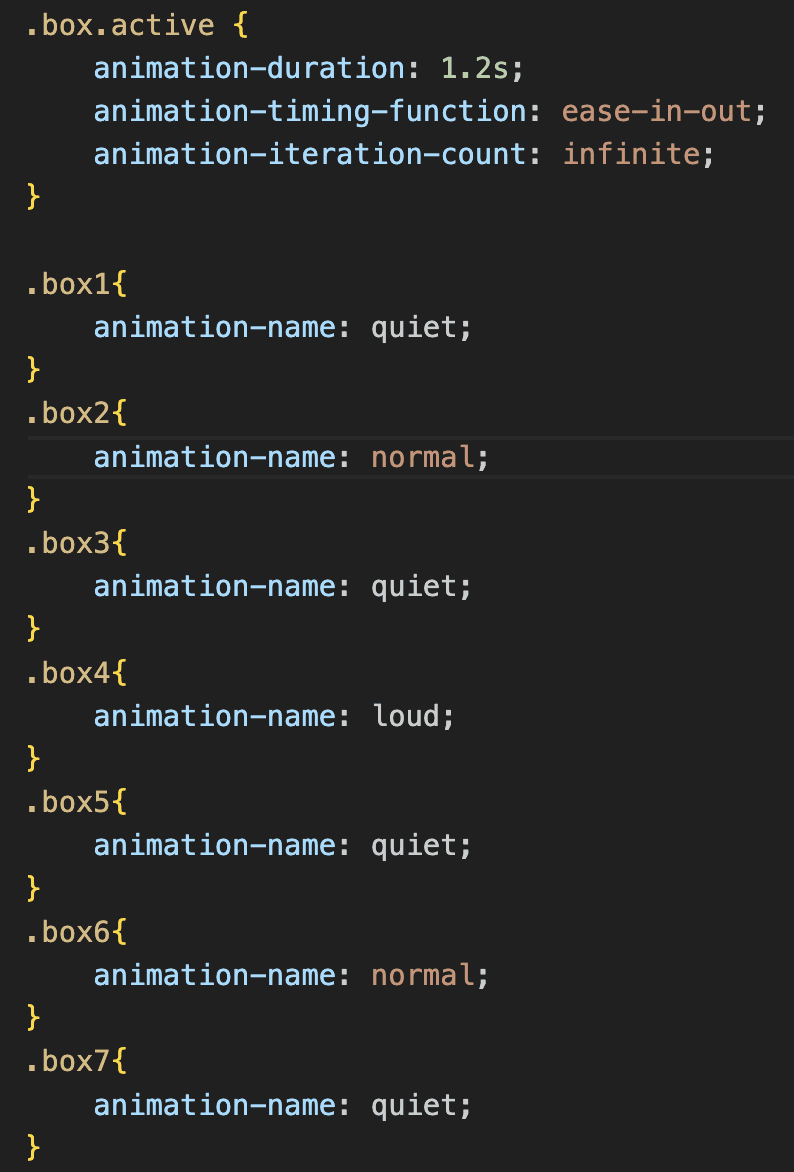
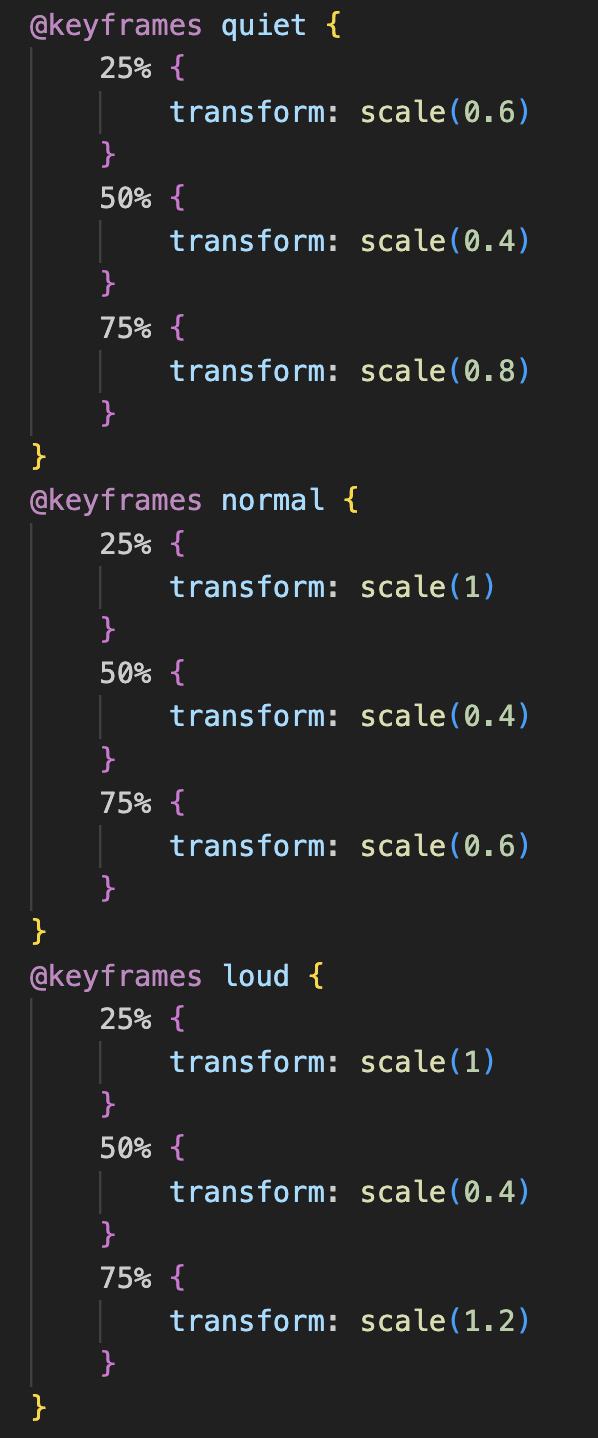
Wave Animation

There are two major parts to the wave animation that moves when a song is playing. First, when the box that holds the smaller wave parts is active (.box.active), the code sets up an infinite animation loop with a 1.2-second cycle time, using ease-in-out timing for smooth transitions. Then, each individual box is assigned an animation-name, specifying one of three keyframe animations (quiet, normal, or loud). The second half of the CSS code creates keyframes for scaling effects. "quiet" animates the box to grow to 0.6 scale, shrink back to 0.4, and then grow to 0.8 scale, "normal" scales between 1, 0.4, and 0.6, giving a moderate visual effect, and "loud" scales between 1, 0.4, and 1.2, creating a more pronounced visual effect. The resulting CSS creates a dynamic, animated visual effect, with each box scaling differently to produce an equalizer-like movement.

Responsiveness
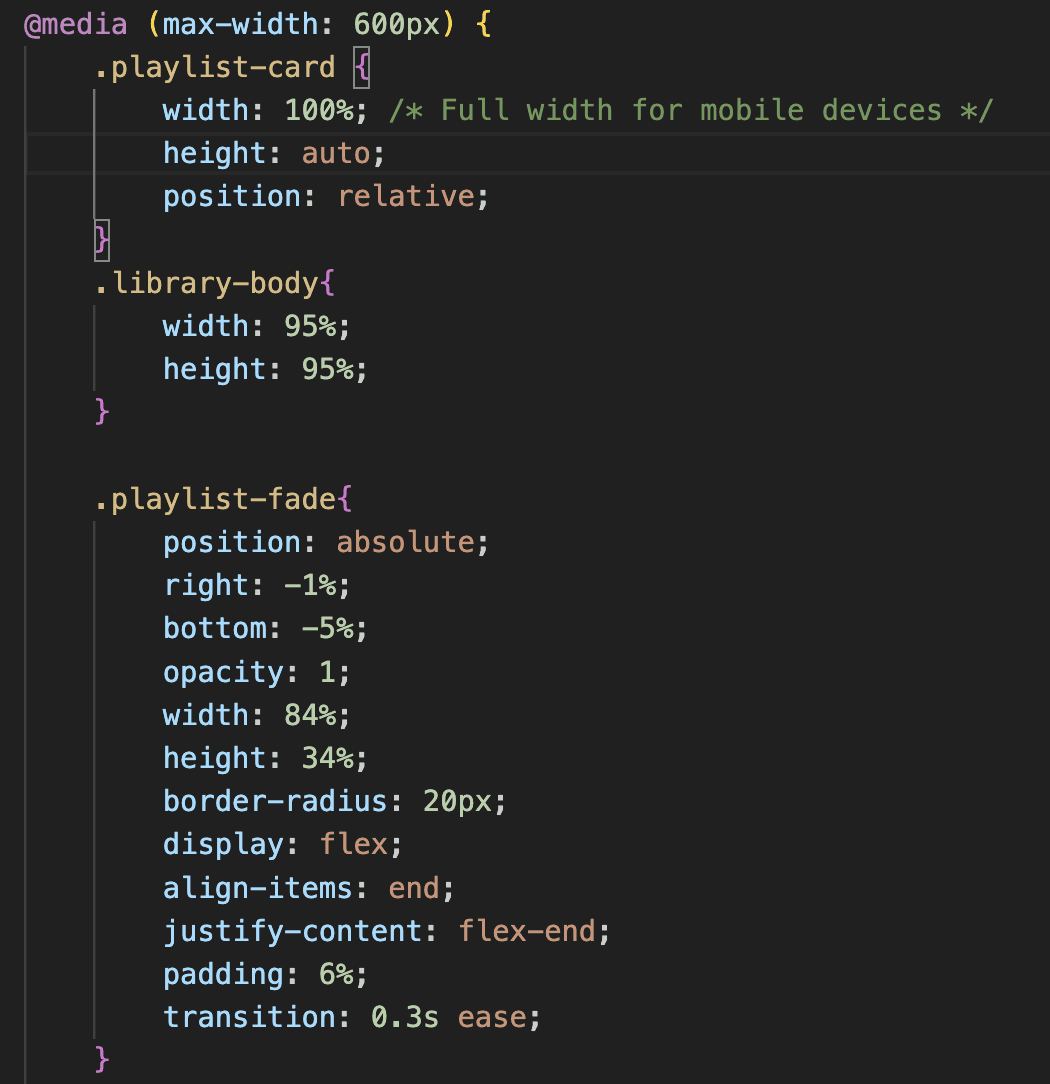
Making the Website Responsive

This is an example of how I make the Library page, which holds the playlist cards as well as a play button that appears when hovered. To ensure a responsive and optimized layout for smaller screens, in this specific part of the code, I use a media query that targets devices with a maximum screen width of 600px. For the playlist-card, I make sure that the width and height are adjusted to the new screen size, and I use position: relative; to keep the element within the normal document flow. For the .playlist-fade (which is the classname for the play button that uses a hover effect), I change the opacity to 1 because there is not hover effect that is possible on mobile devices. I also change the "right" and "bottom" properties to ensure that the button is positioned exactly where I want it to be. Overall, for all of the screen sizes, I decided to keep the Sidebar on the side, taking up about 5% of the screen space, as I want this website to maintain easy navigation to other pages.
This project consists of various interrelated components, many of which I haven’t displayed here but are available in my GitHub repository. Although some components aren’t highlighted individually, the majority share a similar structural approach and functional design, which unifies the project’s architecture. So if you’ve got a penchant for code consistency or just love marveling at streamlined functionality, dive into the repo!

This project consists of various interrelated components, many of which I haven’t displayed here but are available in my GitHub repository. Although some components aren’t highlighted individually, the majority share a similar structural approach and functional design, which unifies the project’s architecture. So if you’ve got a penchant for code consistency or just love marveling at streamlined functionality, dive into the repo!

Results and Next Steps

Results and Next Steps

This project provided me with hands-on experience in integrating APIs, along with opportunities to practice JavaScript and CSS techniques, including animations and layout design. It also enhanced my understanding of UI/UX principles, which I was able to implement directly and effectively within the project.

This project provided me with hands-on experience in integrating APIs, along with opportunities to practice JavaScript and CSS techniques, including animations and layout design. It also enhanced my understanding of UI/UX principles, which I was able to implement directly and effectively within the project.

Github Repository

Check out the source code for this project!

Go to Github

Deployed Project

View and interact with this project!

Go to Project

Final Screens

Final Screens

Login Page

Login Page

Sign Out Page

Feed Page

Favorites Page

Library Page

Player Page
Next Steps

Next Steps

The website currently supports responsive design across multiple devices, allowing users to enjoy seamless playback with a visually appealing layout. It offers a wide range of personalized recommendations in different categories for easy discovery. Future enhancements include adding a search function to let users find and play specific songs, refining the Feed page layout, and creating distinct designs for the Favorites and Library pages to improve user experience. Stay tuned for these exciting updates and more as the project evolves!

The website currently supports responsive design across multiple devices, allowing users to enjoy seamless playback with a visually appealing layout. It offers a wide range of personalized recommendations in different categories for easy discovery. Future enhancements include adding a search function to let users find and play specific songs, refining the Feed page layout, and creating distinct designs for the Favorites and Library pages to improve user experience. Stay tuned for these exciting updates and more as the project evolves!

Sara Chong - UI/UX Designer & Developer

Ready to design the future 🚀 with you, one click at a time!

Sara Chong © 2025. Designed on Framer

Goran Babarogic

Ready to design the future 🚀 with you, one click at a time!

Sara Chong © 2025. Designed on Framer

Sara Chong - UI/UX Designer & Developer

Ready to design the future 🚀 with you, one click at a time!

Sara Chong © 2025. Designed on Framer

Create a free website with Framer, the website builder loved by startups, designers and agencies.