
Menu
UX Research, Product Design & Frontend Development
ASML Staffing Model GUI
ASML Staffing Model GUI
ASML Staffing Model GUI
3 People. 60 global facilities. Navigating thousands of lines of code.
ASML — the world’s leading DUV/EUV lithography chipmaker — runs on a global network of Field Service Managers and Engineers maintaining 60 global facilities. The challenge? Consistent staffing is key, yet running crucial simulations has become a complex, time-consuming ordeal dependent on 3 analysts based in San Diego.
To solve this problem, I developed a modern, innovative Graphical User Interface (GUI) that replaces the manual maze to showcase the limitless potential of combining next-level design with seamless functionality.
Because of company policy and NDA, I am not able to show direct visual examples or specific information about this project! Please keep in mind as I share about my designs and experience!
Because of company policy and NDA, I am not able to show direct visual examples or specific information about this project! Please keep in mind as I share about my designs and experience!
Because of company policy and NDA, I am not able to show direct visual examples or specific information about this project! Please keep in mind as I share about my designs and experience!
Because of company policy and NDA, I am not able to show direct visual examples or specific information about this project! Please keep in mind as I share about my designs and experience!
My Role
My Role
My Role
End-to-end Product Design
User Research
Design System
Frontend Development
Team
Team
Cross-functional partnership between 2 Software Engineers and 2 Data Analysts in the Operational Efficiency Team at San Diego.
Tools
Tools
Microsoft Visio
Qt Designer
PyQt
Teamforge
Jira
Microsoft Visio
Qt Designer
PyQt
Teamforge
Jira
User Research
User Research
Understanding comes First!
Understanding comes First!
The only prior knowledge I had in the semiconductor industry was the “Welcome to ASML” video that I first received in my inbox
The only prior knowledge I had in the semiconductor industry was the “Welcome to ASML” video that I first received in my inbox
So on my first day, when my manager told me I had 12 weeks to design, develop, and present (at a major company conference!!!) a transformative interface that would affect the company greatly, can you imagine what my face looked like?
(hint: 😧 😰 🥲)
So on my first day, when my manager told me I had 12 weeks to design, develop, and present (at a major company conference!!!) a transformative interface that would affect the company greatly, can you imagine what my face looked like?
(hint: 😧 😰 🥲)
12 weeks. The only information I had was:
the project brief
the new software to download
the long, messy code for the staffing simulation that I had optimize.
But I couldn’t even START to look at that until I had learnt how the company functioned and who my target user base was. As my project deals with staffing, I first researched the company’s infrastructure and business models to understand why a staffing simulation was even needed.
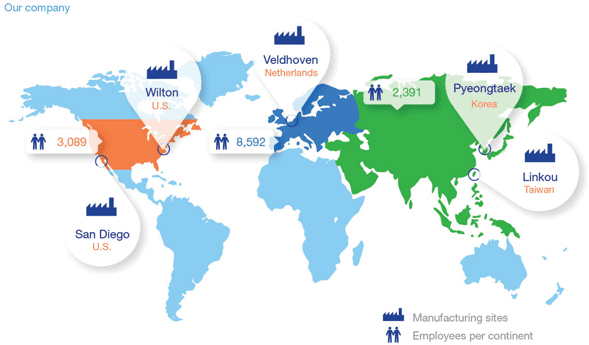
Map of average number of employees at ASML in 2024
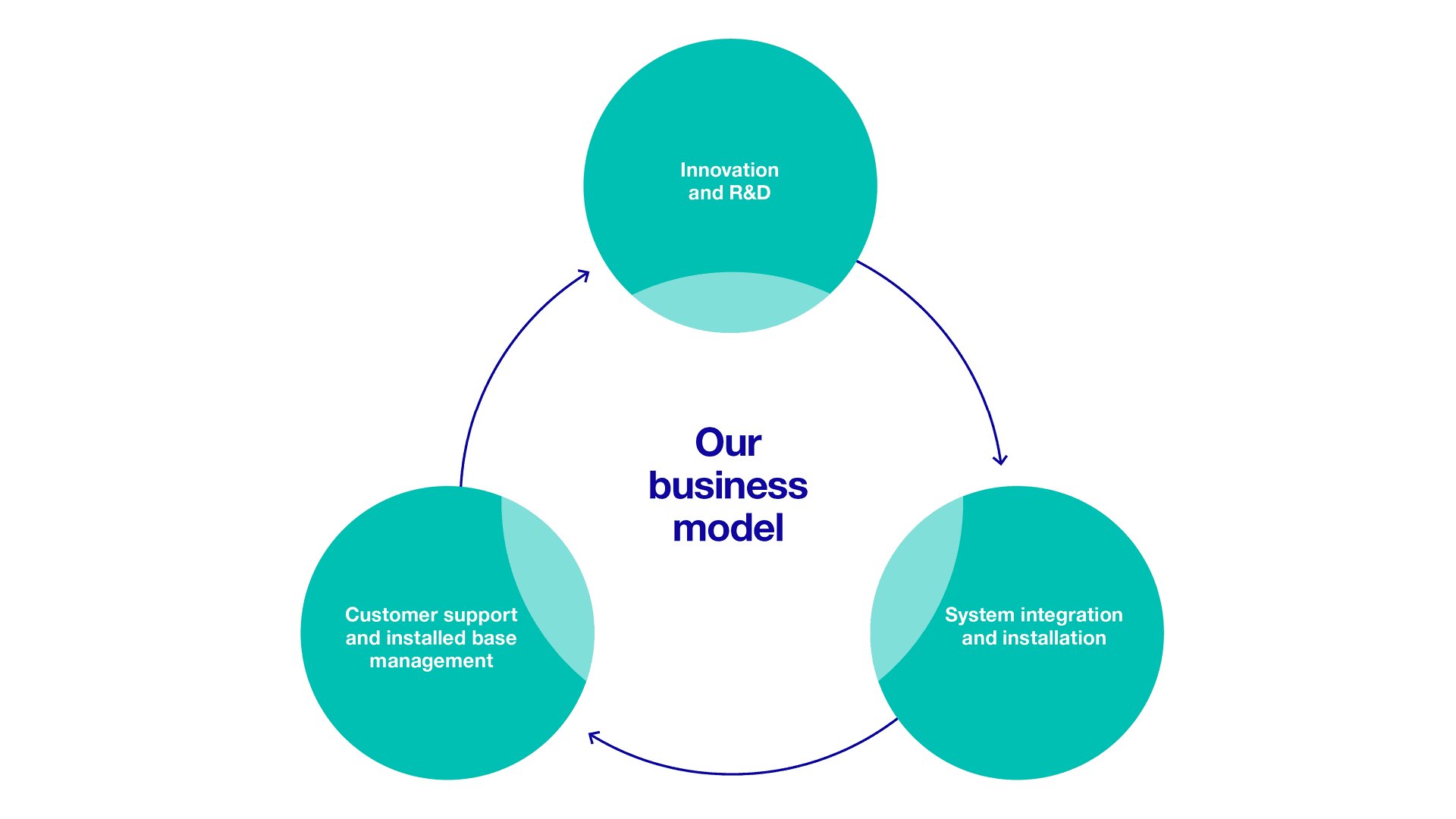
ASML's company-wide business model (2024)
Based on the business model, part of the company’s services is having Field Service Engineers (FSE) install new innovations to the machines, as well as routine maintenance checkups.
Based on the business model, part of the company’s services is having Field Service Engineers (FSE) install new innovations to the machines, as well as routine maintenance checkups.
Consistent staffing needs to be coordinated meticulously to provide the high quality service that ASML strives for.
Consistent staffing needs to be coordinated meticulously to provide the high quality service that ASML strives for.
Consistent staffing needs to be coordinated meticulously to provide the high quality service that ASML strives for.
ASML has 40,000+ Employees; Who am I Designing for?
ASML has 40,000+ Employees; Who am I Designing for?
Once I had a good understanding of the needs of the company’s clients, I delved further into the users that I would directly be designing for — Field Service Managers.
Once I had a good understanding of the needs of the company’s clients, I delved further into the users that I would directly be designing for — Field Service Managers.
To better understand the problem space, I conducted user interviews with 10 FSMs, four located in the U.S., two located in South Korea, three in Taiwan, one from the Netherlands. The goal was to uncover pain points, workflow habits, and expectations around the staffing simulation tool.
Key insights:
FSMs had to wait several months to a year for staffing simulation results.
Results were difficult to access because of their .html formats that could not simply be downloaded.
There was confusion around how staffing decisions aligned with business goals.
Key insights:
FSMs had to wait several months to a year for staffing simulation results.
Results were difficult to access because of their .html formats that could not simply be downloaded.
There was confusion around how staffing decisions aligned with business goals.
Key insights:
FSMs had to wait several months to a year for staffing simulation results.
Results were difficult to access because of their .html formats that could not simply be downloaded.
There was confusion around how staffing decisions aligned with business goals.
Name
Name
John Doe
John Doe
Age
Age
42
42
Austin, Texas, USA
Field Service Manager at ASML
Role description
John Doe has spent the past decade managing service teams that maintain ASML's high-precision photolithography machines at client sites in Texas. John ensures to provide enough on-site support to semiconductor fabs in both engineers and materials, ensuring that equipment downtime is minimized and production efficiency is maximized.

Name
John Doe
Age
42
Austin, Texas, USA
Field Service Manager at ASML
Role description
John Doe has spent the past decade managing service teams that maintain ASML's high-precision photolithography machines at client sites in Texas. John ensures to provide enough on-site support to semiconductor fabs in both engineers and materials, ensuring that equipment downtime is minimized and production efficiency is maximized.
Needs
Needs
Balancing time between urgent equipment repairs and preventative maintenance.
Coordinating with international colleagues across time zones for specialized support.
Optimal performance and minimal downtime of ASML equipment in the field.
Access to data from multiple sites internationally to compare and assess performance.
Pain points
Pain points
Streamline service workflows by leveraging new technology and the necessary number of staff needed.
Manage client relationships, ensuring they are satisfied with the service provided.
Lead and train engineers to stay up-to-date with the latest tools and techniques.
Ensure optimal performance and minimal downtime of ASML equipment in the field.
Who is running the simulations?
Who is running the simulations?
FSMs are only half of my user base. The other half are the THREE data analysts who run the staffing simulations...for ALL the FSMs...globally.
FSMs are only half of my user base. The other half are the THREE data analysts who run the staffing simulations...for ALL the FSMs...globally.
I interviewed all three analysts about their job and the process of running a single request. I also read through the instruction documentation to how to run the simulation, and I finally understood why their laptops were much bigger than most.
I interviewed all three analysts about their job and the process of running a single request. I also read through the instruction documentation to how to run the simulation, and I finally understood why their laptops were much bigger than most.
Key insights:
Key insights:
Hundreds of historical data files need to be stored LOCALLY, often in complex file nests that make it hard to navigate.
Hundreds of historical data files need to be stored LOCALLY, often in complex file nests that make it hard to navigate.
Hundreds of historical data files need to be stored LOCALLY, often in complex file nests that make it hard to navigate.
To run the simulation, they need to manually code commands into a Python terminal.
To run the simulation, they need to manually code commands into a Python terminal.
To run the simulation, they need to manually code commands into a Python terminal.
It can take hours to complete a full request because of the amount of data, and no way to cancel a run if there was a mistake.
It can take hours to complete a full request because of the amount of data, and no way to cancel a run if there was a mistake.
It can take hours to complete a full request because of the amount of data, and no way to cancel a run if there was a mistake.
The results only appear as a .html file, even though many times it is needed in other forms.
The results only appear as a .html file, even though many times it is needed in other forms.
The results only appear as a .html file, even though many times it is needed in other forms.
Information architecture
Information architecture
Decoding Chaos: Taming the Code Beast
Decoding Chaos: Taming the Code Beast
I know ASML’s business model. I understand the user’s needs. I’ve talked to the analysts. Now I need to learn how the actual simulation was modeled so that I could integrate it into my GUI.
I know ASML’s business model. I understand the user’s needs. I’ve talked to the analysts. Now I need to learn how the actual simulation was modeled so that I could integrate it into my GUI.
I know ASML’s business model. I understand the user’s needs. I’ve talked to the analysts. Now I need to learn how the actual simulation was modeled so that I could integrate it into my GUI.
I appreciated the rare notes within the code. Because the code it self was MESSY.
I appreciated the rare notes within the code. Because the code it self was MESSY.
I appreciated the rare notes within the code. Because the code it self was MESSY.
I needed to determine what the necessary input parameters were, and other optional, secondary parameters that were available for users to alter. With those I had to know how the simulation used those parameters to run the simulation.
I needed to determine what the necessary input parameters were, and other optional, secondary parameters that were available for users to alter. With those I had to know how the simulation used those parameters to run the simulation.
I needed to determine what the necessary input parameters were, and other optional, secondary parameters that were available for users to alter. With those I had to know how the simulation used those parameters to run the simulation.

The User Sequence Dance
The User Sequence Dance
Once I knew how to navigate the backend code and the desired uses, I used sequence diagrams to create the desired user flow.
Once I knew how to navigate the backend code and the desired uses, I used sequence diagrams to create the desired user flow.
For context, a user can plug in inputs for a number of different locations, with each location being a different use case. The simulation would then simulate staffing based on the historical data from each location, and then show results of each location and compare it with the other locations.
For context, a user can plug in inputs for a number of different locations, with each location being a different use case. The simulation would then simulate staffing based on the historical data from each location, and then show results of each location and compare it with the other locations.
For context, a user can plug in inputs for a number of different locations, with each location being a different use case. The simulation would then simulate staffing based on the historical data from each location, and then show results of each location and compare it with the other locations.
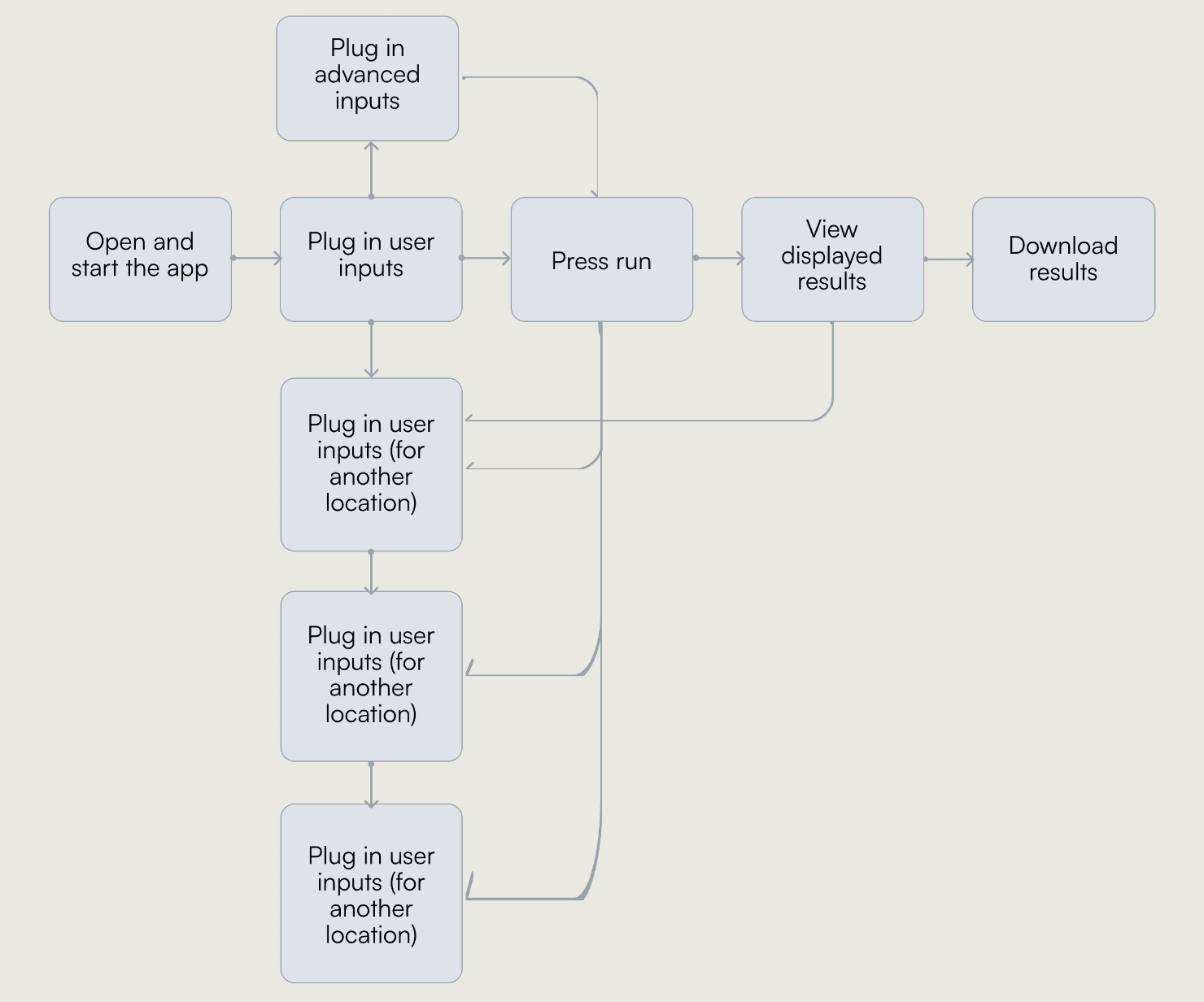
I limited the users to 4 use cases for the preliminary version so that the runtime wouldn’t take forever, but would still be able to show adequate simulation results.
Open and start the app
Download results
Download results
Press run
View Displayed Results
Plug in user inputs (for all cases)
Plug in advanced inputs
If the user dances, the code is the dance shoes
If the user dances, the code is the dance shoes
I also had to make sure I understood the flow of the code, and how it interacts with the user.
I also had to make sure I understood the flow of the code, and how it interacts with the user.

The backend task flow illustrates how the user's interactions (Controller) in the front end is received by the simulation code (Model) to display the results back to the user (View). Classic Model-View-Controller framework.
The backend task flow illustrates how the user's interactions (Controller) in the front end is received by the simulation code (Model) to display the results back to the user (View). Classic Model-View-Controller framework.
User chooses inputs
Retrieve user inputs
Run the simulation
Create output
Display output on front end
Plug in inputs as parameters
If there are other cases with other inputs
The backend task flow illustrates how the user's interactions (Controller) in the front end is received by the simulation code (Model) to display the results back to the user (View). Classic Model-View-Controller framework.
Product design
Product design
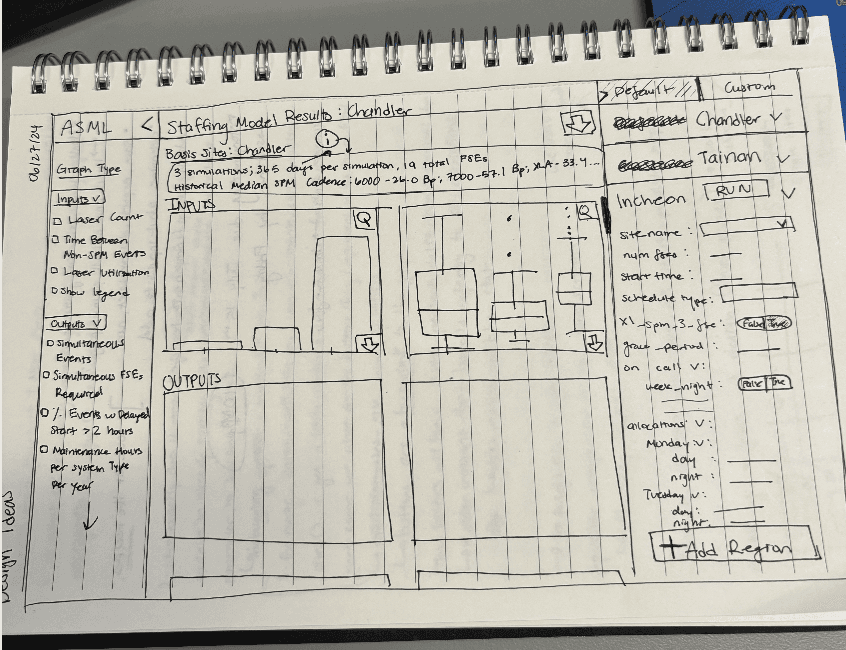
Sketching in my little orange notebook
Sketching in my little orange notebook
At the start of my internship, I was given a small, bright orange notebook. I used it to take notes during meetings, concentration scribbling, and mostly, drawing sketch after sketch of designs.
At the start of my internship, I was given a small, bright orange notebook. I used it to take notes during meetings, concentration scribbling, and mostly, drawing sketch after sketch of designs.
My design strategy was based off of a singular goal:
My design strategy was based off of a singular goal:
How can I allow FSMs to run their own simulations by just pressing buttons?
How can I allow FSMs to run their own simulations by just pressing buttons?
How can I allow FSMs to run their own simulations by just pressing buttons?
My initial sketches were attempts to consolidate space to allow for inputs and results to coexist in a 1440x1024 interface. I wanted to emphasize labels and clear layouts to optimize learning and optionality.
Wireframing...on Microsoft Visio??
Wireframing...on Microsoft Visio??
Due to NDA, I am not able to show any of my wireframes here, so I will try my best to show smaller components!
Due to NDA, I am not able to show any of my wireframes here, so I will try my best to show smaller components!
Due to NDA, I am not able to show any of my wireframes here, so I will try my best to show smaller components!
Because of the company’s privacy policy, I wasn’t able to use Figma (my BFF). Instead, I had to adjust and learn how to use Microsoft Visio to wireframe.
Because of the company’s privacy policy, I wasn’t able to use Figma (my BFF). Instead, I had to adjust and learn how to use Microsoft Visio to wireframe.
My Biggest Challenge:
How can I optimize screen space to display both inputs and outputs simultaneously while still prioritizing my primary goal to give the users their autonomy in running their own simulations?
My Biggest Challenge:
How can I optimize screen space to display both inputs and outputs simultaneously while still prioritizing my primary goal to give the users their autonomy in running their own simulations?
My Biggest Challenge:
How can I optimize screen space to display both inputs and outputs simultaneously while still prioritizing my primary goal to give the users their autonomy in running their own simulations?
1/3
1/3
2/3
2/3
2/3
RULE OF THIRDS! To create a more balanced design with clear focal points, I placed a great emphasis on the visual principle of thirds.
RULE OF THIRDS! To create a more balanced design with clear focal points, I placed a great emphasis on the visual principle of thirds.
RULE OF THIRDS! To create a more balanced design with clear focal points, I placed a great emphasis on the visual principle of thirds.
Location 1
Input 1:
Input 2:
Input 3:
Input 4:
Location 2
Location 3
Location 3
For the input section, I created a toolbox button that could hold multiple input areas for space optimization.
(This is just an example!!)
(This is just an example!!)
For the input section, I created a toolbox button that could hold multiple input areas for space optimization.
(This is just an example!!)
For the input section, I created a toolbox button that could hold multiple input areas for space optimization.
For the input section, I created a toolbox button that could hold multiple input areas for space optimization.
(This is just an example!!)
Advanced Inputs
Advanced Inputs
Input 1:
Input 1:
Input 2:
Input 2:
Input 3:
Input 3:
Input 4:
Input 4:
Location 1
Location 1
Input 1:
Input 1:
Input 2:
Input 2:
Input 3:
Input 3:
Input 4:
Input 4:
Location 2
Location 2
Location 3
Location 4
Location 2
For the less prioritized inputs options, I designed a separate pop-up dialog that would allow those options to be present without taking up additional screen space.
(This is a just an example !!)
(This is a just an example !!)
For the less prioritized inputs options, I designed a separate pop-up dialog that would allow those options to be present without taking up additional screen space.
(This is a just an example !!)
For the less prioritized inputs options, I designed a separate pop-up dialog that would allow those options to be present without taking up additional screen space.
For the less prioritized inputs options, I designed a separate pop-up dialog that would allow those options to be present without taking up additional screen space.
(This is just an example!!)
One challenge I faced during this phase was defending my designs to a team of backend software engineers and data analysts — no one with design experience. Their input and feedback were helpful, but I had to figure out how to create those jargon-filled ideas into a feasible design that would still put the user first!
One challenge I faced during this phase was defending my designs to a team of backend software engineers and data analysts — no one with design experience. Their input and feedback were helpful, but I had to figure out how to create those jargon-filled ideas into a feasible design that would prioritize the user!
Prototyping with QtDesigner
Prototyping with QtDesigner
Once I had most of my wireframes, I was ready to recreate them onto QtDesigner — one of the coolest GUI builder tools.
Once I had most of my wireframes, I was ready to recreate them onto QtDesigner — one of the coolest GUI builder tools.
Once I had most of my wireframes, I was ready to recreate them onto QtDesigner — one of the coolest GUI builder tools.
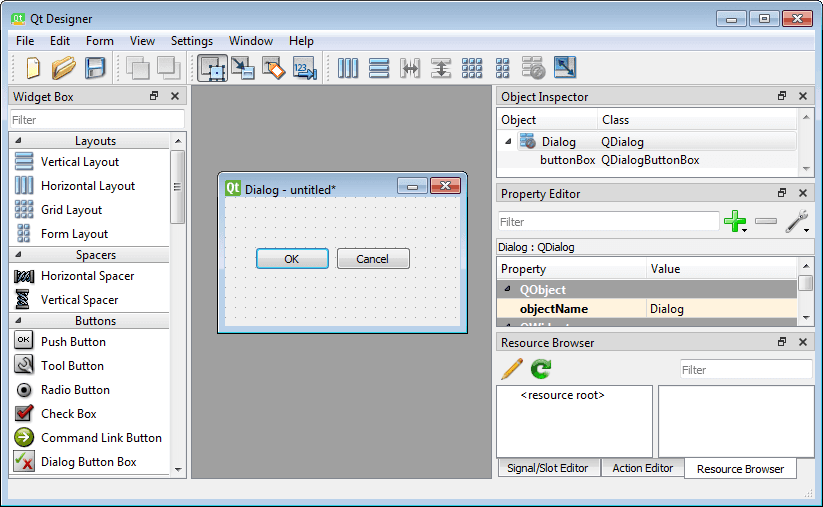
Example of the QtDesigner interface
Example of the QtDesigner interface
Using QtDesigner’s drag-and-drop functionalities, I was able to prototype the GUI by adjusting the properties of the QtDesigner widgets to match the desired functionality. I also played around with CSS to match my desired style and abide by the company’s pre-existing design system.
Using QtDesigner’s drag-and-drop functionalities, I was able to prototype the GUI by adjusting the properties of the QtDesigner widgets to match the desired functionality. I also played around with CSS to match my desired style and abide by the company’s pre-existing design system.
product development
product development
breathing life into the designs
breathing life into the designs
The last half of the project was dedicated to coding the designs to life using PyQt.
The last half of the project was dedicated to coding the designs to life using PyQt.
The last half of the project was dedicated to coding the designs to life using PyQt.
Another amazing feature of QtDesigner is that it can automatically populate my .ui file into a Python file (UTF-16LA). By changing the encoding to UTF-8 to match my environment, I had most of the base code of the frontend ready for me!
Another amazing feature of QtDesigner is that it can automatically populate my .ui file into a Python file (UTF-16LA). By changing the encoding to UTF-8 to match my environment, I had most of the base code of the frontend ready for me!
Another amazing feature of QtDesigner is that it can automatically populate my .ui file into a Python file (UTF-16LA). By changing the encoding to UTF-8 to match my environment, I had most of the base code of the frontend ready for me!
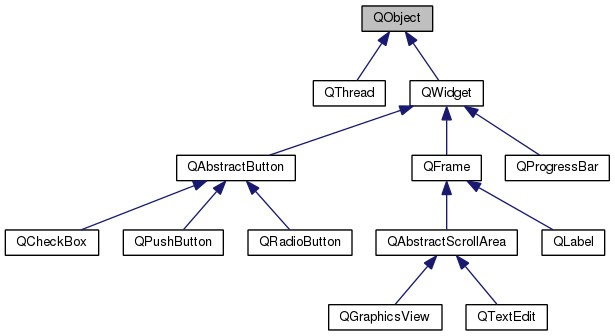
This is just a sample hierarchy!
This is just a sample hierarchy!
With the base code, I was able to directly adjust each element of my design that I had already prototyped. Thus, I was able to attach actions for each button, each widget, each entry field and adjust each functionality to better suit the user.
With the base code, I was able to directly adjust each element of my design that I had already prototyped. Thus, I was able to attach actions for each button, each widget, each entry field and adjust each functionality to better suit the user.
With the base code, I was able to directly adjust each element of my design that I had already prototyped. Thus, I was able to attach actions for each button, each widget, each entry field and adjust each functionality to better suit the user.
Connecting the Frontend to the Backend
Connecting the Frontend to the Backend
Before I was able to connect the frontend code to the backend simulation code, I decided to tidy up the simulation code. When I was first reading through it, I got SO lost, so I decided to write up documentation for the code, working with the original engineers to make sure that I had fully understood.
Before I was able to connect the frontend code to the backend simulation code, I decided to tidy up the simulation code. When I was first reading through it, I got SO lost, so I decided to write up documentation for the code, working with the original engineers to make sure that I had fully understood.
Before I was able to connect the frontend code to the backend simulation code, I decided to tidy up the simulation code. When I was first reading through it, I got SO lost, so I decided to write up documentation for the code, working with the original engineers to make sure that I had fully understood.
In creating a fully functional GUI, there were THREE crucial steps:
In creating a fully functional GUI, there were THREE crucial steps:
In creating a fully functional GUI, there were THREE crucial steps:
The Crucial Importance of Determining Inputs
The Crucial Importance of Determining Inputs
The Crucial Importance of Determining Inputs
Analyzing the simulation code in the backend proved to be crucial when connecting the frontend and backend. I had to access the user inputs from the frontend as parameters for each simulation.
Analyzing the simulation code in the backend proved to be crucial when connecting the frontend and backend. I had to access the user inputs from the frontend as parameters for each simulation.
Analyzing the simulation code in the backend proved to be crucial when connecting the frontend and backend. I had to access the user inputs from the frontend as parameters for each simulation.
Moving Data into a SQL Database
Moving Data into a SQL Database
The historical data used in the simulation was previously stored as local files. To make the data more accessible and consistent, I transitioned the data into a SQL database. This ensures data integrity, efficient querying, and scalability, making it easier to manage large datasets accurately.
The historical data used in the simulation was previously stored as local files. To make the data more accessible and consistent, I transitioned the data into a SQL database. This ensures data integrity, efficient querying, and scalability, making it easier to manage large datasets accurately.
The historical data used in the simulation was previously stored as local files. To make the data more accessible and consistent, I transitioned the data into a SQL database. This ensures data integrity, efficient querying, and scalability, making it easier to manage large datasets accurately.
Displaying the Outputs to the User
Displaying the Outputs to the User
I had to retrieve the outputs from the simulation and display them back for the user to view within the GUI— where the connection between the frontend and the backend finally loop around.
I had to retrieve the outputs from the simulation and display them back for the user to view within the GUI— where the connection between the frontend and the backend finally loop around.
I had to retrieve the outputs from the simulation and display them back for the user to view within the GUI— where the connection between the frontend and the backend finally loop around.
To address the user problem in accessing the results in easy formats, I created options for the user to download their results as either a html file OR a pdf file.
To address the user problem in accessing the results in easy formats, I created options for the user to download their results as either a html file OR a pdf file.
stakeholder presentation
stakeholder presentation
“I’m just an intern!!”
“I’m just an intern!!”
15 minutes to prove my worth. So much pressure. But in preparation for my presentation, I was able to see how my final product was able to accomplish my goal to allow FSMs to run their own simulations at the CLICK of a button.
15 minutes to prove my worth. So much pressure. But in preparation for my presentation, I was able to see how my final product was able to accomplish my goal to allow FSMs to run their own simulations at the CLICK of a button.
15 minutes to prove my worth. So much pressure. But in preparation for my presentation, I was able to see how my final product was able to accomplish my goal to allow FSMs to run their own simulations at the CLICK of a button.
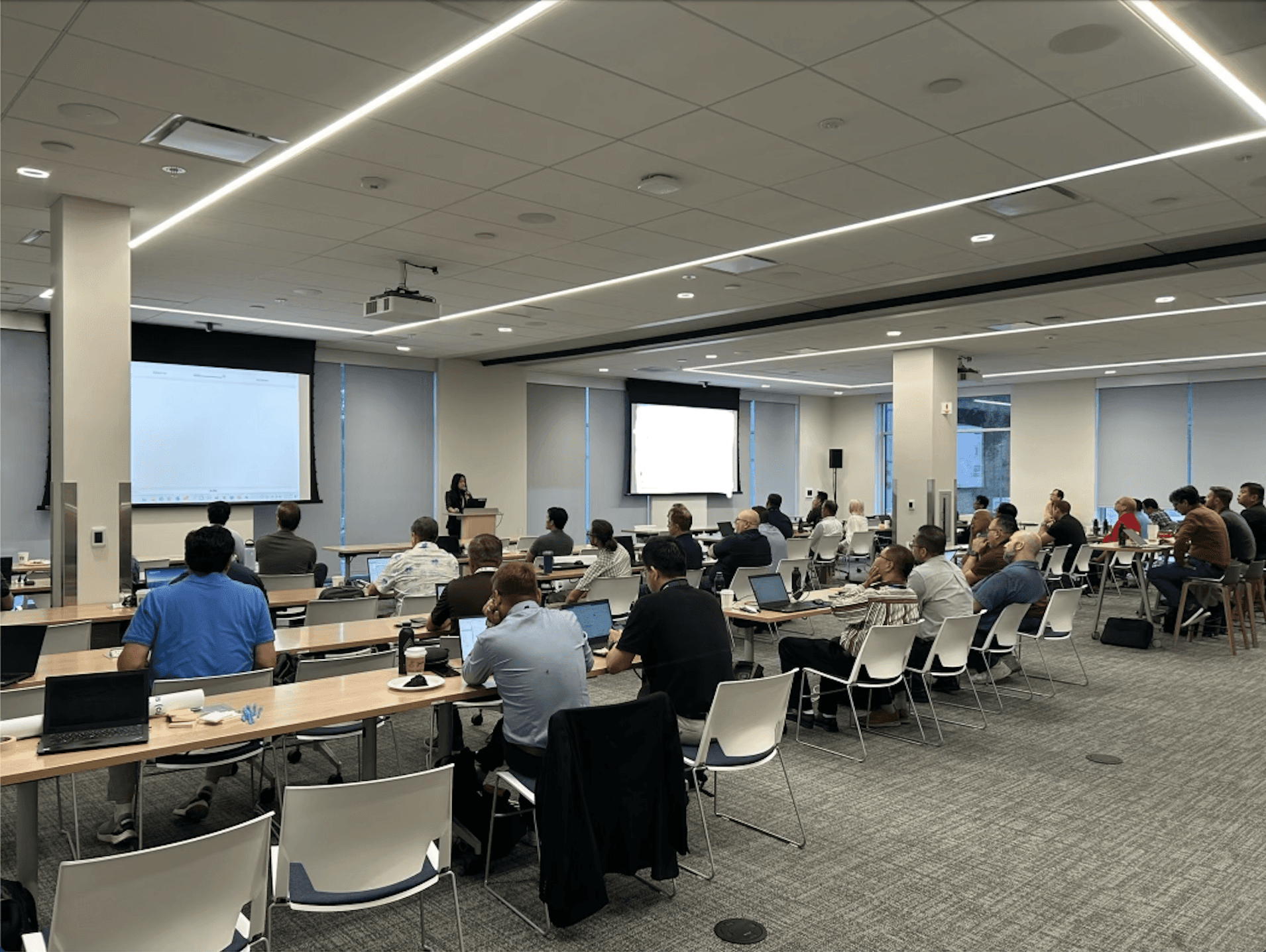
Presenting to 50+ stakeholders globally
Presenting to 50+ stakeholders globally
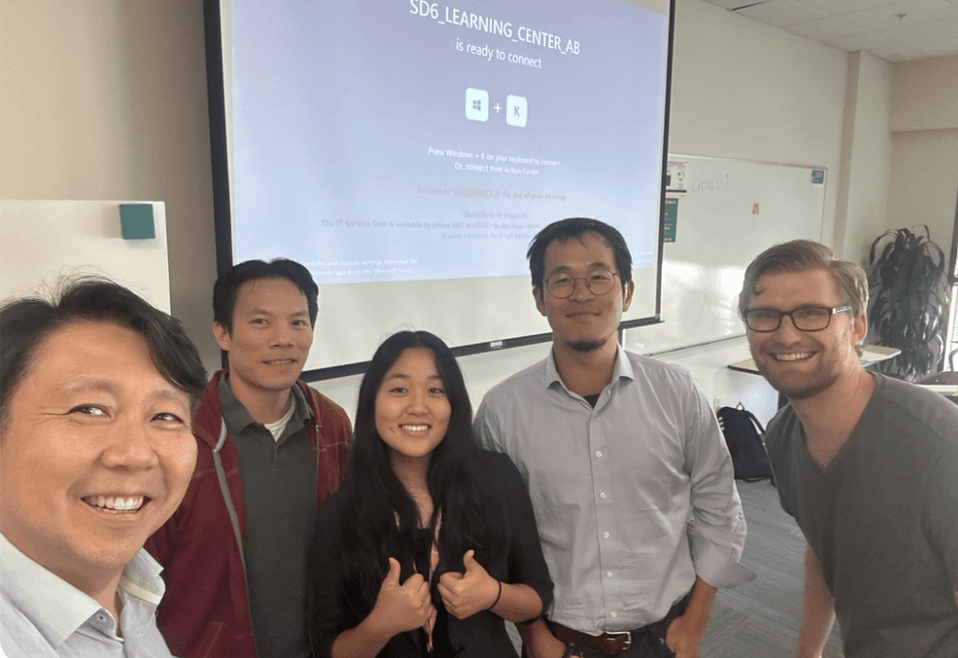
The sigh of relief after I finished!
The sigh of relief after I finished!
the impact
the impact
results were good, but it can get better!
results were good, but it can get better!
The impact of the Staffing Model GUI can be spoken for itself by its impact.
The impact of the Staffing Model GUI can be spoken for itself by its impact.
The impact of the Staffing Model GUI can be spoken for itself by its impact.
The impact of the Staffing Model GUI can be spoken for itself by its impact.
Global accessibility to the staffing simulation increased by:
Global accessibility to the staffing simulation increased by:
Global accessibility to the staffing simulation increased by:
1,500%
Total Staffing Simulation Runtime decreased by:
Total Staffing Simulation Runtime decreased by:
50%
Number of Simulation Runs Increased by:
Number of Simulation Runs Increased by:
27%
As amazing as the results were, my 12-week result was only Phase 1, and there are many more improvements that can be made.
As amazing as the results were, my 12-week result was only Phase 1, and there are many more improvements that can be made.
As amazing as the results were, my 12-week result was only Phase 1, and there are many more improvements that can be made.
As amazing as the results were, my 12-week result was only Phase 1, and there are many more improvements that can be made.
More Flexibility:
Phase 1 allowed for up to 4 different factory locations. Increasing the limit of use cases can allow users to run more simulations!
More Flexibility:
Phase 1 allowed for up to 4 different factory locations. Increasing the limit of use cases can allow users to run more simulations!
Responsiveness:
Because all FSMs usually work through a company laptop (1440x1024), the interface was designed to fit a laptop screen. However, adding responsiveness to the tool would allow for the GUI to be run on any device!
Responsiveness:
Because all FSMs usually work through a company laptop (1440x1024), the interface was designed to fit a laptop screen. However, adding responsiveness to the tool would allow for the GUI to be run on any device!
Responsiveness:
Because all FSMs usually work through a company laptop (1440x1024), the interface was designed to fit a laptop screen. However, adding responsiveness to the tool would allow for the GUI to be run on any device!
Further Advanced Features
There are many advanced features that can be added to elevate the GUI even more. For example, Phase 1 shows the outputs from the most recent simulation run. However, further phases of the GUI could pull previous run saves into the GUI to compare.
Further Advanced Features
There are many advanced features that can be added to elevate the GUI even more. For example, Phase 1 shows the outputs from the most recent simulation run. However, further phases of the GUI could pull previous run saves into the GUI to compare.
Sara Chong - UI/UX Designer & Developer
Ready to design the future 🚀 with you, one click at a time!
Sara Chong © 2025. Designed on Framer
Goran Babarogic
Ready to design the future 🚀 with you, one click at a time!
Sara Chong © 2025. Designed on Framer
Sara Chong - UI/UX Designer & Developer
Ready to design the future 🚀 with you, one click at a time!
Sara Chong © 2025. Designed on Framer