Nonprofit

Centro Community — Web and Mobile Design & Development

Centro Community — Web and Mobile Design & Development

Centro Community — Web and Mobile Design & Development

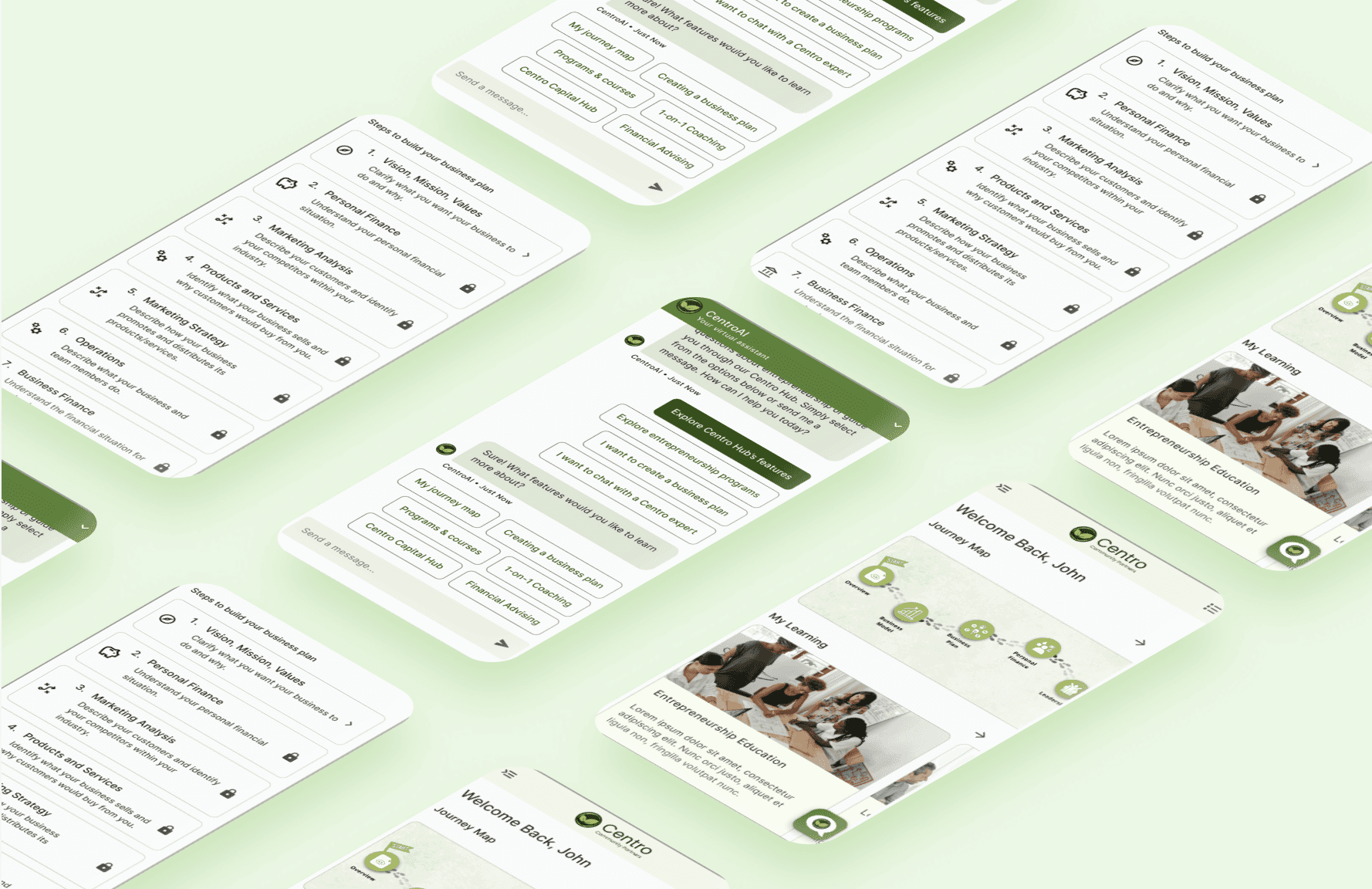
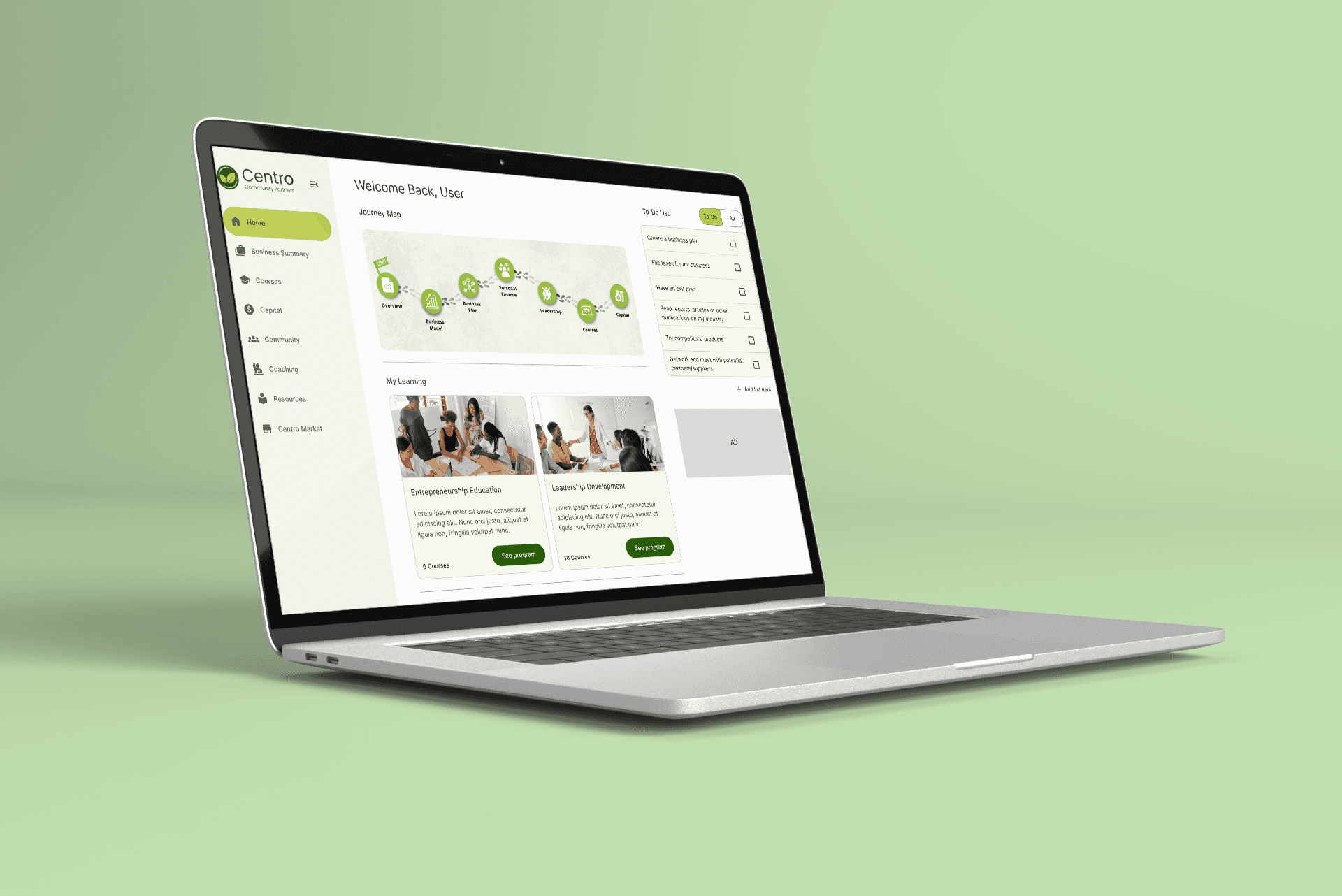
With a user-centered approach, the goal was to create an intuitive interface for small business planning and effortless financial management while incorporating gamification and an AI Chatbot.
Industry

Non-Profit


Headquarters

Oakland, CA

Oakland, CA

Founded

2011

Company Size

30

Project Objective

Project Objective

This project aimed to revamp the existing mobile app that Centro Community Partners uses to educate their clients. My team and I redesigned all the pages and built a web app for a cleaner, smoother user experience. We also integrated new pages and features, such as an AI chatbot assistant.

This project aimed to revamp the existing mobile app that Centro Community Partners uses to educate their clients. My team and I redesigned all the pages and built a web app for a cleaner, smoother user experience. We also integrated new pages and features, such as an AI chatbot assistant.

Results

We helped Centro Community Partners revamp their existing client digital platform by designing and developing a minimum viable product for a user-centric, fully functional, and responsive web application.

We helped Centro Community Partners revamp their existing client digital platform by designing and developing a minimum viable product for a user-centric, fully functional, and responsive web application.

About the Nonprofit

Centro Community Partners’ mission is to build thriving communities by providing underserved, low-income entrepreneurs with entrepreneurship education, one-on-one business coaching, mentorship, and access to capital.

Centro Community Partners’ mission is to build thriving communities by providing underserved, low-income entrepreneurs with entrepreneurship education, one-on-one business coaching, mentorship, and access to capital.

Target Audience

Underserved entrepreneurs, Small Business Owners

My Role

User Research

User Research

Visual Design

Visual Design

Wireframing

Wireframing

Frontend Development

Frontend Development

Backend Architecture

Backend Architecture

Documentation

Documentation

Agile Methodology

We utilized Agile Methodology as our project management style. We conducted weekly meetings with the client, where after receiving feedback, we would realign our priorities to make sure that we had a plan and goals for the week. Then we would begin our new sprint where we often often started with the planning stage. We did design sprints for 6 weeks, and development sprints for 6 weeks.

We utilized Agile Methodology as our project management style. We conducted weekly meetings with the client, where after receiving feedback, we would realign our priorities to make sure that we had a plan and goals for the week. Then we would begin our new sprint where we often often started with the planning stage. We did design sprints for 6 weeks, and development sprints for 6 weeks.

We utilized Agile Methodology as our project management style. We conducted weekly meetings with the client, where after receiving feedback, we would realign our priorities to make sure that we had a plan and goals for the week. Then we would begin our new sprint where we often often started with the planning stage. We did design sprints for 6 weeks, and development sprints for 6 weeks.

Weekly Sprint Planning

Receive Feedback

Present to Client

Design & Build

Weekly Sprint Planning

Design and Build

Present to Client

Receive Feedback

Process

Process

01

Research & Analysis

My team and I connected with the client to identify and understand the project goals and the target demographic. We analyzed the existing app and found pain points. Since the main goal was to redesign the existing app, we opted for comparative research on other websites.

02

Ideation

We conducted user interviews, surveys, and analyzed in-app analytics to understand the pain points and user needs. We also studied competitor apps and industry trends to gather insights

03

Wireframing & Prototyping

We conducted user interviews, surveys, and analyzed in-app analytics to understand the pain points and user needs. We also studied competitor apps and industry trends to gather insights

04

Documentation & Environment Setup

We conducted user interviews, surveys, and analyzed in-app analytics to understand the pain points and user needs. We also studied competitor apps and industry trends to gather insights

05

Frontend & Backend Development

We conducted user interviews, surveys, and analyzed in-app analytics to understand the pain points and user needs. We also studied competitor apps and industry trends to gather insights

06

Visual Design

We conducted user interviews, surveys, and analyzed in-app analytics to understand the pain points and user needs. We also studied competitor apps and industry trends to gather insights

01

Research & Analysis

My team and I connected with the client to identify and understand the project goals and the target demographic. We analyzed the existing app and found pain points. Since the main goal was to redesign the existing app, we opted for comparative research on other websites.

02

Ideation

We conducted user interviews, surveys, and analyzed in-app analytics to understand the pain points and user needs. We also studied competitor apps and industry trends to gather insights

03

Wireframing & Prototyping

We conducted user interviews, surveys, and analyzed in-app analytics to understand the pain points and user needs. We also studied competitor apps and industry trends to gather insights

04

Documentation & Environment Setup

We conducted user interviews, surveys, and analyzed in-app analytics to understand the pain points and user needs. We also studied competitor apps and industry trends to gather insights

05

Frontend & Backend Development

We conducted user interviews, surveys, and analyzed in-app analytics to understand the pain points and user needs. We also studied competitor apps and industry trends to gather insights

06

Visual Design

We conducted user interviews, surveys, and analyzed in-app analytics to understand the pain points and user needs. We also studied competitor apps and industry trends to gather insights

01 Research & Analysis

01 Research & Analysis

Connecting with the Client

Centro intended to target users of all ages, demographics and knowledge levels that wanted to start their own business.

Centro intended to target users of all ages, demographics and knowledge levels that wanted to start their own business.

After discussing with the client, we were tasked with 3 main tasks:

Recreate existing Business Planning Tool from the existing Centro design with a new visual aesthetic that is well structured, persuasive and easy to navigate so that users perception of the brand remains positive and so they want to continue using Centro’s services.

After discussing with the client, we were tasked with 3 main tasks:

After discussing with the client, we were tasked with 3 main tasks:

Recreate existing Business Planning Tool from the existing Centro design with a new visual aesthetic that is well structured, persuasive and easy to navigate so that users perception of the brand remains positive and so they want to continue using Centro’s services.

Ideate new layout that implements new features in an engaging design that is cohesive with existing Business Planning Tool so that current users are able to easily adapt to utilizing the new version of the app.

Create research-backed designs for the new AI Chatbot with the help of suggestions and feedback to refine, connect, and blend with existing designs.

After our initial consultation with Centro Community Partners we found that these main points drove our research:

After our initial consultation with Centro Community Partners we found that these main points drove our research:

💡 How might we…

  • Help new entrepreneurs who have never started a business before?

  • Better provide assistance to users?

  • Show users how far along in planning their business they are?

Common Pain Points

Common Pain Points

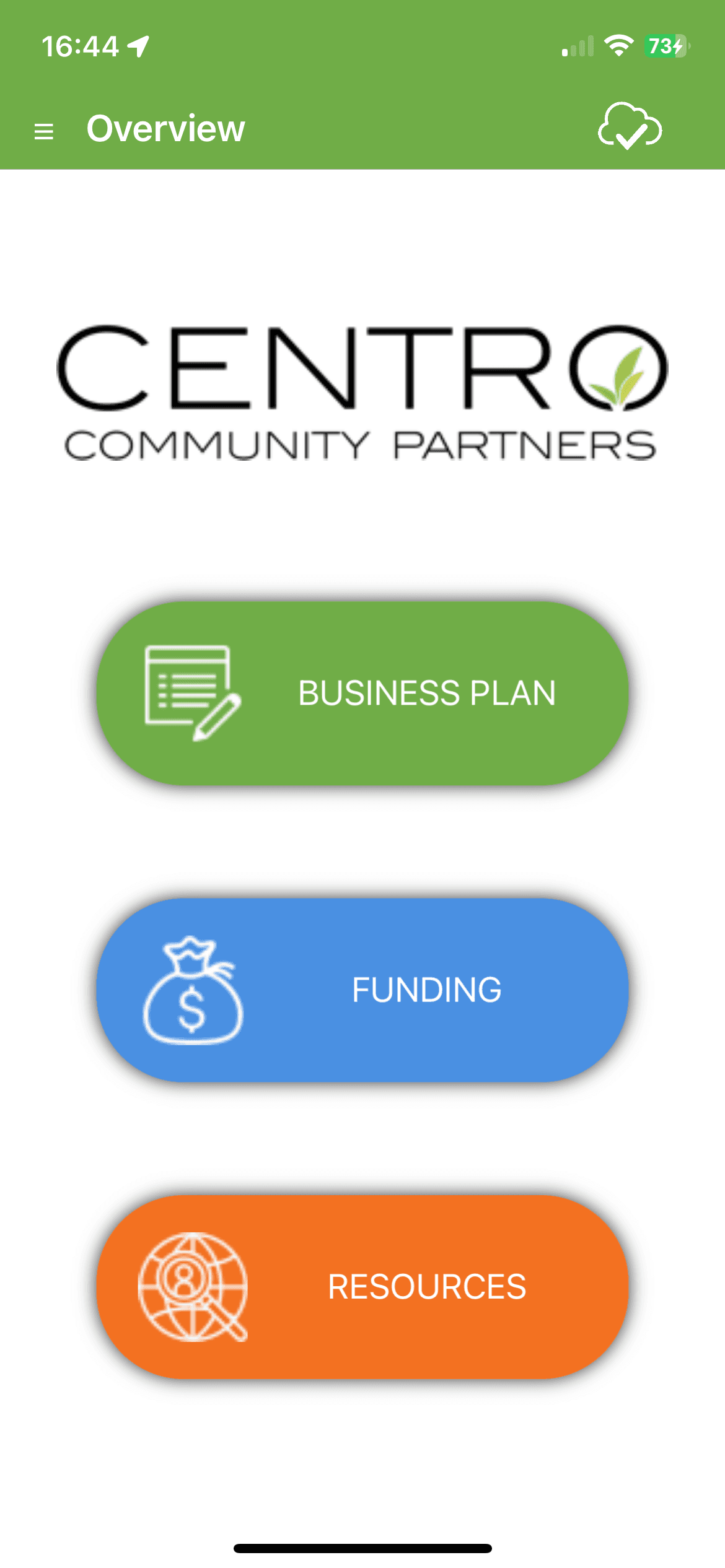
We conducted user testing on the current Centro app and identified common pain points throughout the flow.

We conducted user testing on the current Centro app and identified common pain points throughout the flow.

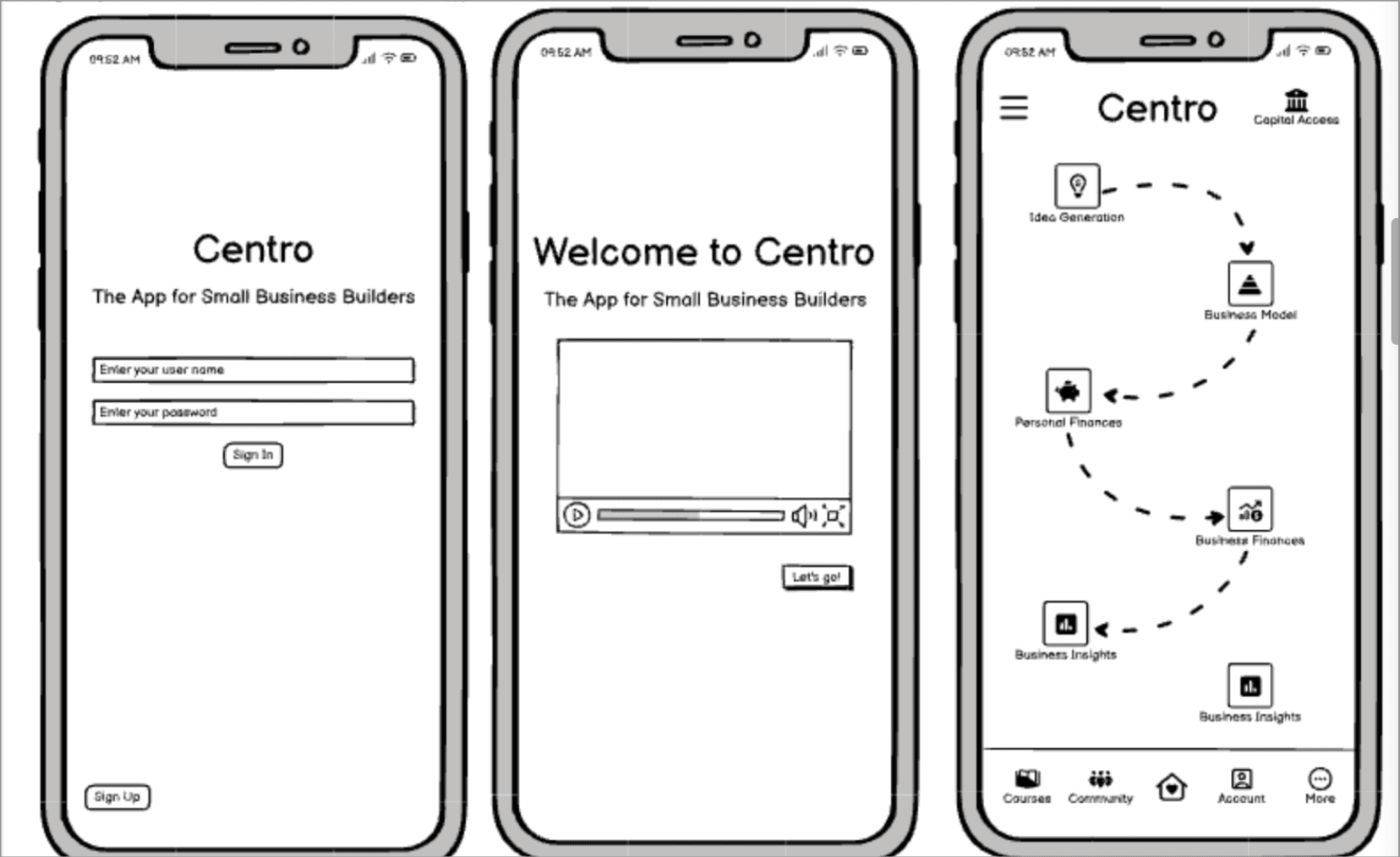
Pop-up message: After signing into the app, a pop-up message (video explaining how to use the app’s main features) will appear and we would have to exit the message every time it pops up.

Flow of the business planning tool: We found that having to go through the carousel for each step within the business planning tool was tedious and wanted to easily view all activities.


Comparative Analysis

Comparative Analysis

Since our main focus was to redesign the existing Centro app, we conducted comparative research on other websites within the market for the parts we would be adding in. We noted the usability, visual design, and functionality of similar features from competitors that we wanted to model parts of our site after to create a seamless experience for the users.

Since our main focus was to redesign the existing Centro app, we conducted comparative research on other websites within the market for the parts we would be adding in. We noted the usability, visual design, and functionality of similar features from competitors that we wanted to model parts of our site after to create a seamless experience for the users.

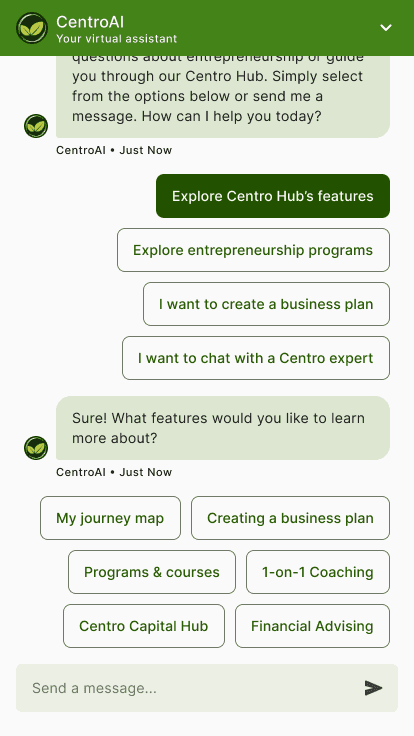
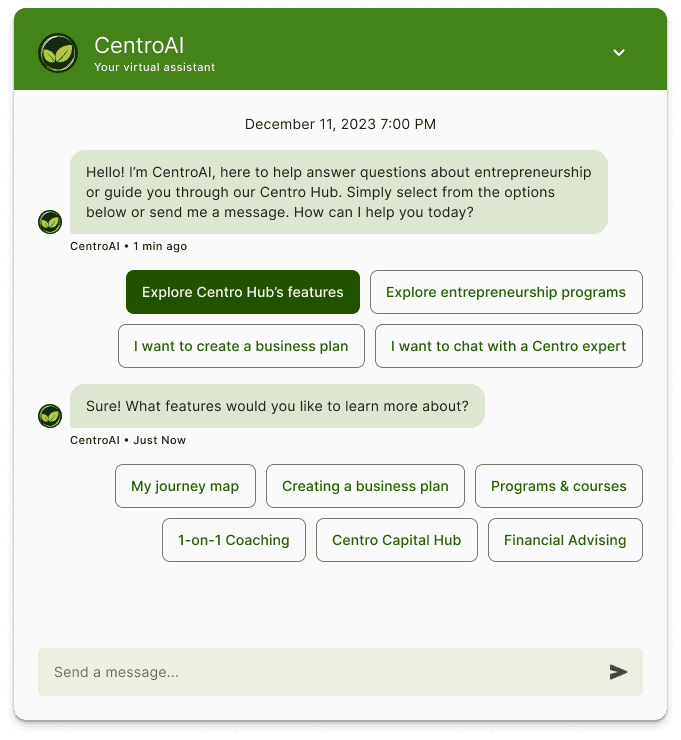
Chatbot feature: S&P Global’s chatbot provides predefined questions/responses to help guide the user and allows them to type their own questions/responses.

Alignment with Centro’s features: We integrated a similar concept by offering predefined questions/responses to guide users. This approach facilitates user engagement and ensures a seamless process for entrepreneurs seeking additional information and assistance.

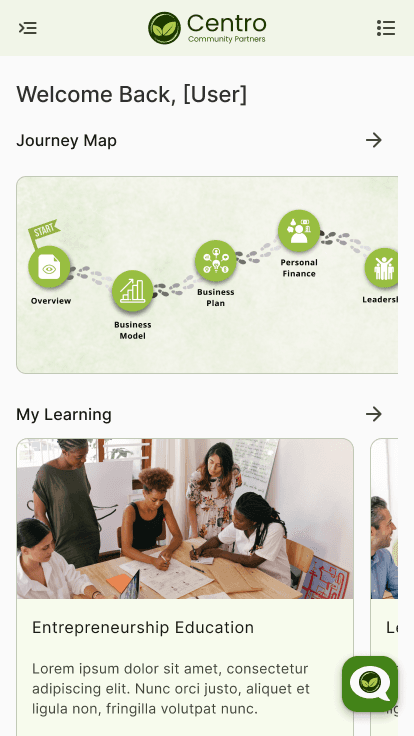
Navigation bar and journey map: Duolingo’s map visually displays the user’s journey progress.

Alignment with Centro’s features: We incorporated a similar concept to visually represent progress within the entrepreneurship education journey.

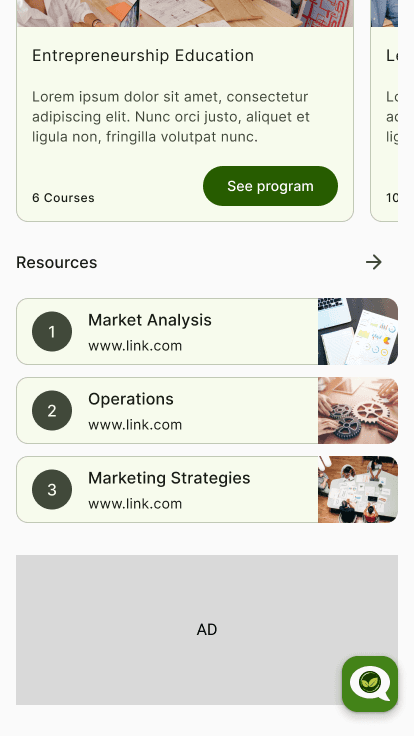
Courses feature: Canvas showcases courses with the course name along with an image that visually communicates the main purpose of the courses.

Alignment with Centro’s features: We found inspiration in the Canvas’ course presentation for clarity and engagement, and modified the concept by displaying the number of courses and adding a button for users to view the program.

Chatbot feature: S&P Global’s chatbot provides predefined questions/responses to help guide the user and allows them to type their own questions/responses.

Navigation bar and journey map: Duolingo’s map visually displays the user’s journey progress.

Courses feature: Canvas showcases courses with the course name along with an image that visually communicates the main purpose of the courses.

Alignment with Centro’s features: We integrated a similar concept by offering predefined questions/responses to guide users. This approach facilitates user engagement and ensures a seamless process for entrepreneurs seeking additional information and assistance.

Alignment with Centro’s features: We incorporated a similar concept to visually represent progress within the entrepreneurship education journey.

Alignment with Centro’s features: We found inspiration in the Canvas’ course presentation for clarity and engagement, and modified the concept by displaying the number of courses and adding a button for users to view the program.

02 Ideation

02 Ideation

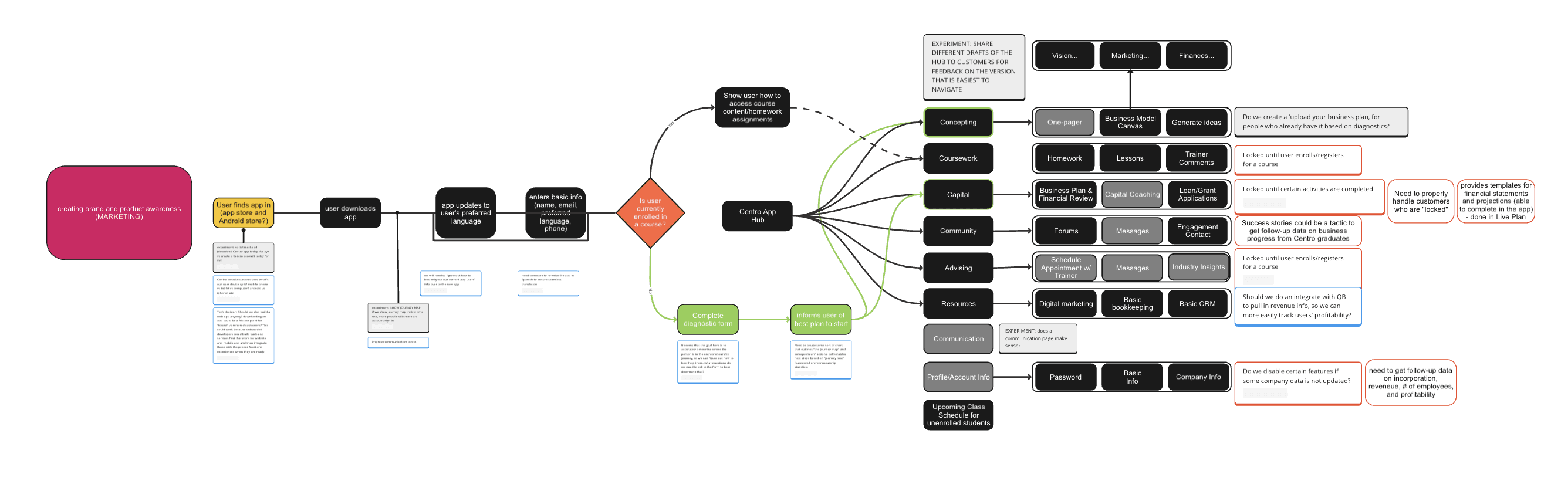
Centro provided us with a sitemap and user flows for the app’s structure. Once the team decided on prioritized features, we restructured the sitemap and user flows to reflect the changes.

Centro provided us with a sitemap and user flows for the app’s structure. Once the team decided on prioritized features, we restructured the sitemap and user flows to reflect the changes.

App Logic

App Logic

We kept the app logic the same, as our goal was to redesign the interface of the app, not change the app infrastructure

We kept the app logic the same, as our goal was to redesign the interface of the app, not change the app infrastructure

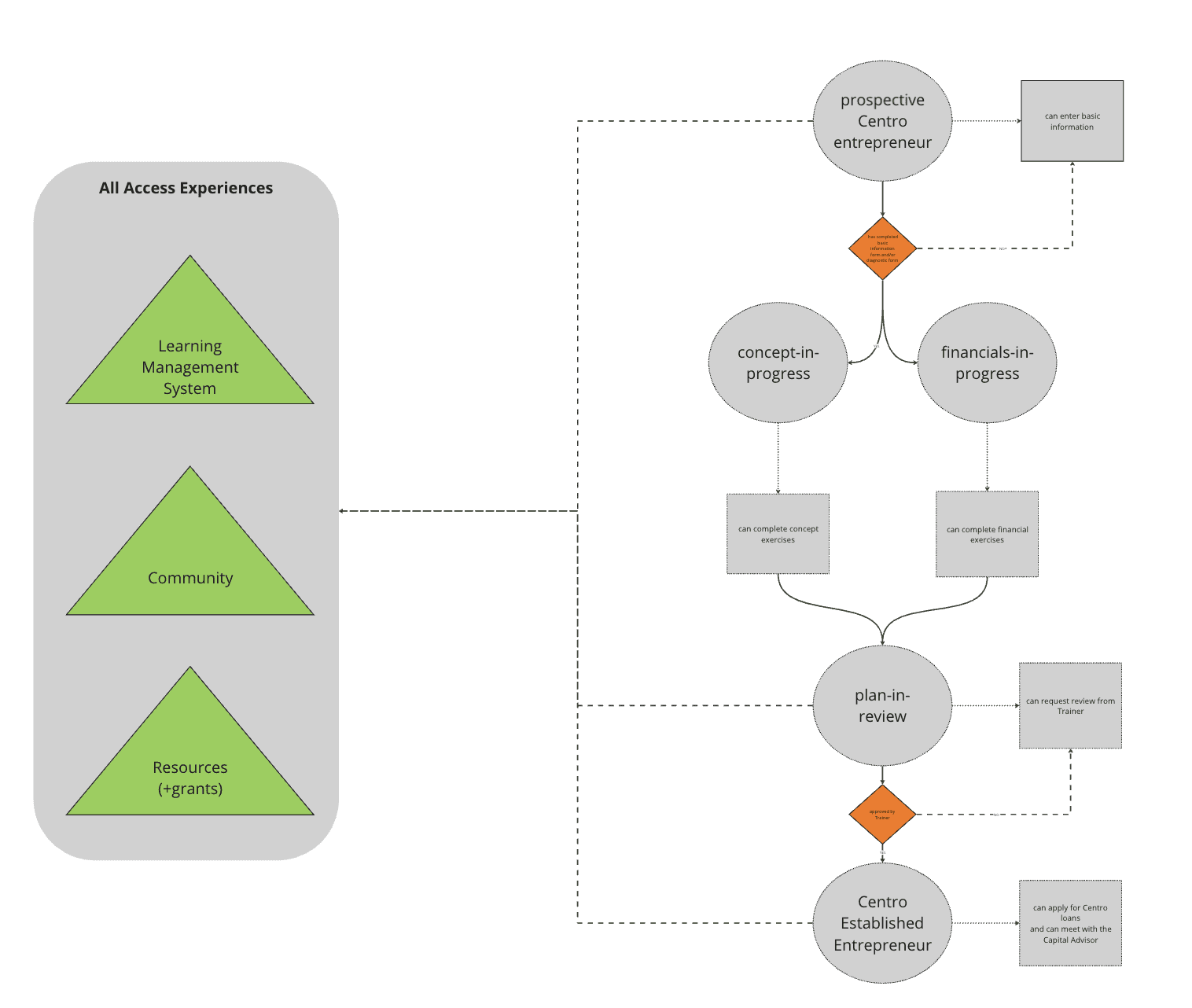
User Flow

User Flow

We refined the user flow by testing various page options, addressing potential obstacles, and adjusting steps based on user needs, adding or removing actions accordingly.

We refined the user flow by testing various page options, addressing potential obstacles, and adjusting steps based on user needs, adding or removing actions accordingly.

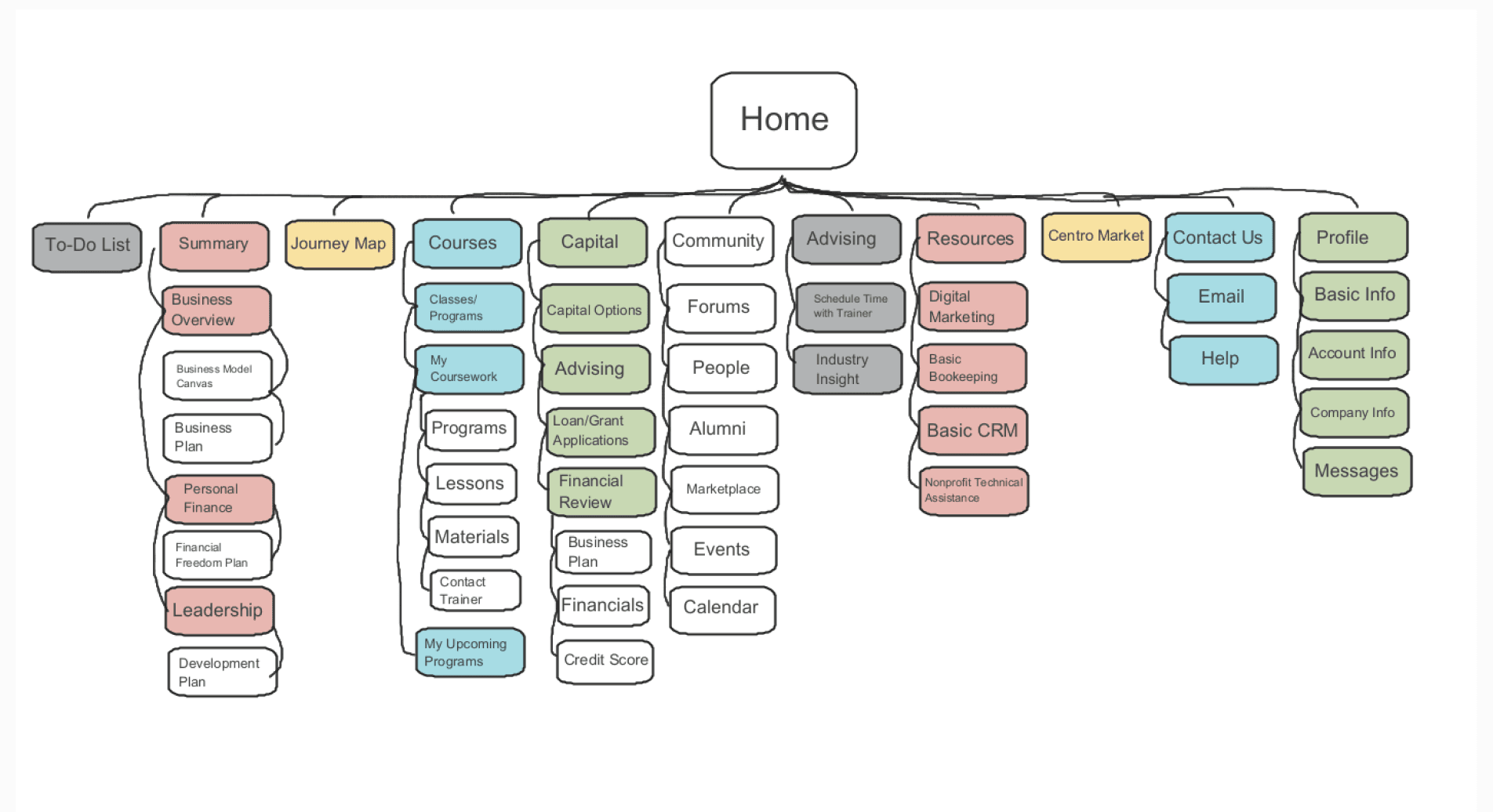
Site Map

Site Map

We revamped the site map by adding new subpages, restructuring the order of existing ones for better navigation, and incorporating an entirely new page to enhance the overall user experience.

We revamped the site map by adding new subpages, restructuring the order of existing ones for better navigation, and incorporating an entirely new page to enhance the overall user experience.

After editing user flows and restructuring the site map, we decided that we would prioritize these following features:

  • Business Planning Tool

  • Ai Chatbot

  • Journey Map

  • To-Do List

  • Capital Hub

  • User Profiles

  • Programs/Courses Info
03 Sketching, Wireframing & Prototyping

03 Sketching, Wireframing & Prototyping

Sketches

Sketches

Layouts

Layouts

The original app is a native app on both iOS and Android, so the dev team decided to create the new app as a web app to save time on development as it can be accessed on any device.

The original app is a native app on both iOS and Android, so the dev team decided to create the new app as a web app to save time on development as it can be accessed on any device.

The original app is a native app on both iOS and Android, so the dev team decided to create the new app as a web app to save time on development as it can be accessed on any device.

The original app is a native app on both iOS and Android, so the dev team decided to create the new app as a web app to save time on development as it can be accessed on any device.

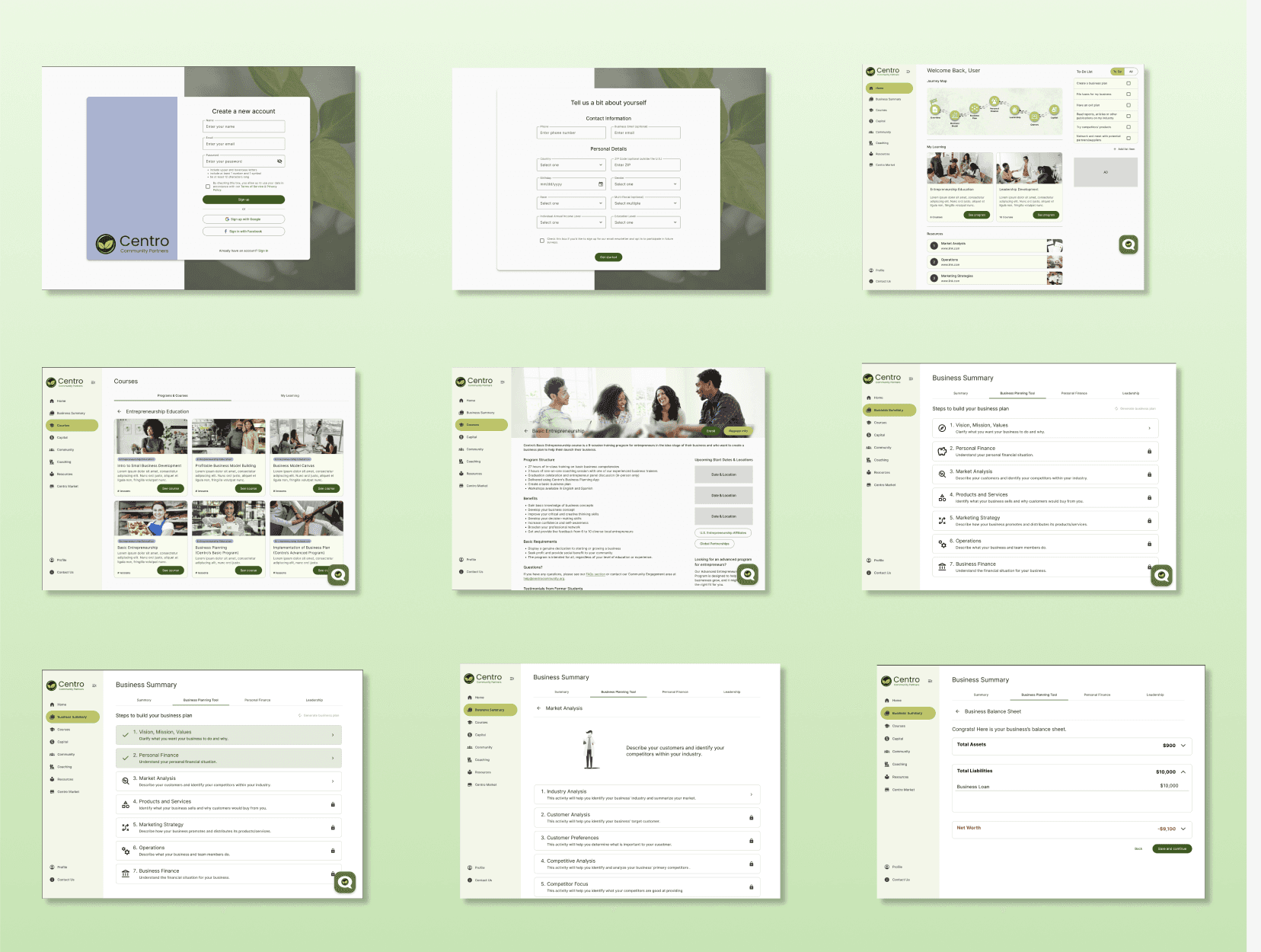
Desktop Layout

Desktop Layout

We decided to start with the desktop view because the Business Planning Tool takes some time to complete, so users would be more likely to use the app while sitting at a desk rather than on the go (which mobile would be preferred).

We decided to start with the desktop view because the Business Planning Tool takes some time to complete, so users would be more likely to use the app while sitting at a desk rather than on the go (which mobile would be preferred).

Mobile Layout

Mobile Layout

The most difficult layout was the landing page and figuring out where each component would be, keeping it as similar to desktop as possible for consistency, while making sure the layout is still intuitive and usable on mobile.

The most difficult layout was the landing page and figuring out where each component would be, keeping it as similar to desktop as possible for consistency, while making sure the layout is still intuitive and usable on mobile.

AI Chatbot

AI Chatbot

The most difficult layout was the landing page and figuring out where each component would be, keeping it as similar to desktop as possible for consistency, while making sure the layout is still intuitive and usable on mobile.

The most difficult layout was the landing page and figuring out where each component would be, keeping it as similar to desktop as possible for consistency, while making sure the layout is still intuitive and usable on mobile.

AI Chatbot

To-Do List

To-Do List

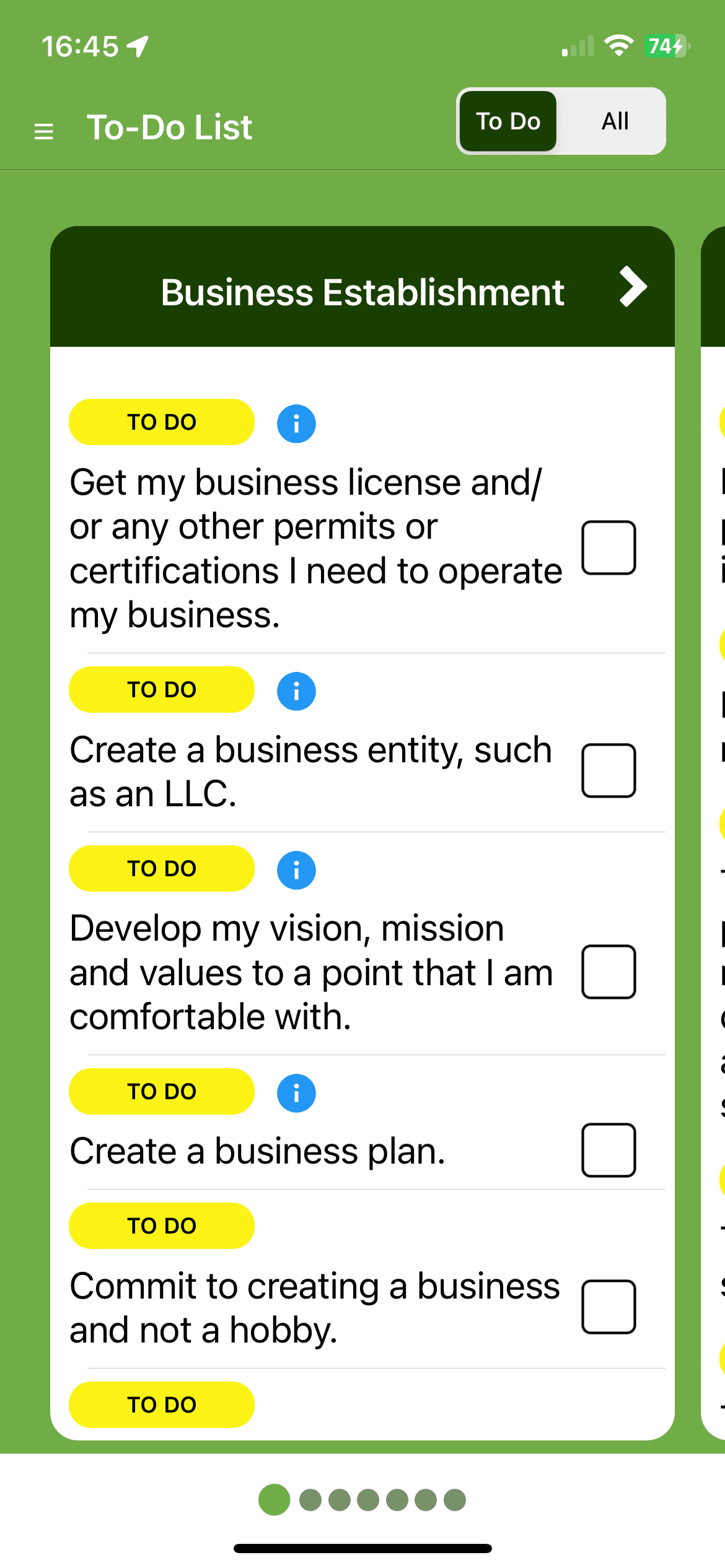
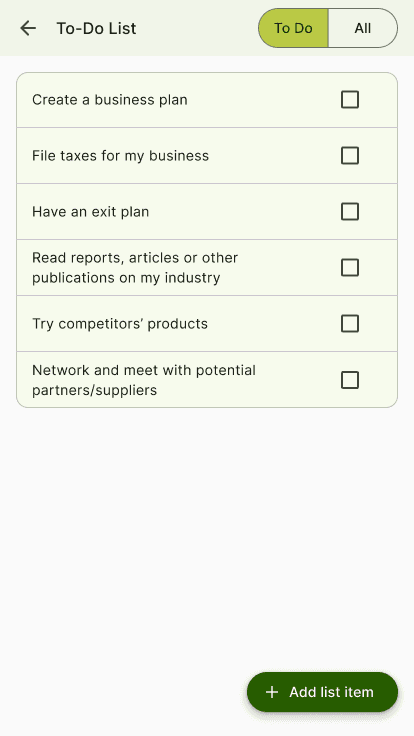
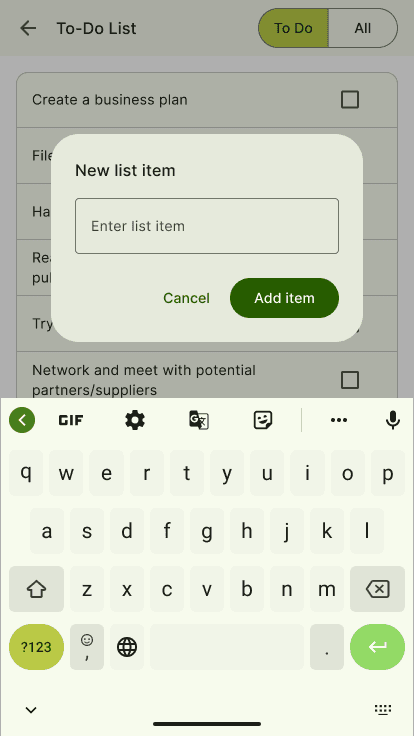
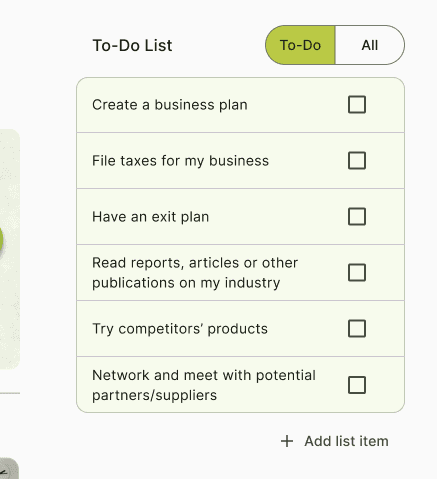
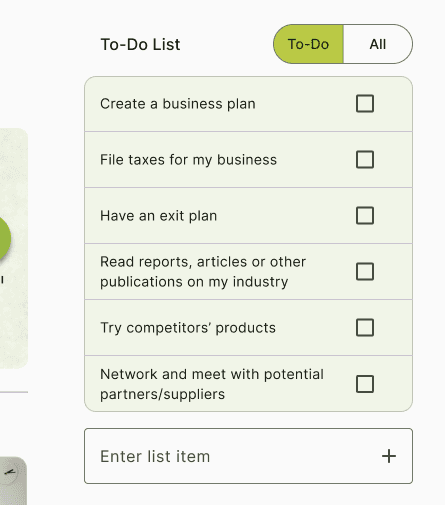
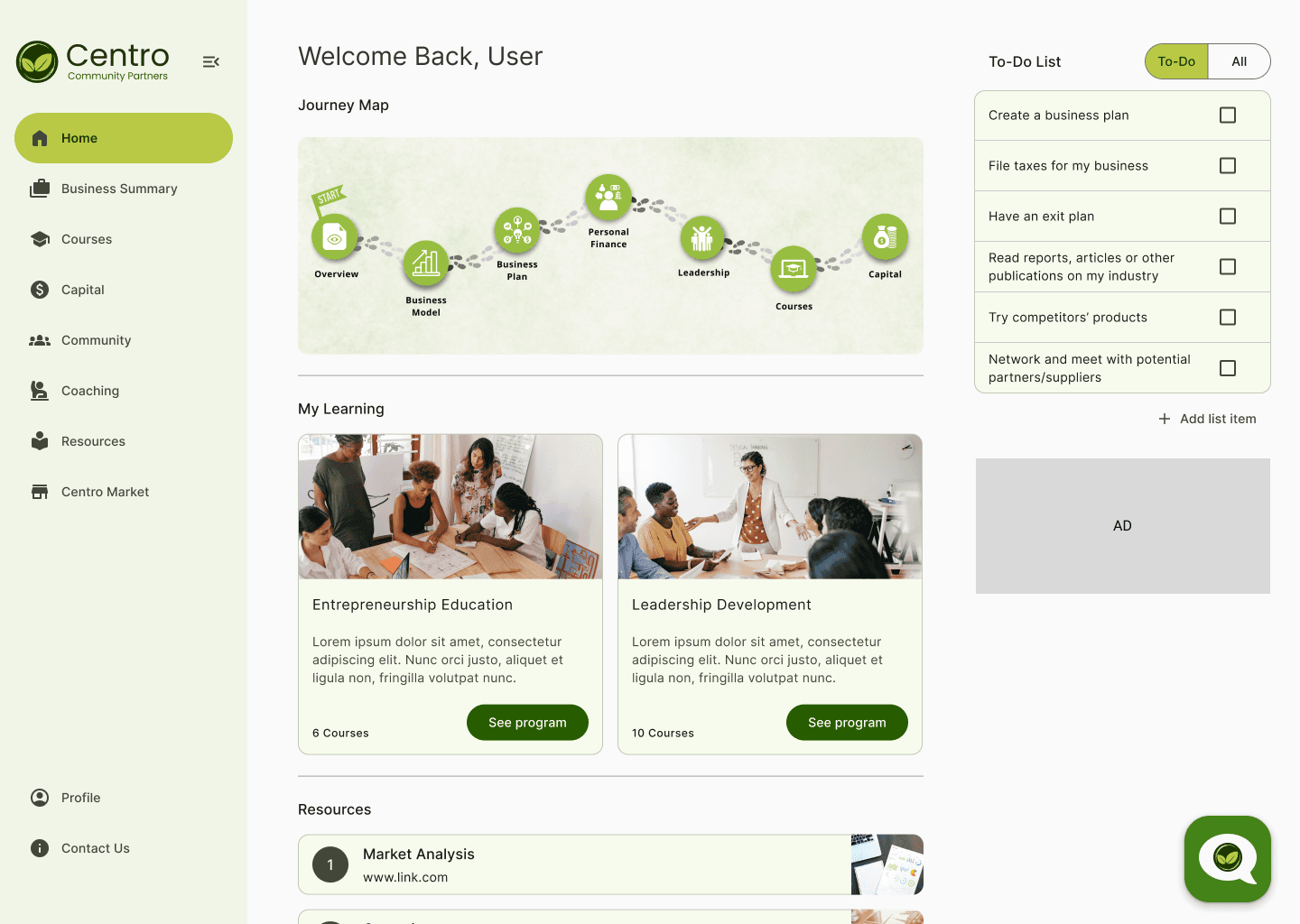
Since there are already many sections in the navigation, the to-do list exists as a widget on the Home Page in desktop view. The To-Do List, along with Journey Map and My Learning provides the user with an overview of what has been accomplished and what their next steps should be. Since the user’s account info will already be stored online, we replaced the cloud save icon with a list icon where user’s can easily access the To-Do List on a mobile device.

Since there are already many sections in the navigation, the to-do list exists as a widget on the Home Page in desktop view. The To-Do List, along with Journey Map and My Learning provides the user with an overview of what has been accomplished and what their next steps should be. Since the user’s account info will already be stored online, we replaced the cloud save icon with a list icon where user’s can easily access the To-Do List on a mobile device.

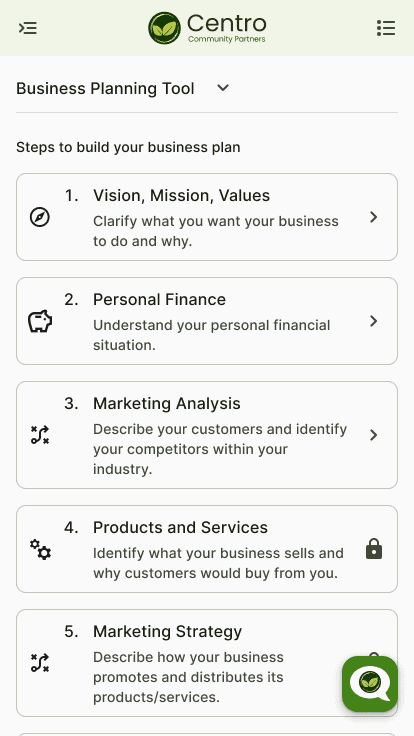
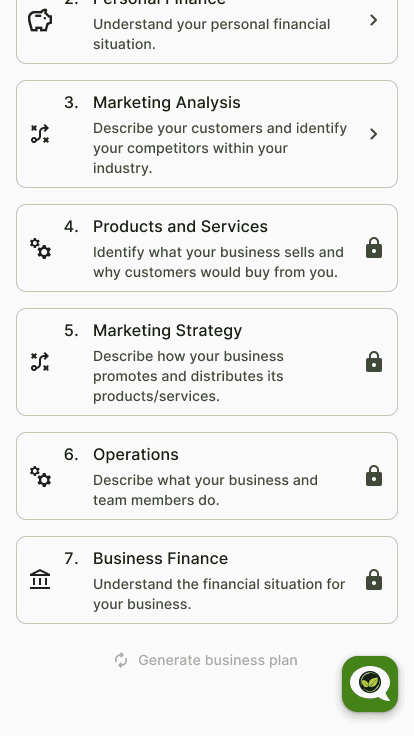
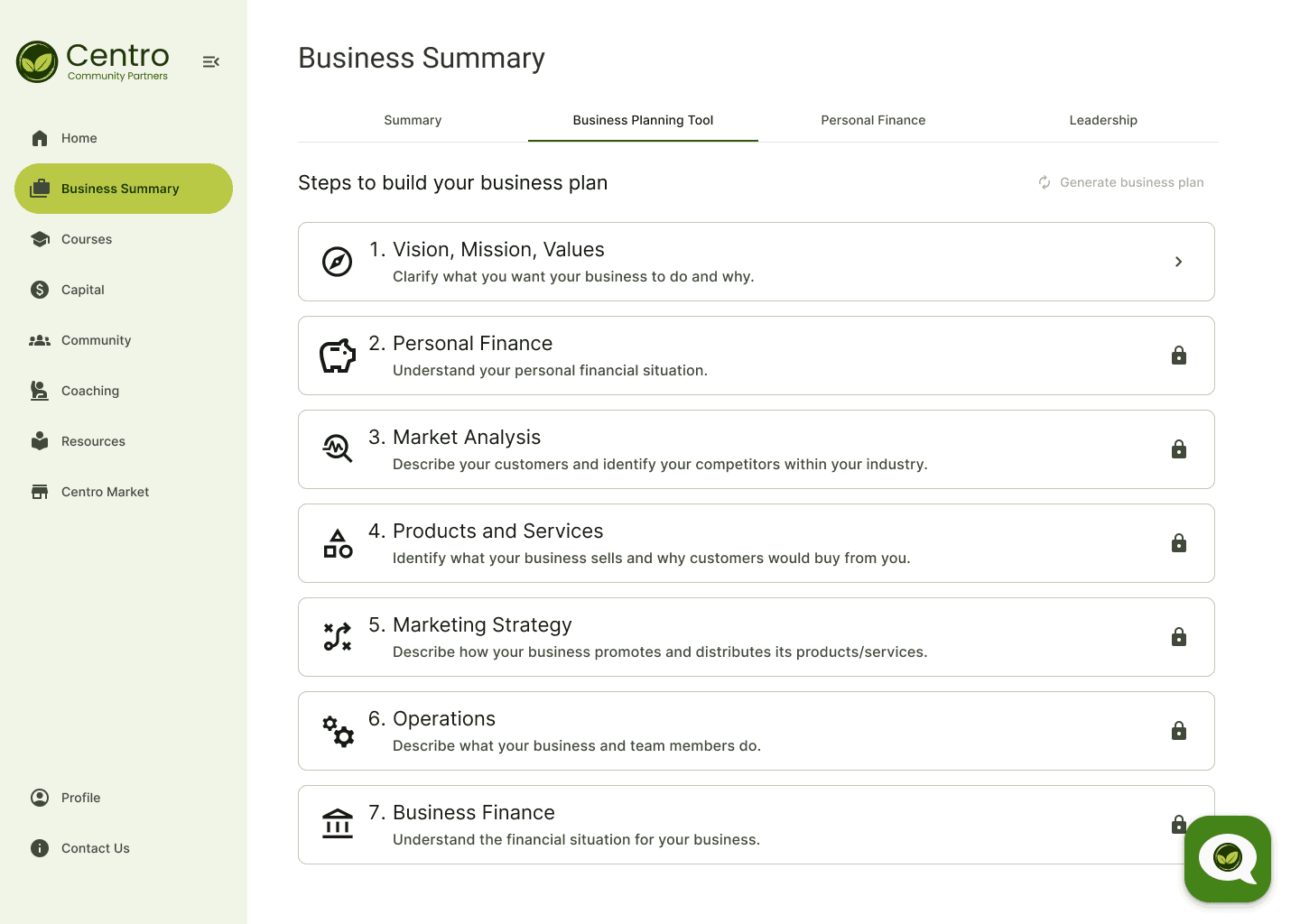
Business Planning Tool

Business Planning Tool

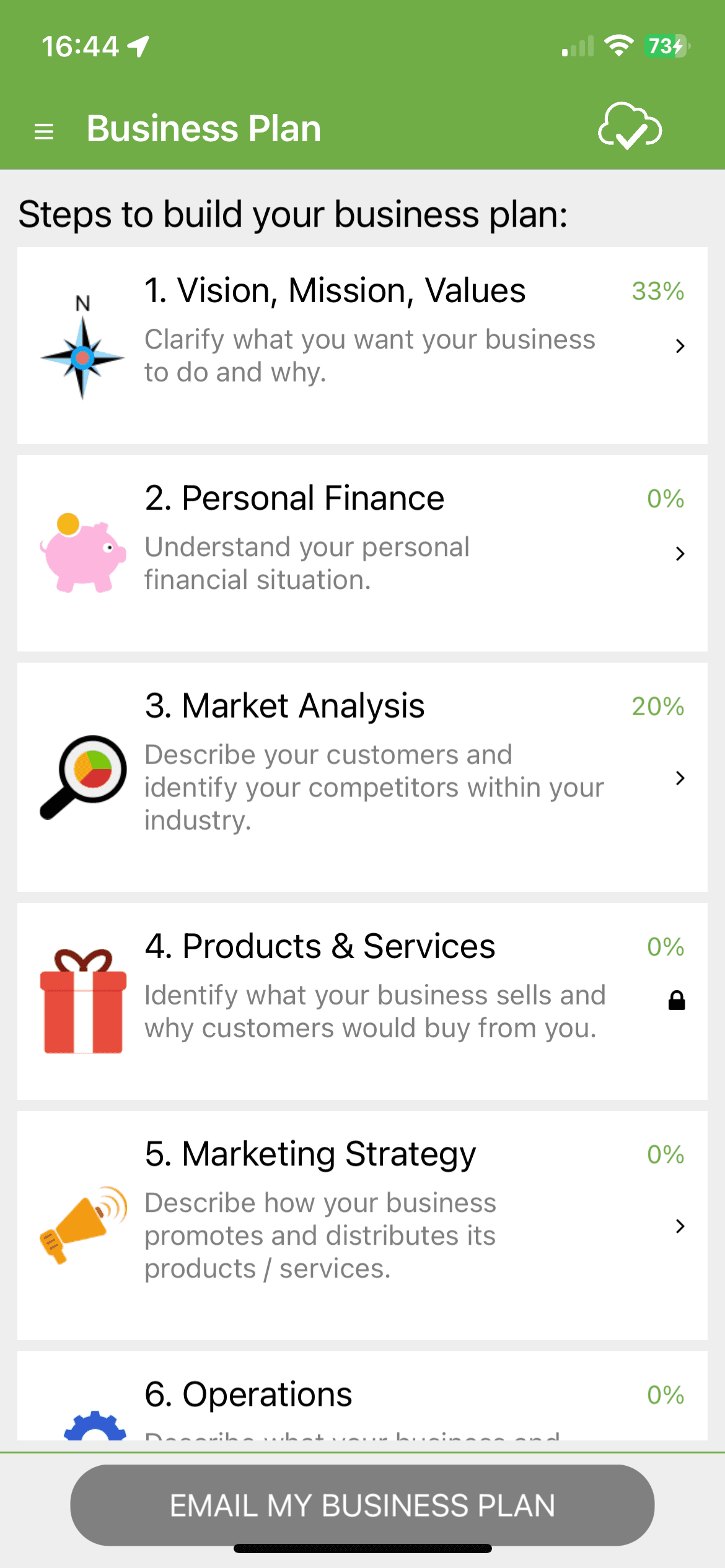
Aside from UI changes, the Business Planning Tool is the same as the original app. It now lives under the Business Summary tab where all the user’s business related info can be found.

Aside from UI changes, the Business Planning Tool is the same as the original app. It now lives under the Business Summary tab where all the user’s business related info can be found.

04 Documentation and Environment Setup

04 Documentation and Environment Setup

Documentation

Documentation

Before even starting development, one aspect that is usually underrepresented is documentation and clear understanding of requirements for components. We believed that it would be essential for the team’s success as well as a key requirement for any future teams that would use this software to have well written documentation.

Before even starting development, one aspect that is usually underrepresented is documentation and clear understanding of requirements for components. We believed that it would be essential for the team’s success as well as a key requirement for any future teams that would use this software to have well written documentation.

Before even starting development, one aspect that is usually underrepresented is documentation and clear understanding of requirements for components. We believed that it would be essential for the team’s success as well as a key requirement for any future teams that would use this software to have well written documentation.

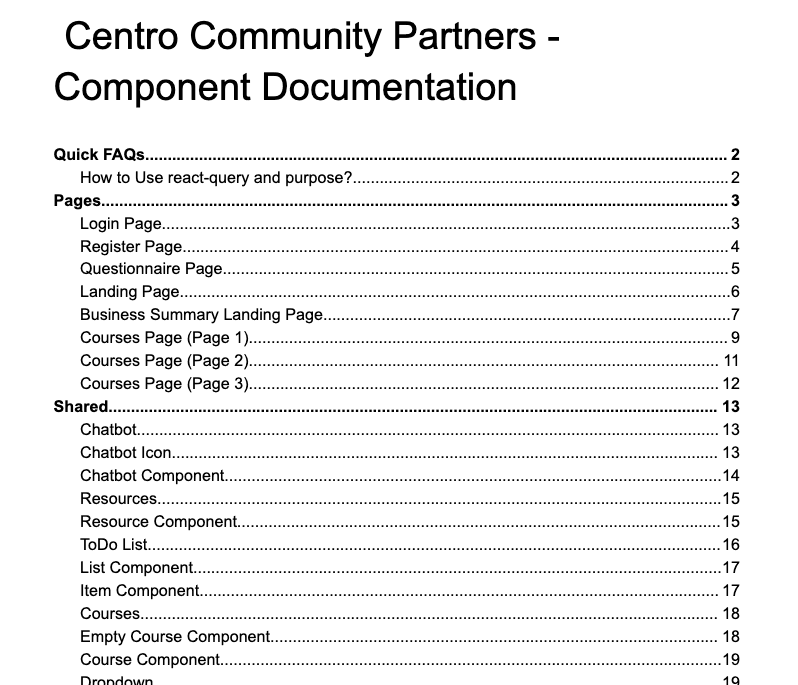
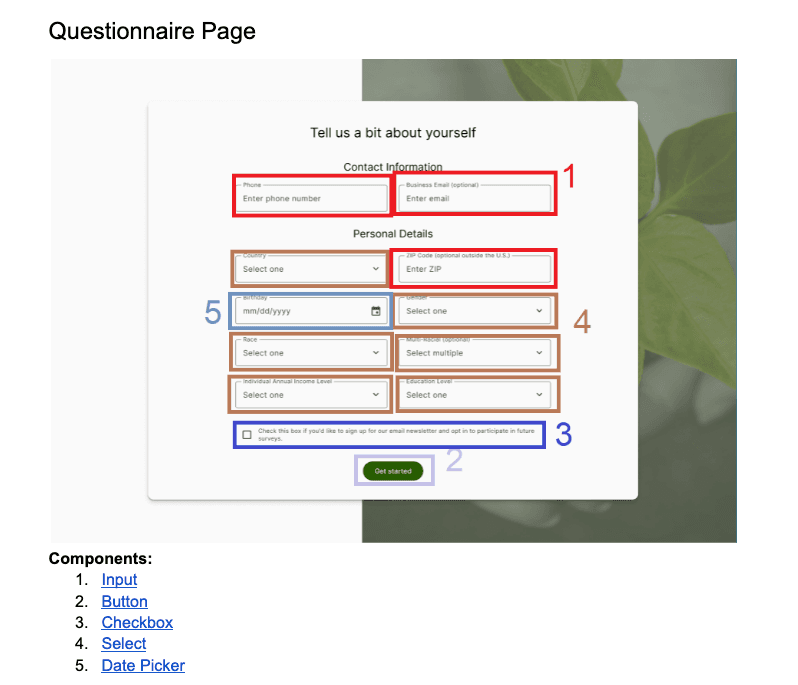
Centro Component Documentation for Pages and Components

Centro Component Documentation for Pages and Components

Centro Component Documentation for Pages and Components

Example of documentation for the Questionnaire Page

Example of documentation for the Questionnaire Page

Example of documentation for the Questionnaire Page

Environment Setup

Github

We created contributing guidelines and PR rules to make it easier to collaborate

Azure OpenAI Access

By integrating Azure OpenAI, our app harnesses the power of natural language processing (NLP) to provide personalized guidance and support to entrepreneurs of color.


We were given access to the Azure OpenAI public keys in order to connect it to the AI instant messaging interface we developed. This service has been tailored for Centro Community Partners to offer website visitors the ability to engage in real-time conversations

Salesforce Access

We enabled data synchronization between Salesforce and our built platform with access provided by Centro Community Partners. This streamlines the process of updating the user records and enables us to track user’s business progress accurately within Salesforce.

05 Frontend & Backend Development

05 Frontend & Backend Development

Frontend Development

Frontend Development

Our team developed the website’s front-end using React, with Material UI and Styled Components being the CSS frameworks employed to underscore our dedication to delivering high-quality web solutions that meet both user expectations and development objectives.

Our team developed the website’s front-end using React, with Material UI and Styled Components being the CSS frameworks employed to underscore our dedication to delivering high-quality web solutions that meet both user expectations and development objectives.

Using React for front-end development.

Material UI and Styled Components
Backend Development

Backend Development

Our backend infrastructure was created to handle critical functionalities such as data storage, user authentication, and integration with various external services.

Our backend infrastructure was created to handle critical functionalities such as data storage, user authentication, and integration with various external services.

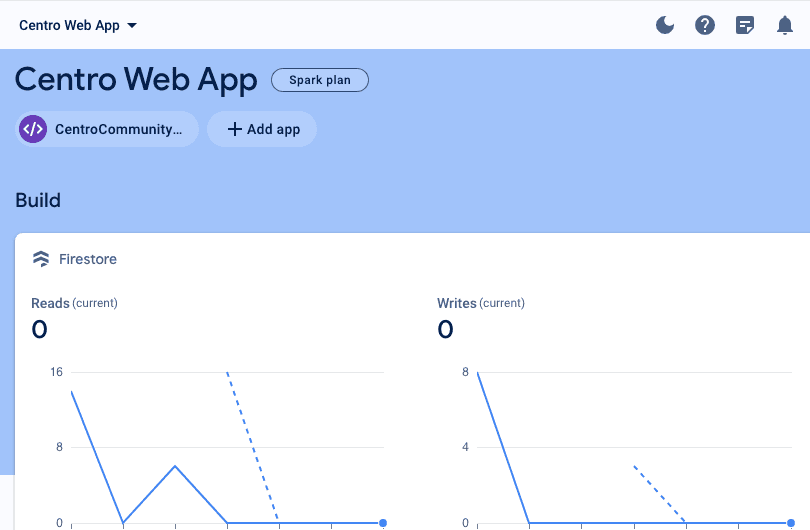
Firebase Overview Section for the Centro App

Firebase Overview Section for the Centro App

Firebase Overview Section for the Centro App

Firebase served as the backbone of our backend architecture. Leveraging Firebase allowed us to establish a unified database instance, ensuring streamlined data management and accessibility for all users within the application. On the backend, our tech stack comprised Node.js, which provided a robust runtime environment for executing server-side code.

Firebase served as the backbone of our backend architecture. Leveraging Firebase allowed us to establish a unified database instance, ensuring streamlined data management and accessibility for all users within the application. On the backend, our tech stack comprised Node.js, which provided a robust runtime environment for executing server-side code.

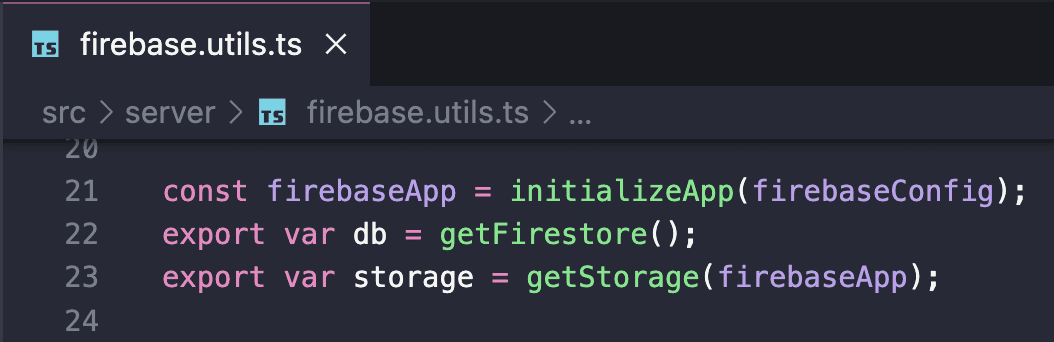
Firebase Utils File which handles all the backend connections to Firebase

Firebase Utils File which handles all the backend connections to Firebase

Firebase Utils File which handles all the backend connections to Firebase

Leveraging Firebase's capabilities, the module facilitates user registration and login processes through functions such as registerUser and loginUser, ensuring secure handling of user data including name, email, password, and task lists. Notably, user passwords are hashed using SHA-256 for enhanced security measures, while authentication tokens are stored in local storage to manage user sessions efficiently.

Leveraging Firebase's capabilities, the module facilitates user registration and login processes through functions such as registerUser and loginUser, ensuring secure handling of user data including name, email, password, and task lists. Notably, user passwords are hashed using SHA-256 for enhanced security measures, while authentication tokens are stored in local storage to manage user sessions efficiently.

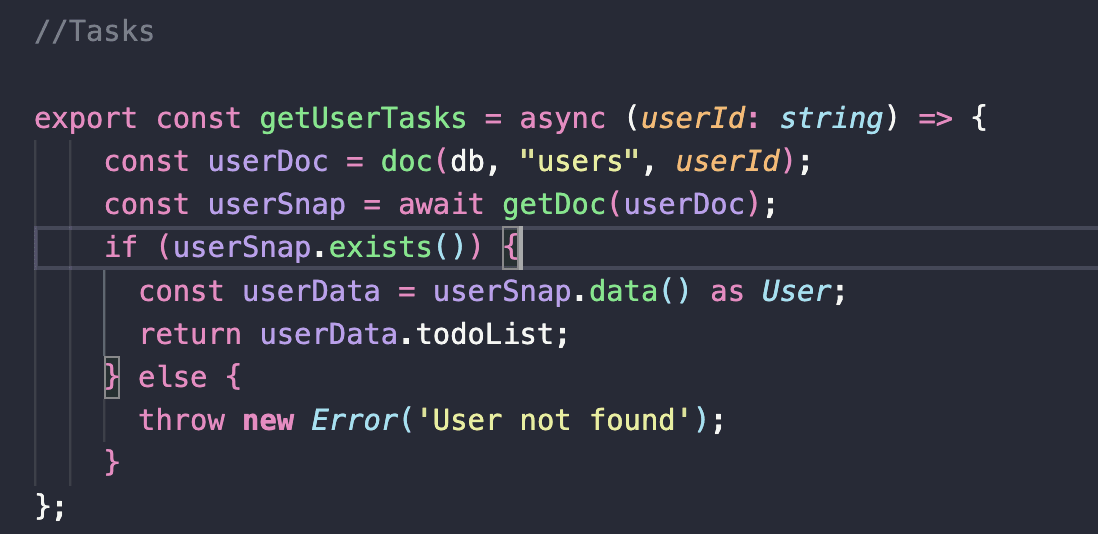
GetUserTasks Function within the Firebase.utils File

The module includes functions like getUserCourses and getUserTasks, enabling users to access and manage their course enrollments and task lists respectively. These functions interact with Firestore to fetch user-specific data, ensuring seamless integration between frontend and backend components. Additionally, task management functionalities like addUserTask and completeUserTask allow users to add new tasks to their todo lists and mark tasks as completed, facilitating effective task management within the application.

GetUserTasks Function within the Firebase.utils File

The module includes functions like getUserCourses and getUserTasks, enabling users to access and manage their course enrollments and task lists respectively. These functions interact with Firestore to fetch user-specific data, ensuring seamless integration between frontend and backend components. Additionally, task management functionalities like addUserTask and completeUserTask allow users to add new tasks to their todo lists and mark tasks as completed, facilitating effective task management within the application.

Moreover, the module handles course management operations with functions such as getCourses and createCourse, enabling users to retrieve course information and create new courses as necessary. These functions interact with Firestore to fetch existing course data and update the database with newly created courses, ensuring consistent data management throughout the application. Lastly, the submitQuestionnaire function manages the submission of questionnaire data, updating the user document in Firestore with the provided responses.

Moreover, the module handles course management operations with functions such as getCourses and createCourse, enabling users to retrieve course information and create new courses as necessary. These functions interact with Firestore to fetch existing course data and update the database with newly created courses, ensuring consistent data management throughout the application. Lastly, the submitQuestionnaire function manages the submission of questionnaire data, updating the user document in Firestore with the provided responses.

Overall, this JavaScript module leverages Firebase's robust backend services to enable seamless user authentication, data storage, and management functionalities within the web application, ensuring a secure and efficient user experience.

Overall, this JavaScript module leverages Firebase's robust backend services to enable seamless user authentication, data storage, and management functionalities within the web application, ensuring a secure and efficient user experience.

06 Visual Design

06 Visual Design

Typography

Typography

Display Large - Inter 57/64 -0.25

Display Medium - Inter 45/52 . 0

Display Small - Inter 36/44 . 0

Headline Large - Inter 32/40 . 0

Headline Medium - Inter 28/36 . 0

Headline Small - Inter 24/32 . 0

Title Large - Inter Regular 22/28 . 0

Title Medium - Inter Medium 16/24 . +0.15

Title Small - Inter Medium 14/20 . +0.1

Label Large - Inter Medium 14/20 . +0.1

Label Medium - Inter Medium 12/16 . +0.5

Label Small - Inter Medium 11/16 . +0.5

Body Large - Inter 16/24 . +0.5

Body Medium - Inter 14/20 . +0.25

Body Small - Inter 12/16 . +0.4

Colors

Colors

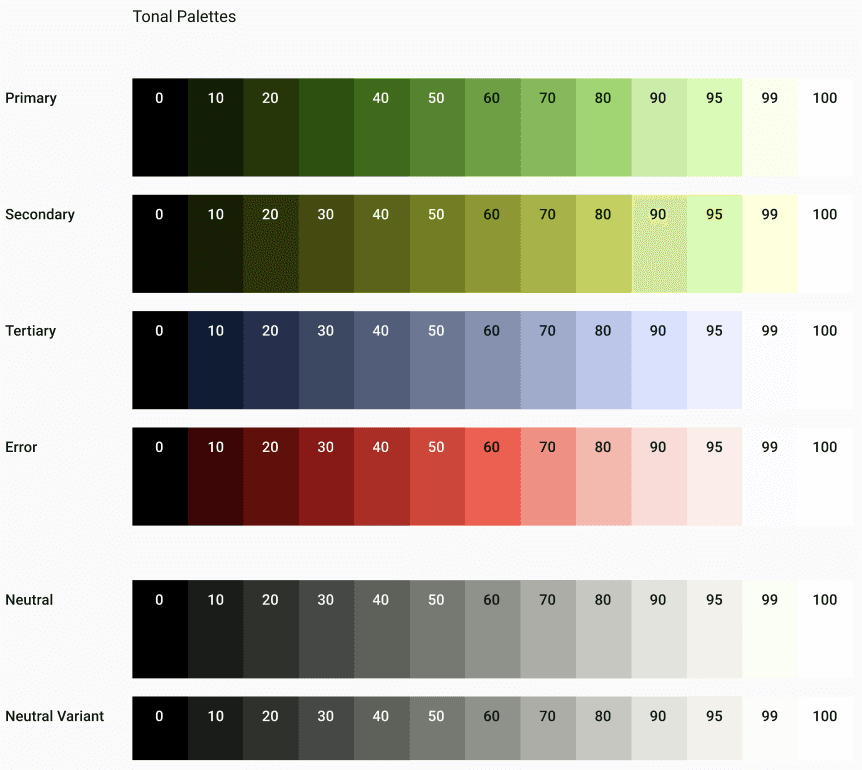
The original app emphasized a lot of green for color, so we incorporated a similar color theme, but we all made different variations of palettes. We then voted on the color scheme that best matched the overall mission and values kept that as the final palette. We decided on different hues of green, along with blue as an accent colour to evoke a sense of harmony, calmness, and trust.

The original app emphasized a lot of green for color, so we incorporated a similar color theme, but we all made different variations of palettes. We then voted on the color scheme that best matched the overall mission and values kept that as the final palette. We decided on different hues of green, along with blue as an accent colour to evoke a sense of harmony, calmness, and trust.

Tonal Palettes

Primary

0

10

20

40

50

60

70

80

90

95

99

100

Secondary

0

10

20

30

40

50

60

70

80

90

95

99

100

Tertiary

0

10

20

30

40

50

60

70

80

90

95

99

100

Error

0

10

20

30

40

50

60

70

80

90

95

99

100

Neutral

0

10

20

30

40

50

60

70

80

90

95

99

100

Neutral Variant

0

10

20

30

40

50

60

70

80

90

95

99

100

Logo

Logo

We made different variations of logos, most with the key features of the original logo (the leaf stem and the ‘C’). We voted for our final but Centro decided they liked a different designbetter so we went with the one that the client wanted.

We made different variations of logos, most with the key features of the original logo (the leaf stem and the ‘C’). We voted for our final but Centro decided they liked a different designbetter so we went with the one that the client wanted.

Components

Components

Navigation Drawer

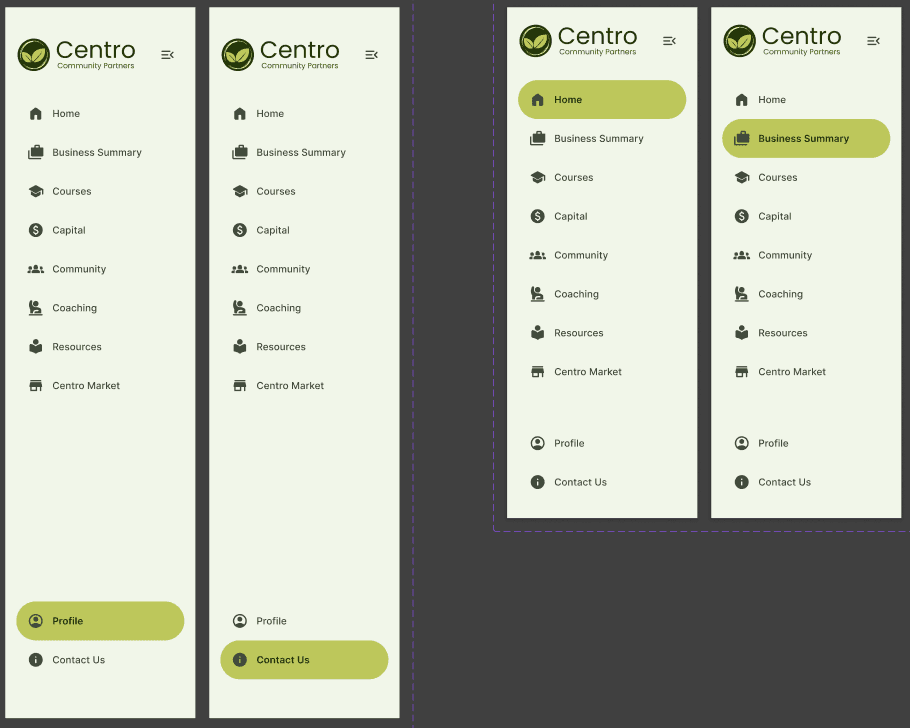
We added a navigation drawer with a long, horizontal base with labels as well. We highlighted the navigation bar with a brighter green within the color palette.
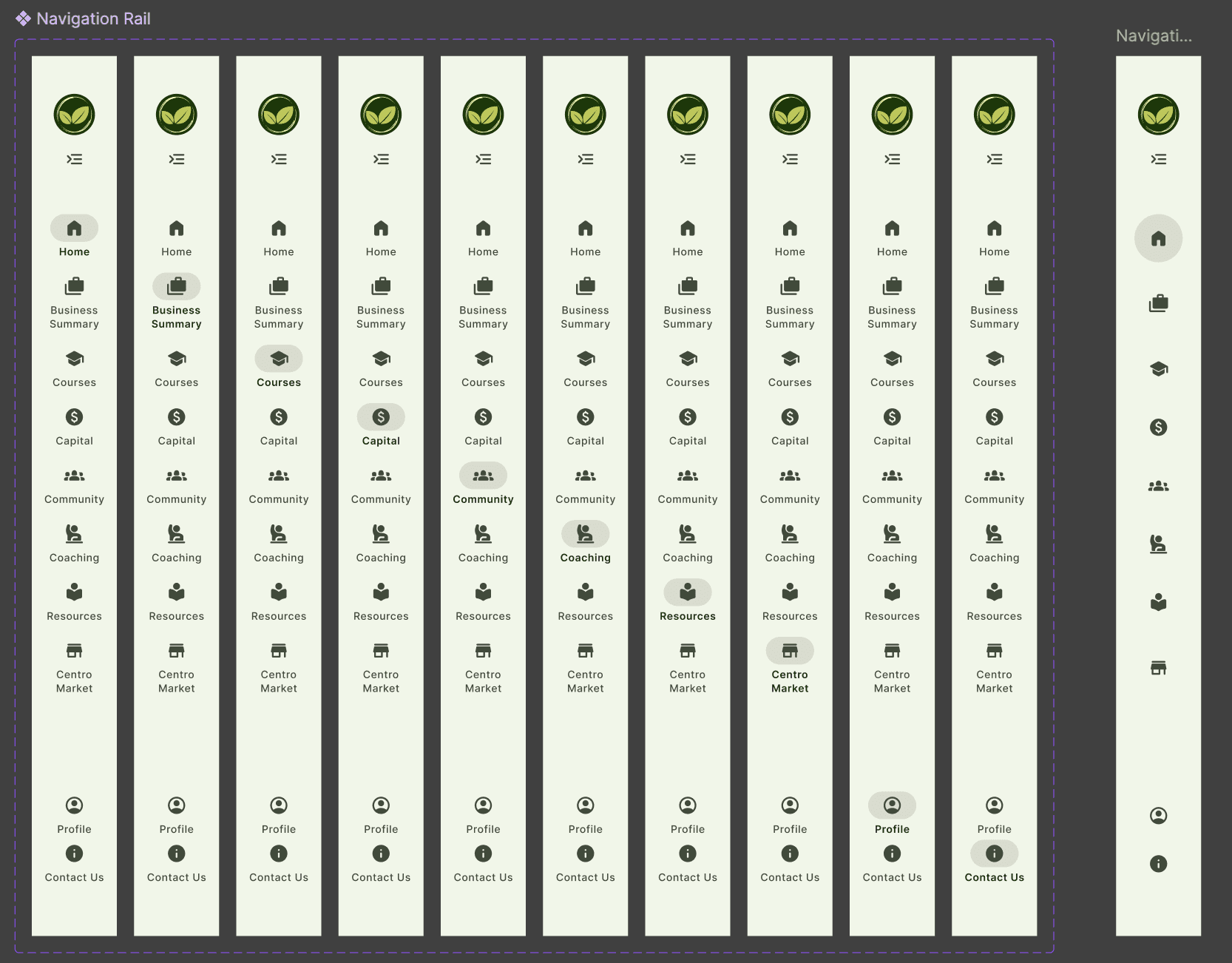
Navigation Rail

For parts like the sidebar for the navigation, we shaded the icons as a slightly darker green and a gray circle when chosen. For the mobile navigation rail, we omitted the words
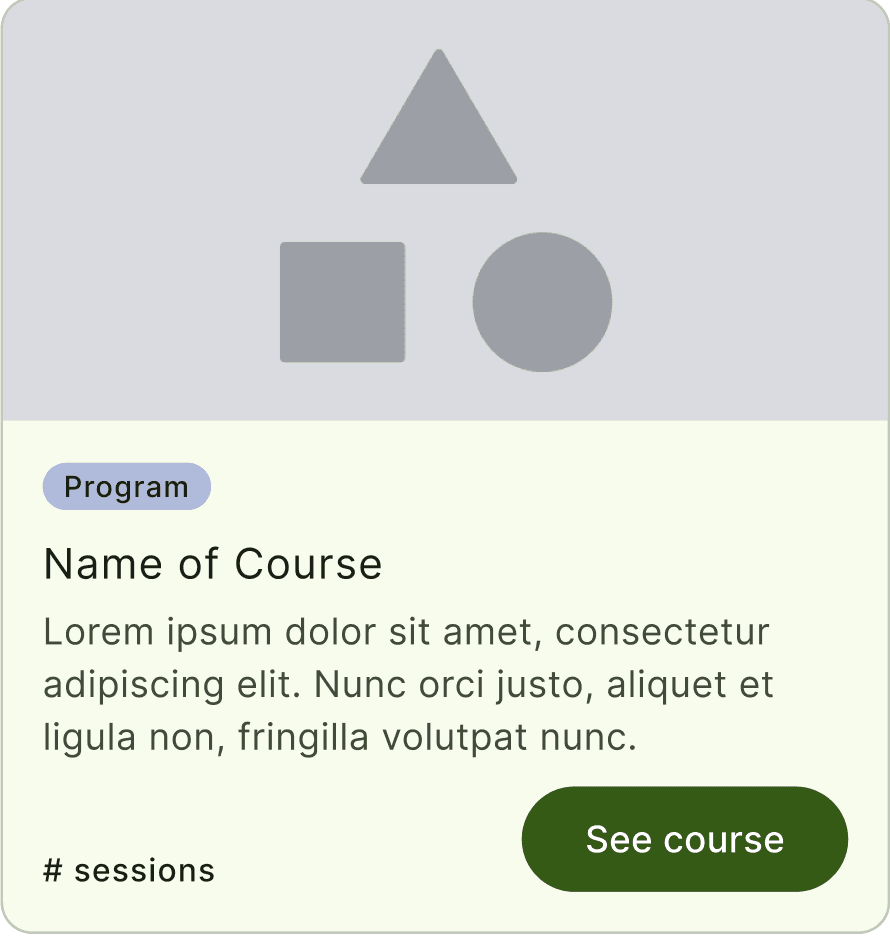
Course / Program Card

With a curvature of 12, the card component has the same green theme with the bottom half being a lighter green and a darker green button on the bottom right of the course card, which would lead to a certain page.
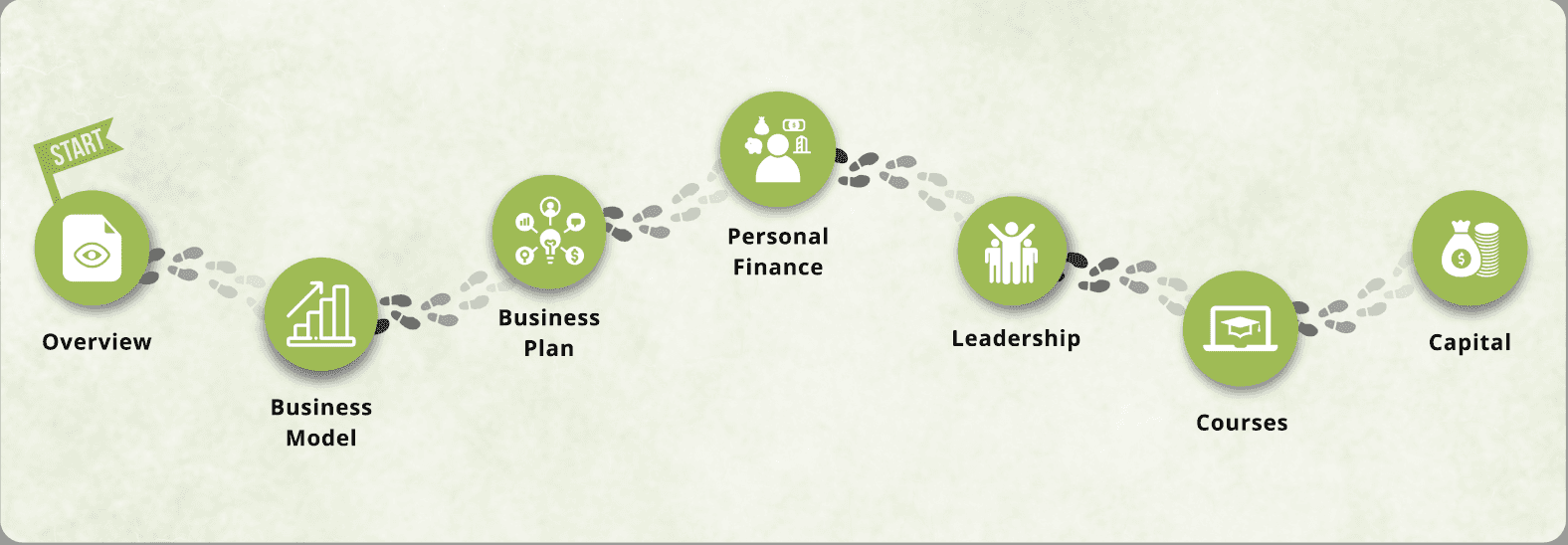
Journey Map

This component has a circular theme of bubbles that have all the steps of Centro plan highlighted, and when completed, is highlighted in green with a checkmark.
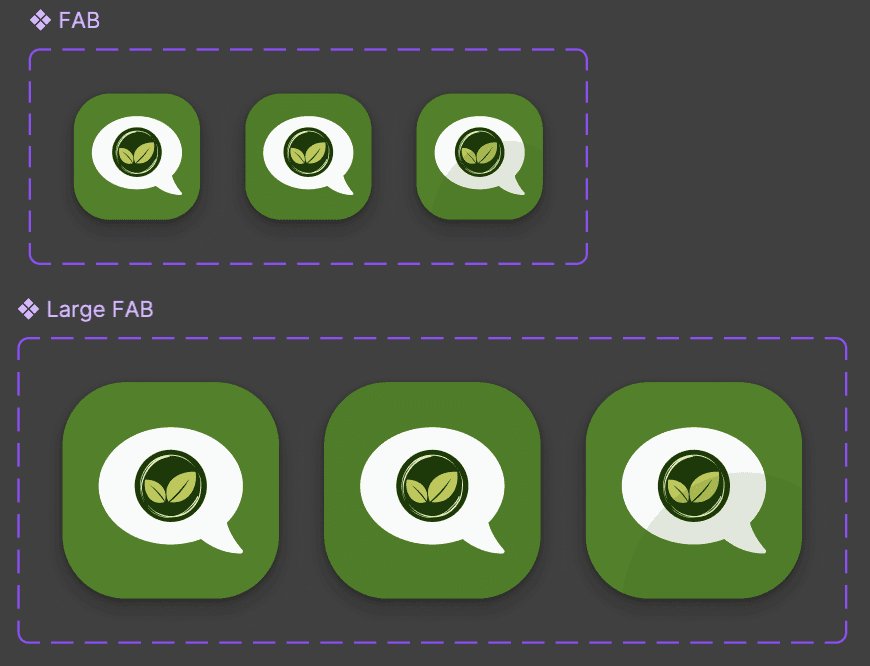
Chatbot Component

For the AI Chatbot, we incorporated the green leaf aspect of the Centro logo inside a message icon to indicate within a green background in order to give a clear indication of the AI chatbot.
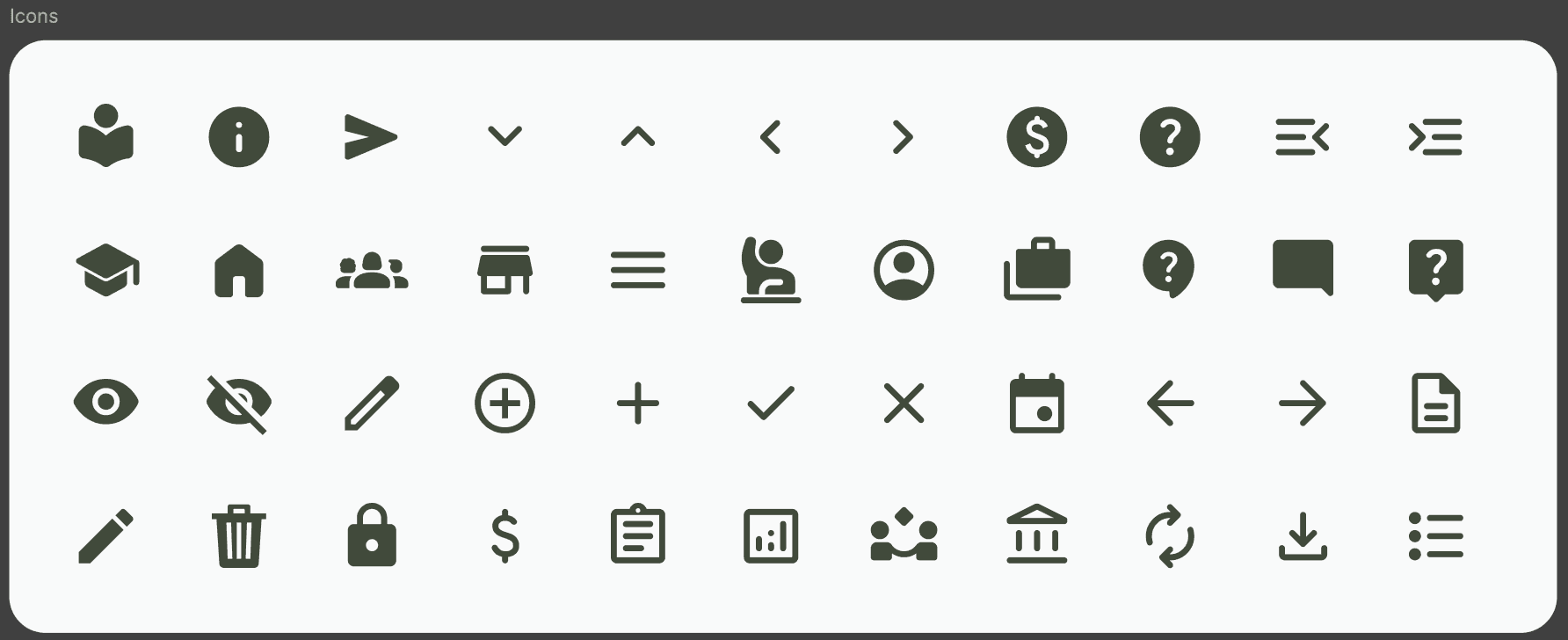
Icons

We have 44 icons that we use that are derived from the pre-set icons from Material UI
Results

Results

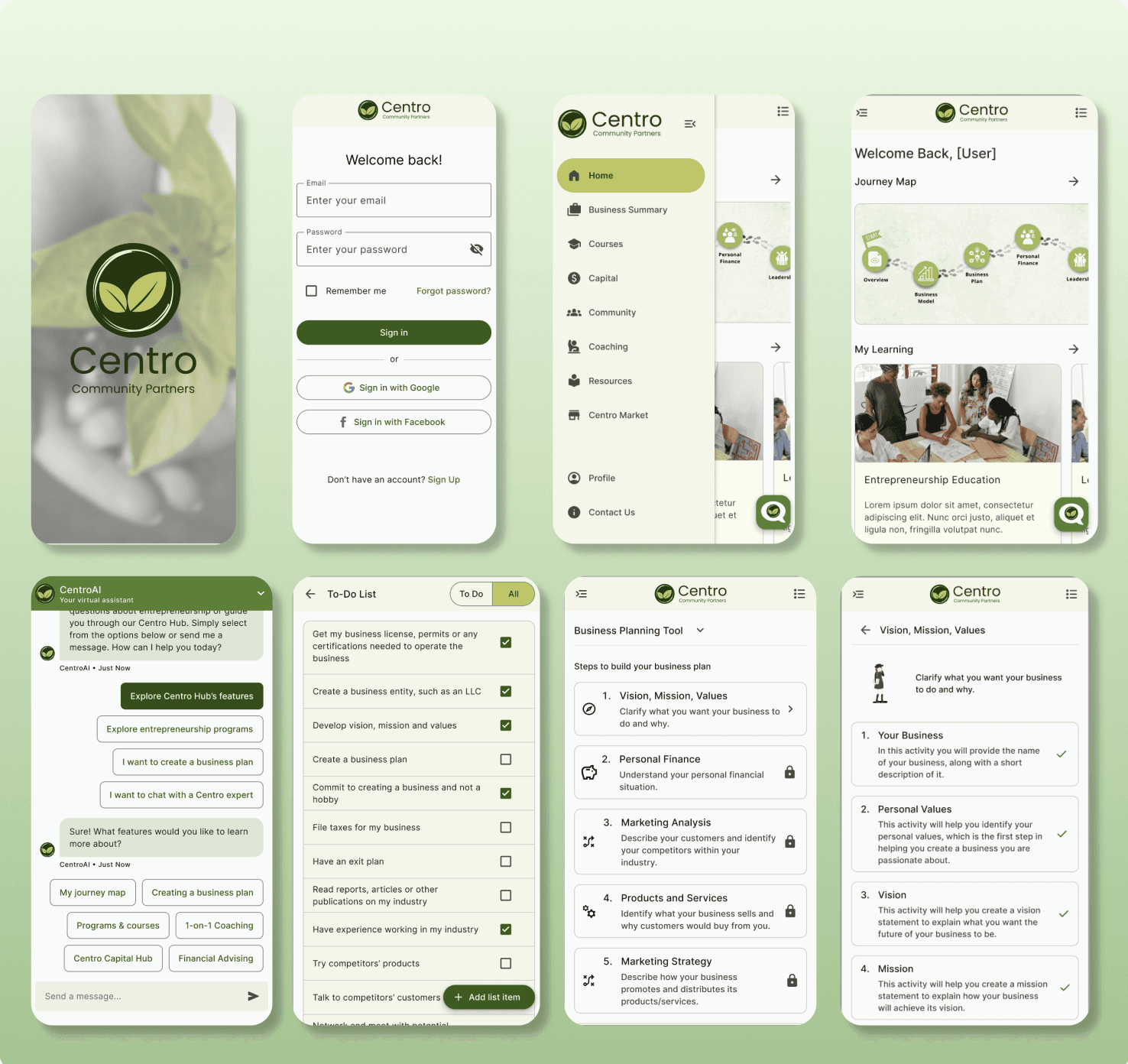
We helped Centro Community Partners revamp their existing client digital platform by designing and developing a minimum viable product for a user-centric, fully functional, and responsive web application.

We helped Centro Community Partners revamp their existing client digital platform by designing and developing a minimum viable product for a user-centric, fully functional, and responsive web application.

Mobile Wireframes

Desktop Wireframes

Testimonial 📩

This talented small group of developers has propelled Centro Community Partners into the age of AI with their innovative AI-driven learning system. Their elegant design provides low-income women and entrepreneurs of color with unprecedented equity and scalable access to business education and entrepreneurship training, empowering them to learn, start, and grow their businesses once only dreamed of. We are immensely grateful for their transformative contributions to our organization and commitment to racial equity and social justice.

-Arturo A. Noriega, Founder & CEO, Centro Community Partners
Sara Chong - UI/UX Designer & Developer

Ready to design the future 🚀 with you, one click at a time!

Sara Chong © 2025. Designed on Framer

Sara Chong - UI/UX Designer & Developer

Ready to design the future 🚀 with you, one click at a time!

Sara Chong © 2025. Designed on Framer

Goran Babarogic

Ready to design the future 🚀 with you, one click at a time!

Sara Chong © 2025. Designed on Framer

Create a free website with Framer, the website builder loved by startups, designers and agencies.